
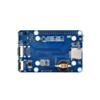
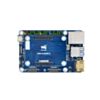
Mini-Computer Carrier Board for CM5 - Case included
Available with a lead time
Expect dispatch between Nov 02 and Nov 09
Quantity Discounts:
- 6+ $58.43 (exc GST)
- 12+ $56.60 (exc GST)
Restrictions apply to this equipment as it uses button/coin cell batteries:
- The equipment is intended to be used in trades, professions or industries
- The equipment is not intended for sale to the general public
- The equipment is not intended to be used where children are present
- You are aware that this equipment may not meet child safety testing requirements as it is not intended to be used by consumers or general public, but rather, is intended to be used in trades, professions or industries in conjunction with the limitations and restrictions listed above
- You are aware that these restrictions are due to a change in Australian legislation in 2022 for button/coin cell batteries

A declaration of use will need to be submitted during checkout.
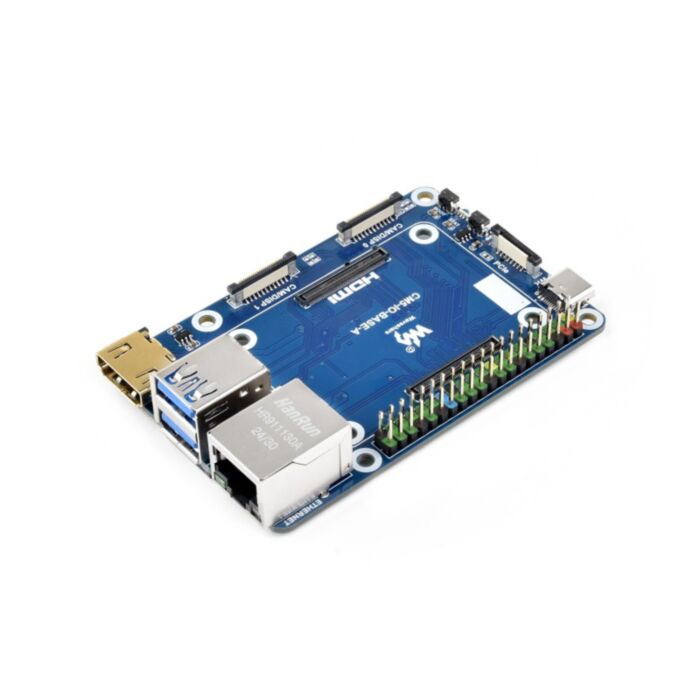
Transform your Raspberry Pi Compute Module 5 into a compact, fully featured mini-computer with the Waveshare CM5-IO-BASE-BOX-A bundle. Perfect for embedded applications, industrial control and rapid prototyping, it combines robust connectivity, active cooling and a sleek aluminium enclosure.
Choose this all-in-one solution to support dual 4K displays, high-speed USB and PCIe expansions, with flexible mounting options for wall or DIN-rail installations.
Technical Specifications
| CM5 socket | Compatible with all Raspberry Pi Compute Module 5 variants |
|---|---|
| Networking | Gigabit Ethernet (RJ45) |
| PCIe | 16-pin PCIe Gen2/3 ×1 |
| GPIO | Standard 40-pin Raspberry Pi header |
| USB | 2× USB 3.2 Gen1 Type-A; 2× USB 2.0 via 6-pin FFC |
| MIPI | 2× 4-lane FFC (22-pin) for CSI/DSI |
| Video | 2× HDMI (one via FFC), dual 4K outputs |
| Storage | TF card slot (for Lite variants without eMMC) |
| Cooling | 5V PWM fan header (4-pin JST-SH) + fan included |
| Power | DC 5V 5A input |
| Dimensions (board) | 85 × 56 mm |
| Dimensions (with case) | 90 × 68 mm |
How to Use/Installation
- Insert your Compute Module 5 into the CM5 socket, ensuring alignment with the colour-coded 40-pin GPIO header.
- If using a Lite variant, insert a pre-burnt TF card into the slot; for eMMC variants, connect via boot button and USB for image programming.
- Attach any desired HATs, PCIe expansion cards or MIPI cameras/displays to the respective headers and connectors.
- Mount the assembled unit inside the aluminium case; secure with the supplied screws and clip on the fan for optimal airflow.
- Choose wall-mount or DIN-rail installation using the included brackets, then connect network, HDMI and USB peripherals.
- Power on via the PSW button: short press for soft on/off, long press for hard shutdown; status LED indicates operating state.
Compatibility
- Raspberry Pi Compute Module 5 (Lite and eMMC variants)
- Standard Raspberry Pi 40-pin HATs and HAT+ modules
- PCIe expansion boards (Gen2/Gen3 ×1)
- DSI displays and CSI cameras via 22-pin FFC
- HDMI adapters and USB2.0 FFC dongles
Additional Resources
What’s Included
- CM5-IO-BASE-A base board
- Aluminium alloy case (top, bottom and side panels)
- Cooling fan with JST-SH cable
- Wall-mount brackets and DIN-rail buckle
- Screws and standoffs for assembly
This product contains a button cell battery. It is intended for use by industry, trades and professions and is not intended for sale to the general public. Keep it out of reach of young children.
Exact shipping can be calculated on the view cart page (no login required).
Products that weigh more than 0.5 KG may cost more than what's shown (for example, test equipment, machines, >500mL liquids, etc).
We deliver Australia-wide with these options (depends on the final destination - you can get a quote on the view cart page):
- $3+ for Stamped Mail (typically 10+ business days, not tracked, only available on selected small items)
- $7+ for Standard Post (typically 6+ business days, tracked)
- $11+ for Express Post (typically 2+ business days, tracked)
- Pickup - Free! Only available to customers who live in the Newcastle region (must order online and only pickup after we email to notify you the order is ready). Orders placed after 2PM may not be ready until the following business day.
Non-metro addresses in WA, NT, SA & TAS can take 2+ days in addition to the above information.
Some batteries (such as LiPo) can't be shipped by Air. During checkout, Express Post and International Methods will not be an option if you have that type of battery in your shopping cart.
International Orders - the following rates are for New Zealand and will vary for other countries:
- $12+ for Pack and Track (3+ days, tracked)
- $16+ for Express International (2-5 days, tracked)
If you order lots of gear, the postage amount will increase based on the weight of your order.
Our physical address (here's a PDF which includes other key business details):
40 Aruma Place
Cardiff
NSW, 2285
Australia
Take a look at our customer service page if you have other questions such as "do we do purchase orders" (yes!) or "are prices GST inclusive" (yes they are!). We're here to help - get in touch with us to talk shop.
Have a product question? We're here to help!
 Nano Base Board (A) for CM5SKU: WS-29307 Brand: WaveshareNano Base Board (A) for Raspberry Pi Compute Module 5, Same Size As The CM5...
- Mini Base Board (B) for CM5 - Onboard EEPROM and Encryption ChipSKU: WS-30703 Brand: WaveshareMini Base Board (B) designed for Raspberry Pi Compute Module 5, Onboard EEPROM A ...
- Raspberry Pi 5 Model B 4GBSKU: CE09785 Brand: Raspberry Pi
The 4GB Raspberry Pi 5 is the latest powerhouse in the Raspberry Pi lineup. I ...
- Nano Base Board (B) for CM5 - With PCIeSKU: WS-30581 Brand: WaveshareNano Base Board (B) for Raspberry Pi Compute Module 5, Same Size As The CM5...


- USB Female Type B ConnectorSKU: PRT-00139 Brand: SparkfunUSB Type ‘B’ Female connector. The 4 connection pins have 2-2.5mm spacing al ...
- DC Barrel Power Jack/ConnectorSKU: PRT-00119 Brand: SparkfunDC power jack/connector. This is a common barrel-type power jack for DC wall sup ...
- 0.5mm Lead Free 250g Roll SolderSKU: AT1075 Brand: Core ElectronicsLead free. Complies with European RoHS. Tin 99.3%, copper 0.7%. 0.5mm 250g Roll
- PiicoDev Adapter for BreadboardsSKU: CE07691 Brand: PiicoDevThe PiicoDev® Adapter for Breadboards allows you to break-out the 4-wires in a ...


Videos
View AllGuides
How to Set Up a Raspberry Pi Kiosk - Launch a Fullscreen Webpage on Boot!
Raspberry Pi 5 Vs Raspberry Pi 4 Model B | Comparison & Benchmarking

Raspberry Pi 5 | Review, Performance & Benchmarks

How to set up a PiHole on a Raspberry Pi - Block All Ads and More!
Projects

Identify Birds through Sound with a Raspberry Pi | BirdNET-Pi Project
ESP32 IR-Triggered Camera with Home Assistant Integration
Smart Mirror with Raspberry Pi
Educational Workshops

Raspberry Pi Workshop for Beginners

Makers love reviews as much as you do, please follow this link to review the products you have purchased.
Product Comments