
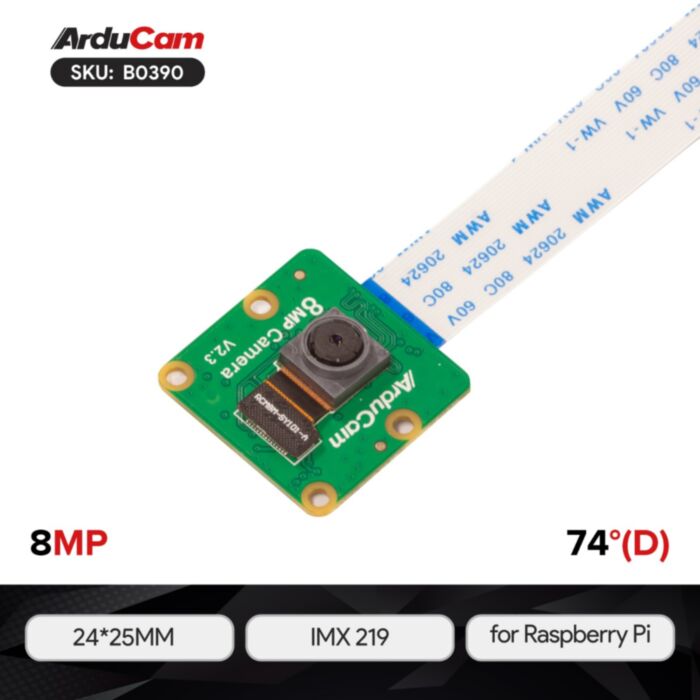
ArduCam IMX219 Fixed Focus Camera
Just like the Raspberry Pi official camera V2, this camera module is equipped with a high-definition IMX219 8MP sensor for shooting HD video and still images.
In stock, ships same business day if ordered before 2PM
Fastest delivery: Tomorrow*
Disclaimer:
For next-day delivery, the shipping address must
be in the AusPost next-day network, eParcel Express must be selected, and the order must be placed
before 2PM AEST Mon-Thurs excluding NSW Public Holidays. Orders may be delayed due to AusPost
pickup timings and order verifications. eParcel Express is typically a 1-day service within the
AusPost next-day network, though it is sometimes 2+ days.
Quantity Discounts:
- 10+ $11.69 (exc GST)
- 25+ $11.33 (exc GST)
Just like the Raspberry Pi official camera V2, this camera module is equipped with a high-definition IMX219 8MP sensor for shooting HD video and still images. It has excellent image quality, color fidelity, and supports 1080p30, 720p60, and VGA90 video modes, as well as still capture.
For beginners, this is a very easy camera module to get started; for advanced players, this camera module has more knowledge that you should explore and DIY.
Applications
- Unmanned Aerial Vehicles (UAVs)
- Building Drones
- Autonomous Robotic Systems
- Mobile Medical Imaging
- Intelligent Video Analytics (IVA)
Features
- 8MP HD Camera: Designed for the Raspberry Pi, based on Sony 8MP IMX219 Sensor.
- Higher quality: Compared with the official Raspberry Pi Camera v1, not only the resolution is improved, but its image quality, color fidelity, and low light performance are all upgraded by leap.
- 1080P High resolution: Supports 3280 × 2464 pixel still images, as well as 1080p30, 720p60, and VGA90 video modes, and still captures.
- Easy to setup: Simply use the 15pin ribbon cable to attach the CSI port on the Raspberry Pi, then make a simple configuration and you are ready to use the camera.
- Easy to use for beginners, and for advanced gamers, it offers more to explore.
- Wide Application: Perfect for time-lapses, homebrew home security applications, using Octoprint for monitoring your 3D Printer, and wildlife cameras.
Specifications
| Sensor | Sony IMX219 |
| Optical Size | Type 1/4(Diagonal 4.60mm) |
| Resolution | 8MP |
| Pixel Size | 1.12µm × 1.12µm |
| Active Pixels | 3280 (H) × 2464 (V) |
| CSI-2 Data Output | 2-lane mode |
| Output Format | Raw8/Raw10 |
| Frame Rates | 30fps@8MP, 60fps@1080p, 180fps@720p |
| Shutter Type | Rolling Shutter |
| Focus Type | Fixed Focus |
| Lens Type | Stock Lens |
| Focus Distance | 200mm to infinity |
| F.NO | 2.0 |
| Effective Focal Length | 3.04mm |
| Field of View(FOV) | 62.2°(H), 48.8°(V) |
| IR Sensitivity | Visible light, Integral IR Filter |
| Camera Board Size | 24mm × 25mm |
| Peaking Current | 300mA |
Package
- 1 × Arducam IMX219 Visible Light Fixed Focus Camera Module
- 1 × 15cm 15pin FPC cable
- 1 × 15cm 15pin to 22pin FPC cable
Note
- Raspberry Pi board is not included in the package
- This camera module supports the latest Raspberry Pi OS Bullseye (January 28, 2022 and later) and libcamera apps and is not available for users of previous Raspberry Pi OS (Legacy).
Documentation
Exact shipping can be calculated on the view cart page (no login required).
Products that weigh more than 0.5 KG may cost more than what's shown (for example, test equipment, machines, >500mL liquids, etc).
We deliver Australia-wide with these options (depends on the final destination - you can get a quote on the view cart page):
- $3+ for Stamped Mail (typically 10+ business days, not tracked, only available on selected small items)
- $7+ for Standard Post (typically 6+ business days, tracked)
- $11+ for Express Post (typically 2+ business days, tracked)
- Pickup - Free! Only available to customers who live in the Newcastle region (must order online and only pickup after we email to notify you the order is ready). Orders placed after 2PM may not be ready until the following business day.
Non-metro addresses in WA, NT, SA & TAS can take 2+ days in addition to the above information.
Some batteries (such as LiPo) can't be shipped by Air. During checkout, Express Post and International Methods will not be an option if you have that type of battery in your shopping cart.
International Orders - the following rates are for New Zealand and will vary for other countries:
- $12+ for Pack and Track (3+ days, tracked)
- $16+ for Express International (2-5 days, tracked)
If you order lots of gear, the postage amount will increase based on the weight of your order.
Our physical address (here's a PDF which includes other key business details):
40 Aruma Place
Cardiff
NSW, 2285
Australia
Take a look at our customer service page if you have other questions such as "do we do purchase orders" (yes!) or "are prices GST inclusive" (yes they are!). We're here to help - get in touch with us to talk shop.
Have a product question? We're here to help!
 Raspberry Pi Zero 2 W (Wireless) with Soldered Male HeadersSKU: CE09937 Brand: Raspberry Pi
The Zero 2 W series - now with headers! Add a HAT or Bonnet easily and quickl ...
- 16MP IMX519 Autofocus CameraSKU: AC-B0371 Brand: Arducam
A resolution of 16 megapixels (compared to 8MP and 12MP), an autofocus lens, ...
- Arducam 5MP OV5647 1080p Mini Camera ModuleSKU: AC-B0033 Brand: Arducam
This is a mini 5MP Arducam camera module compatible with the Raspberry Pi, mo ...
- Arducam 8MP IMX219 Auto Focus Camera ModuleSKU: AC-B0393 Brand: Arducam
Raspberry Pi Camera: Designed for Raspberry Pi, this 8MP HD camera module has ...


- Jumper Wire 20cm Ribbon (F/F, 40pcs)SKU: CE05098 Brand: Core ElectronicsJumpstart your electronics project with a pack of 40, 20cm female-to-female jump ...
- Polymer Lithium Ion Battery (LiPo) 3.7V 2400mAhSKU: CE04379 Brand: Core Electronics
Welcome to the awesomeness that is LiPo batteries. Polymer Lithium Ion batter ...
- Waveshare 3.5inch LCD IPS 480x320SKU: WS-12824 Brand: WaveshareA perfectly sized IPS panel for a portable Raspberry Pi interface
- UPS HAT for Raspberry Pi ZeroSKU: DFR0528 Brand: DFRobotDFRobot UPS HAT is an uninterruptable power supply shield designed for the Raspb ...



Videos
View AllGuides

YOLO Pose Estimation on the Raspberry Pi AI Hat+ | Writing Custom Python Code

YOLO Object Detection on the Raspberry Pi AI Hat+ | How to Write Custom Python Code

Getting Started with YOLO Pose Estimation Recognition on the Raspberry Pi

Face Recognition With Raspberry Pi and OpenCV
Projects

Backyard Birdcam
ESP32 IR-Triggered Camera with Home Assistant Integration

Rain Gauge Data Logger
Educational Workshops
Raspberry Pi Workshop for Beginners

Makers love reviews as much as you do, please follow this link to review the products you have purchased.
Product Comments