
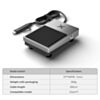
xTool Pedal Switch for F-Series
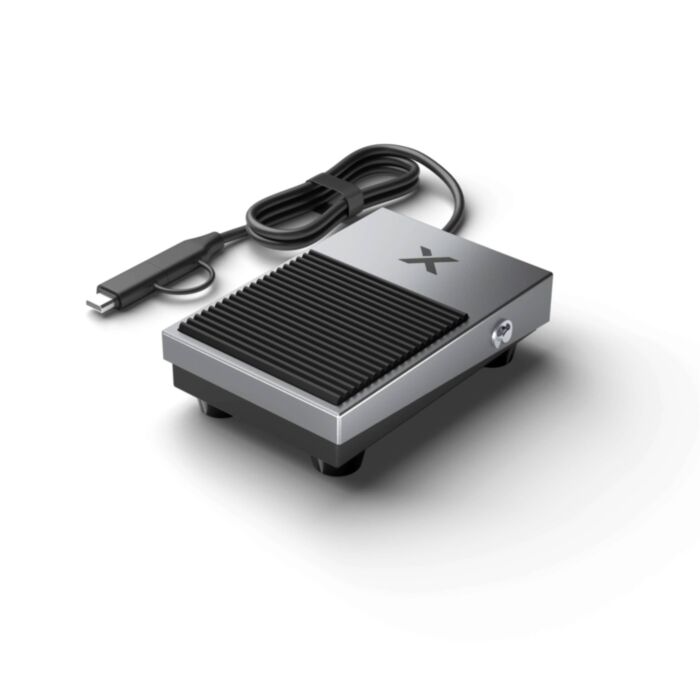
Start, pause and repeat engraving jobs with a tap of your foot, keeping both hands free to load and align the next piece.
In stock, ships same business day if ordered before 2PM
Delivered by Tue, 27th of Oct
Hands-free job control for your xTool F-Series engraver. Step once to start, step again to pause, and double-step to run the same job again.
Batch engraving means loading a part, lining it up, starting the job, then doing it all again. Reaching for the mouse or the machine every cycle slows you down, and touching the engraver mid-setup can nudge a carefully aligned workpiece. The pedal keeps your hands on the material and away from the machine.
Built from sturdy aluminium alloy, it plugs straight into the F-Series accessory port. It needs no extra software setup and responds automatically to the machine's current task status.
Setup is Simple
- Plug the pedal into the machine's dedicated switch port (on the F1/F1 Lite, this is the reserved port on the back, not the side extension port).
- Load your job in xTool Studio as normal.
- Step to start. Your hands stay free for the next workpiece.
Features
- Faster batch production: start, pause, resume and repeat jobs without going back to the software between parts.
- Keeps your alignment intact: triggering from the floor avoids bumping the engraver or shifting small, precisely placed items.
- Less strain in long sessions: a simple foot press replaces hundreds of repeated clicks.
- Durable, lightweight build: aluminium alloy construction made to handle daily workshop use.
- Genuine xTool accessory: an OEM part designed for the F-Series accessory port, for reliable plug-and-play operation.
Specifications
| Property | Specification |
|---|---|
| Compatible machines | xTool F1, F1 Lite, F1 Ultra, F2, F2 Ultra, F2 Ultra UV |
| Construction | Aluminium alloy |
| Connection | F-Series switch accessory port (shared with the Button Switch; use one or the other) |
| Controls | Step: start/pause/resume. Double-step after completion: repeat job |
This product is listed in:
Laser Cutters>xTool>F2Laser Cutters>xTool>F2 Ultra
Laser Cutters>xTool>F1 Series
Exact shipping can be calculated on the view cart page (no login required).
Products that weigh more than 0.5 KG may cost more than what's shown (for example, test equipment, machines, >500mL liquids, etc).
We deliver Australia-wide with these options (depends on the final destination - you can get a quote on the view cart page):
- $3+ for Stamped Mail (typically 10+ business days, not tracked, only available on selected small items)
- $7+ for Standard Post (typically 6+ business days, tracked)
- $11+ for Express Post (typically 2+ business days, tracked)
- Pickup - Free! Only available to customers who live in the Newcastle region (must order online and only pickup after we email to notify you the order is ready). Orders placed after 2PM may not be ready until the following business day.
Non-metro addresses in WA, NT, SA & TAS can take 2+ days in addition to the above information.
Some batteries (such as LiPo) can't be shipped by Air. During checkout, Express Post and International Methods will not be an option if you have that type of battery in your shopping cart.
International Orders - the following rates are for New Zealand and will vary for other countries:
- $12+ for Pack and Track (3+ days, tracked)
- $16+ for Express International (2-5 days, tracked)
If you order lots of gear, the postage amount will increase based on the weight of your order.
Our physical address (here's a PDF which includes other key business details):
40 Aruma Place
Cardiff
NSW, 2285
Australia
Take a look at our customer service page if you have other questions such as "do we do purchase orders" (yes!) or "are prices GST inclusive" (yes they are!). We're here to help - get in touch with us to talk shop.
Have a product question? We're here to help!
 Solderless Breadboard - 830 Tie Point (ZY-102)SKU: CE00304 Brand: Core ElectronicsIf you're prototyping a circuit big or small, then you'll want a quality breadbo ...
-
-
- Arduino Uno R3SKU: A000066 Brand: ArduinoThe Arduino UNO is the most used board in the family of Arduino boards. If you ...


Videos
View AllGuides
xTool F2 Ultra Setup Guide | Assembly and Calibration

xTool P3 First Time Cutting Quick Start Guide

Setting Up Your xTool P3 | From Unboxing to First Cut

xTool P3 Overview | A New Standard for Making?
Projects
The Rats Nest VCC Desktop Power Supply

Remote-Controlled Mars Rover
FlipperMate: Hands-Free Pinball

Makers love reviews as much as you do, please follow this link to review the products you have purchased.
Product Comments