
From Mystery Parts to Workshop Memory
How an old ThinkPad, a microscope camera, and a deliberately simple bit of software became an AI-assisted electronics bench
1. The Problem
At one end of my workshop, I had accumulated a couple of boxes and a bench full of electronic components, many of them either unlabeled, half-remembered, or both. The workshop itself is a lean-to room alongside a four-car garage, where I do electronics, 3D printing, laser cutting, and other small projects.
I wanted a proper way to look closely at small parts, work out what they actually are, and - just as importantly - remember where I'd put them afterwards. Buying a ready-made solution felt wrong on two counts: it wouldn't fit how I actually work, and half the fun is building the tools as well as using them.
So I set out to build my own AI-assisted electronics bench, using as much gear I already owned as I could get away with, and only reaching for something new when the job genuinely demanded it.
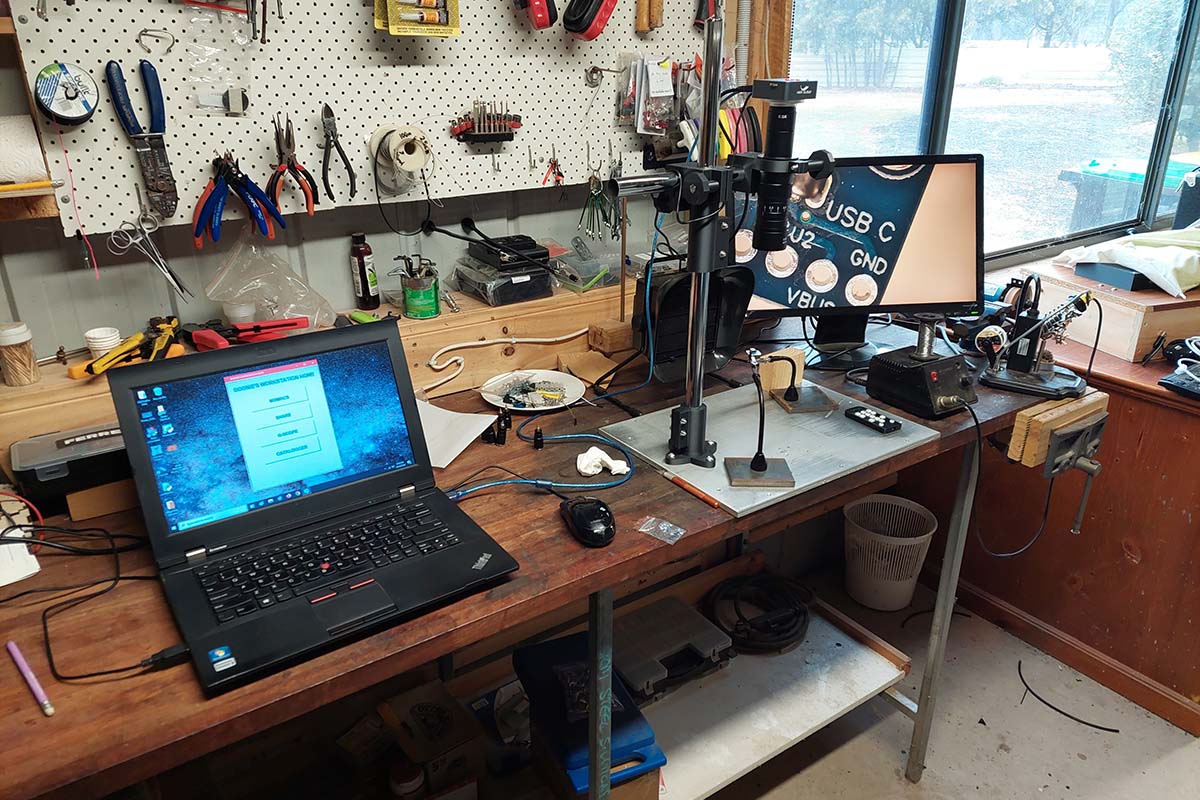
The working bench: the L430 on the left, the Magnifiser centre, and the 21-inch monitor showing the live image.
2. First Architecture
The starting plan looked sensible on paper. A HIGH CLOUD 20 MP HDMI/USB microscope camera would feed a spare 21-inch monitor directly over HDMI. That gave me basic magnification without depending on a computer. Alongside that, the camera would connect to a Raspberry Pi 4 via USB, which would handle the 'smart' side: capture, control, and eventually things like a motorised XY stage and test probes.
An old Lenovo ThinkPad L430 - previously my wife's laptop - was drafted in as the cockpit. Its job was not heavy processing. It was there to put the buttons, photographs, component records, and AI access in front of me at the bench.
My main Ryzen desktop sits elsewhere and handles the heavier work, file storage, and most AI research; the L430 stays at the electronics bench as the local workstation.
I built an early control-panel mock-up around five ideas: CAPTURE, EXAMINE, IDENTIFY, CATALOGUE and ASK. It looked convincing. Then I started connecting the real hardware.
3. The Raspberry Pi Detour
The Pi could be reached over Ethernet after the usual small battles with SSH, usernames, and changing addresses. The microscope camera was also visible to Linux as a USB video device. On paper, everything looked right.
In practice, the Pi could see the camera but could not get a usable video stream from it. Linux detected it as a USB video device, but the camera's UVC behaviour caused errors; VLC could not open it, and attempts to query the supported video formats failed. I have not included an exact kernel error here because I did not preserve one well enough to quote it reliably.
I never found the root cause. That turned out not to matter.
Instead of continuing down a Linux camera-compliance rabbit hole, I plugged the microscope camera directly into the L430. It worked.
That was one of the useful lessons of the whole project. Once you've spent hours solving a problem, it is very easy to keep solving it because of the effort already invested. Sometimes the better question is whether the problem needs solving at all.
The Pi didn't fail - it was given a job it never needed.
It went back into the parts pool. If it earns a specific job later, it can come back.
4. Let The Magnifiser Be a Magnifiser
With the Pi removed from the image path, the system became much simpler. The HIGH CLOUD camera feeds the large monitor directly over HDMI for normal bench work, while USB to the L430 is available when I actually need a computer image.
The camera sits behind a sharp 0.7x-4.5x zoom lens with a 0.5x auxiliary objective. The auxiliary lens is there mainly for working clearance: enough room under the optics for hands, probes and a soldering iron.
The support is a 3D-printed base clamp with vertical and horizontal bearers and a knob-adjustable camera holder. A VEVOR magnetic helping-hands station holds the work. A motorised XY stage underneath uses two stacked plates on M6 threaded rod, small 28BYJ-48 steppers, ULN2003 drivers, and an Arduino Uno. It is deliberately slow because slow proved reliable.
The important bit is not the hardware list. It is that the basic magnifier remains useful even if every clever part around it is switched off.
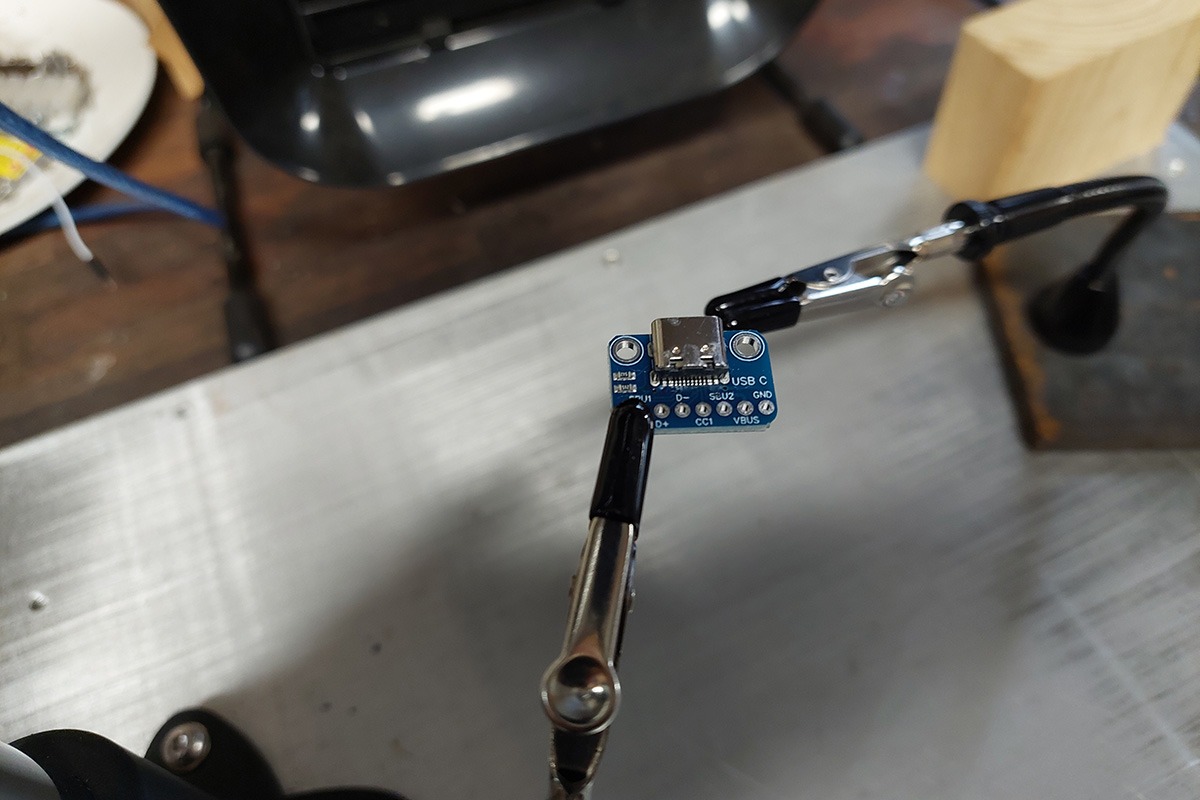
The small USB-C breakout at bench scale.
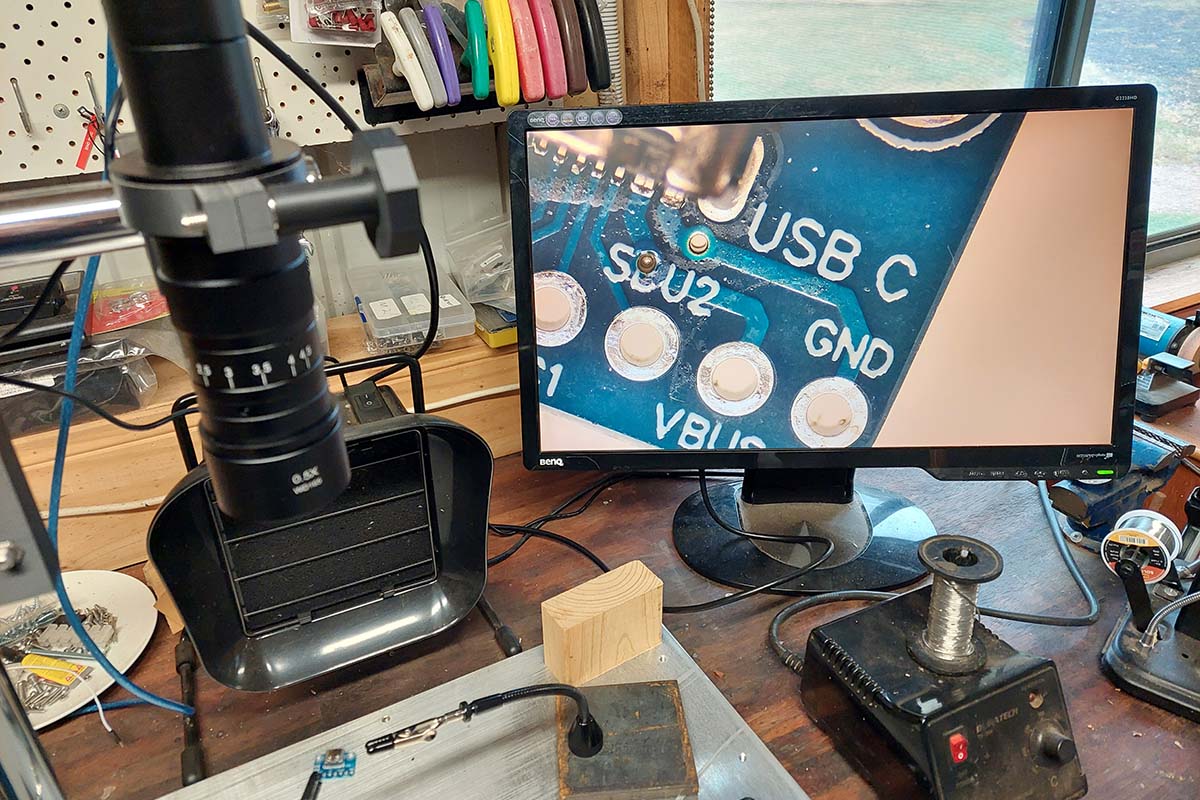
The same board on the monitor through the Magnifiser.
5. The Tools That Earned a Place
Every extra tool now exists because a real job demanded it:
G-Scope on the L430 takes USB control of the microscope camera when I want a computer capture.
nomacs is the local viewer for deep zoom, pan, crop, rotate, and comparison.
Share is a simple network transfer inbox between the L430 and the Ryzen desktop when an image needs research or heavier work.
Catalogger remembers identified components and where I put them.
Workstation HOME gives me one uncomplicated place to launch those tools.
The practical G-Scope decision is equally simple: examine the picture locally on the L430, send it to Share for research, or discard it.
6. Routine Photography: Make The Clean Picture Easy
For routine Catalogger photography, I use a Canon EOS 1000D connected to the Ryzen desktop and open DigiCamControl. A photograph taken with the Canon is placed automatically in a folder called Catalogger Identification inside the Magnifiser folder.
I can leave that folder open, so the new photograph appears immediately. From there I drag it straight into an AI for research, into an open Catalogger form, or open it in Nomacs for closer examination. Catalogger Identification is a working inbox, not permanent storage.
That workflow has ended up almost embarrassingly simple: take the photo, it appears, drag it where it needs to go.
7. Catalogger: The Workshop's Memory
Looking at a mystery component is only half the problem. The other half is finding the bloody thing six months later.
Catalogger is the permanent memory of the workshop: what an item is, what is known about it, what it looks like and where it lives. It now has a general catalogue plus specialist filers for resistors, capacitors and the deliberately broad LEDs & Leads collection.
The opening page has a global Find box. It searches across the catalogue rather than expecting me to remember the exact item name. Names, descriptions, uses, notes, markings and locations can all provide the clue. That matters because workshop memory is usually more like 'that little board I used on the Dulcimator' than a perfect part number.
The resistor and capacitor filers handle the things that benefit from regular value-based storage. LEDs & Leads handles identified odds and ends that do not deserve an elaborate taxonomy.
The catalogue is now proven to work from the L430 as well as the Ryzen, including the global search.
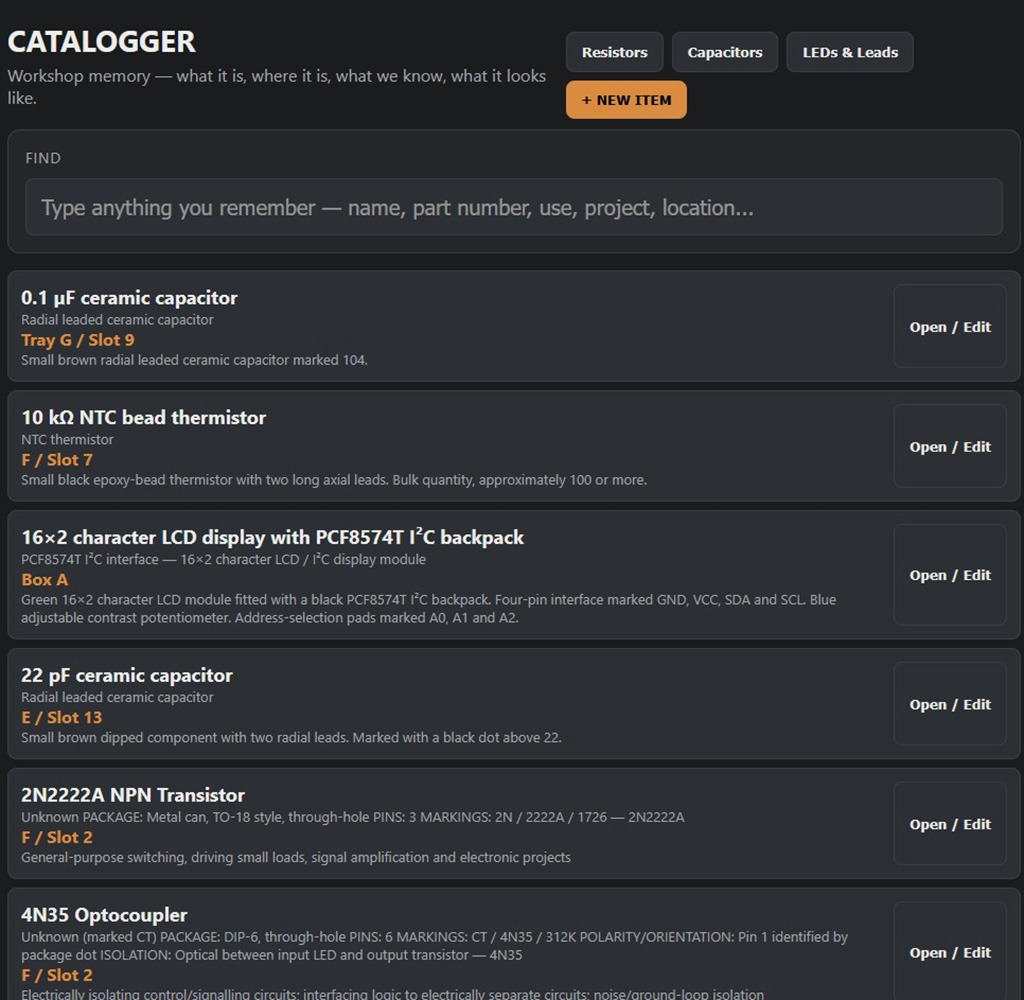
Catalogger opening page: the global Find box and real catalogue records.
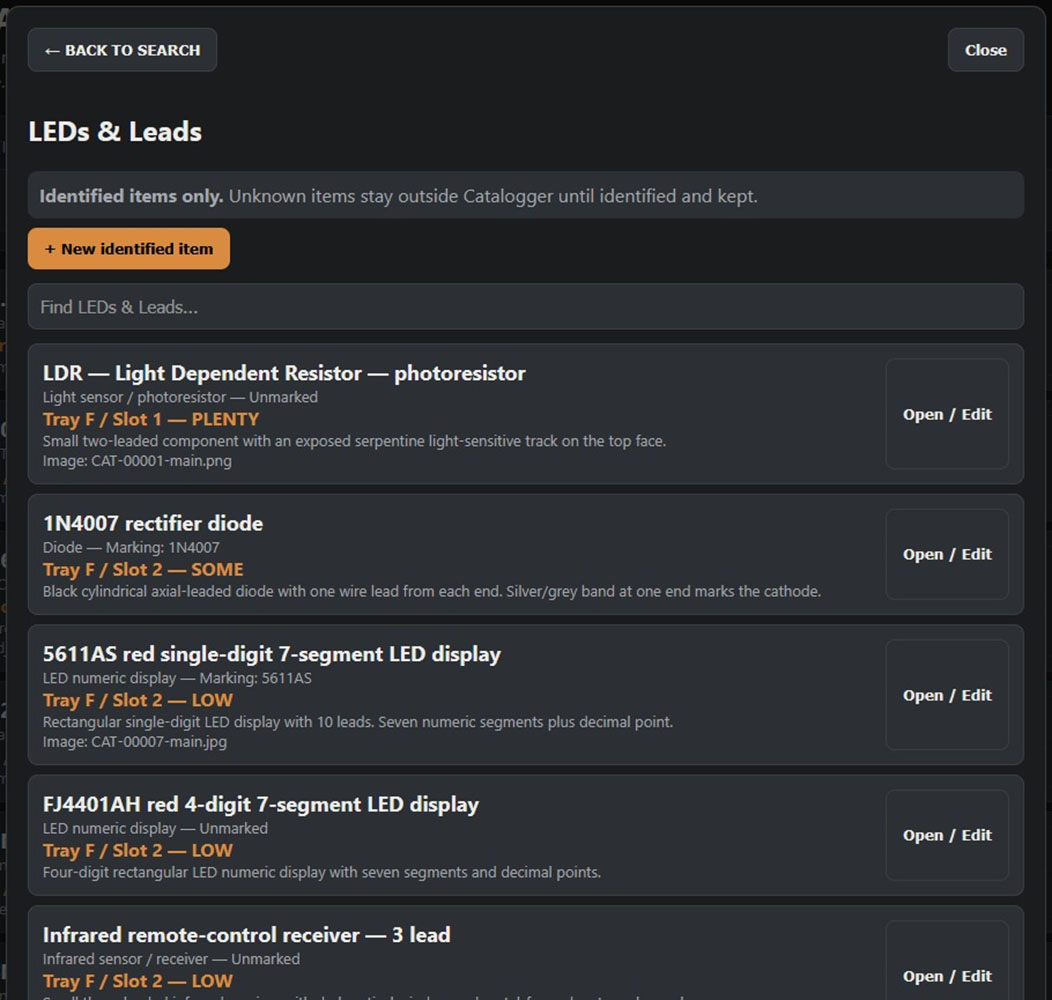
The LEDs & Leads filer, for identified odds and ends.
8. AI Can Suggest; I Decide
Nothing becomes catalogue truth because a camera or an AI said so.
When a component needs identifying, I photograph it and examine the evidence. If AI research is useful, I use it. Once I am satisfied, the AI produces a standard identification block which I paste into Catalogger's Paste identification box and press FILL FORM.
FILL FORM puts the information into the matching fields, but it does not save the record. I check the result, correct it if necessary, add the actual physical location and stock state, and press SAVE myself.
A 22 pF ceramic capacitor was a good example. The Canon photograph showed that a marking was present but did not resolve it clearly. Under the Magnifiser a black dot above '22' became visible. The item could then be catalogued as 22 pF, while voltage and tolerance remained unknown rather than being guessed.
The rule is simple: record what the evidence supports. UNKNOWN is a perfectly good answer.
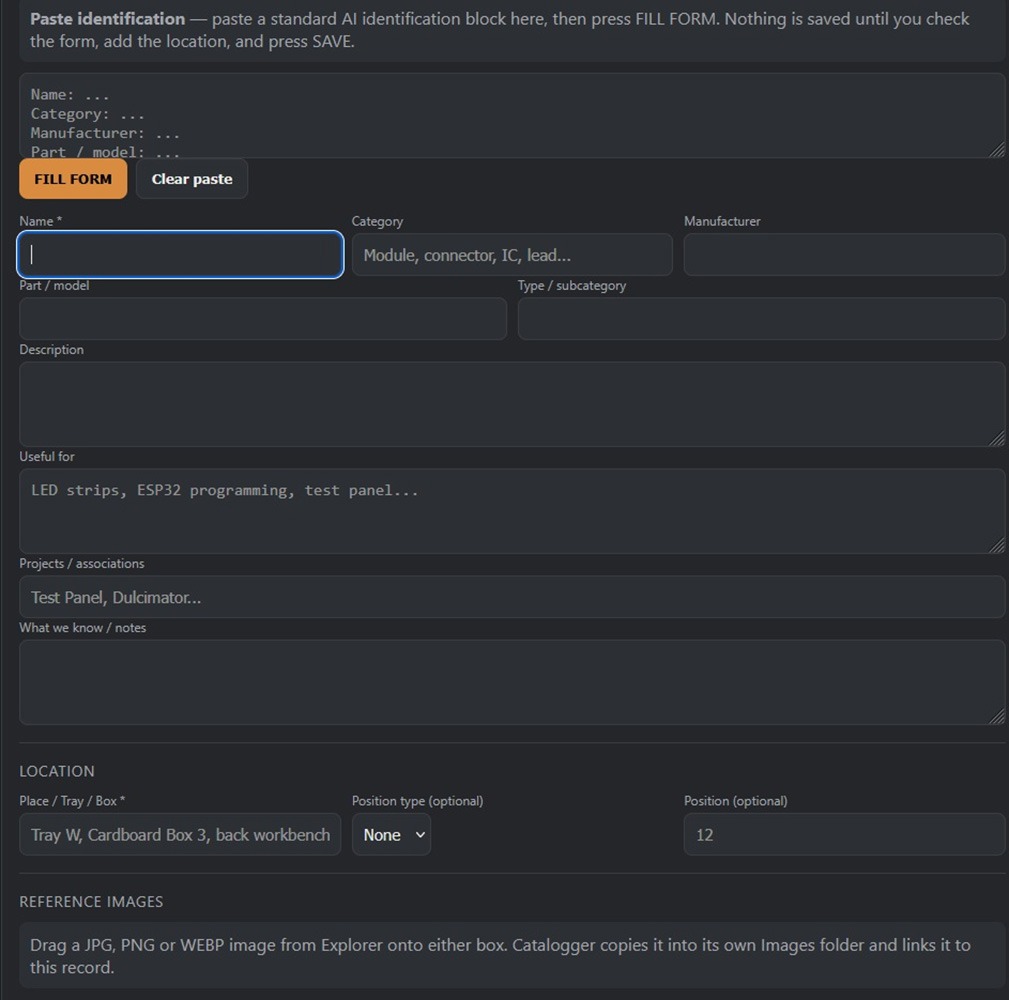
Paste identification and FILL FORM: the AI supplies the block, and I check it and press SAVE myself.
9. Workstation HOME
By the time nomacs, Share, G-Scope and Catalogger were all useful, hunting through Windows for them had become the next unnecessary nuisance.
Workstation HOME is a small Python launcher on the L430 with four large buttons: NOMACS, SHARE, G-SCOPE and CATALOGGER. It either starts the required program or brings its existing window forward. F11 recalls HOME when it is buried underneath something else.
It is deliberately dumb. It does not replace the programs underneath it, and those programs do not depend on it to keep working. That is the same principle as the direct HDMI feed from the microscope: the basic tool should still work when the clever bit doesn't.
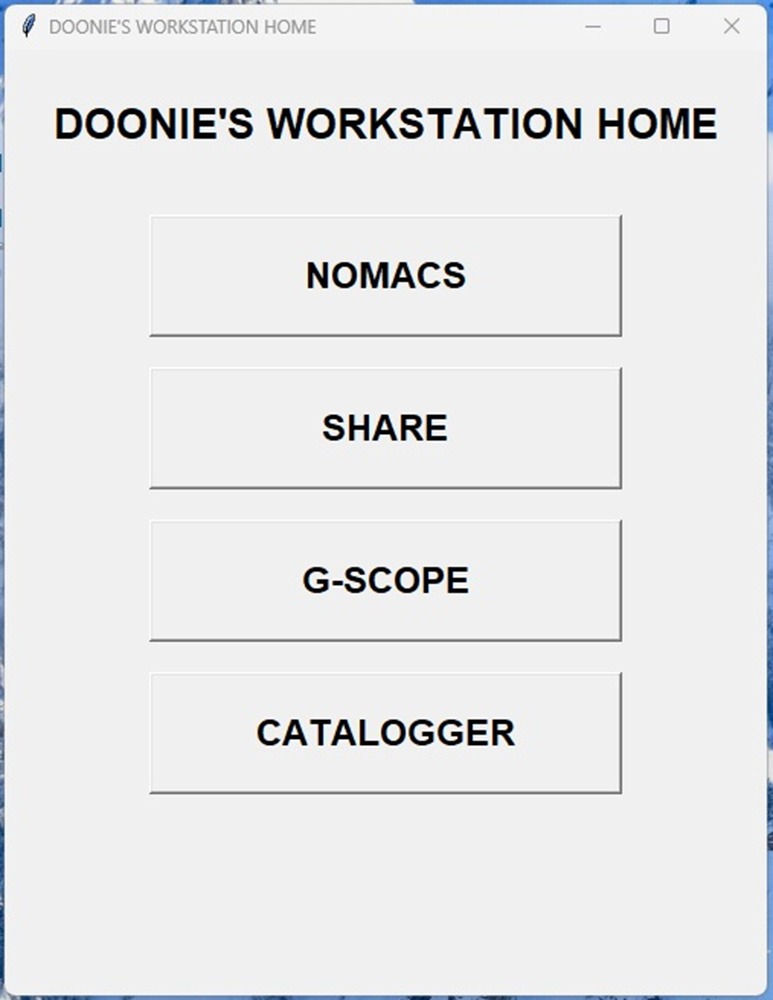
Workstation HOME: four buttons and nothing clever.
10. Where the AI Actually Helped
AI was useful throughout the build, but I did not treat it as an oracle. I have used ChatGPT, Claude, Gemini, DeepSeek and Grok at different points for design discussion, code, research and criticism. Where the consequence matters, I deliberately put a claim or a piece of work in front of another AI and ask it to find faults.
That approach caught a real software bug. Workstation HOME's Catalogger button and the Catalogger server had ended up using different ports - 8000 and 8766. Normal testing had made the system appear to work, but another AI reading the code found the mismatch.
The useful pattern has been: let AI build, let another AI criticise, then physically test the result. The human still decides what is actually true.
11. What I Used
This is not a prescriptive bill of materials. Much of it was equipment I already owned; the point was to reuse useful gear rather than buy a matched system.
- HIGH CLOUD 20 MP HDMI/USB microscope camera
- 0.7x-4.5x zoom lens with 0.5x auxiliary objective
- Spare 21-inch HDMI monitor
- Lenovo ThinkPad L430
- Ryzen desktop PC
- Canon EOS 1000D for routine component photographs
- VEVOR magnetic helping-hands station
- Arduino Uno
- 2 x 28BYJ-48 stepper motors
- 2 x ULN2003 stepper-driver boards
- M6 threaded rod and 3D-printed mounts/parts
- Raspberry Pi 4 - used during development, then removed from the finished image path
12. Where It Stands
The Magnifiser, Catalogger, and Workstation HOME are now working tools rather than design ideas. I am using them to work through the couple of boxes and bench stock of unidentified electronics that started the whole exercise.
A separate Test Panel for basic electrical measurements is a future job, not part of the finished workstation described here. The next major build waiting behind the cataloguing is my self-playing slide-dulcimer project, which is one reason being able to find the right resistor, capacitor, or module matters in the first place.
The Raspberry Pi is still around too. It simply no longer gets a job by default.
13. What I Would Take From It
The most useful result was not a particular camera, laptop, program or AI service. It was learning to give each piece of equipment one clear job and to stop adding machinery when the simple route already worked.
If you've got an old laptop, a camera and a pile of half-remembered components, you do not need to copy my hardware. Build the smallest useful loop you can: look at the thing, capture evidence when needed, identify it carefully, and remember where you put it.
Use AI properly, with knowledge and a drop of suspicion. Treat its output as a claim to be understood and verified, not as truth because it sounds authoritative.
And when a troublesome piece of hardware turns out not to be necessary, that can be a successful result too.

