
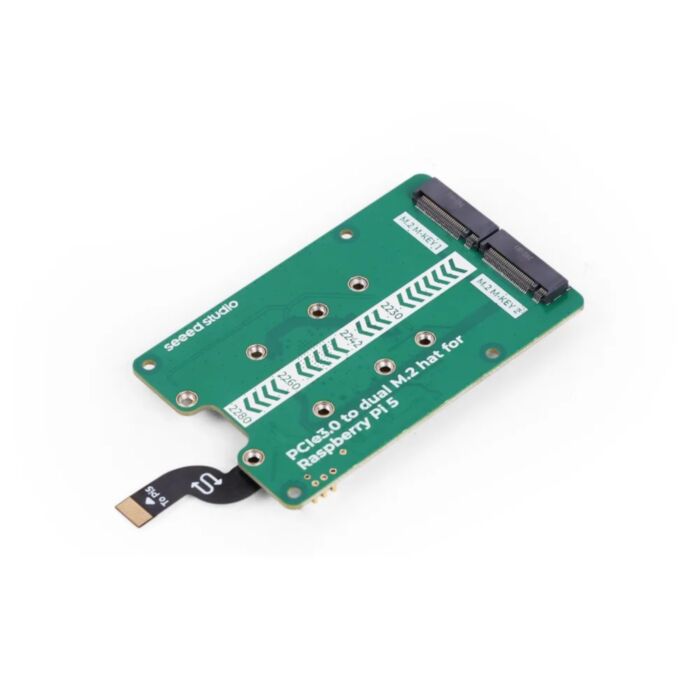
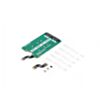
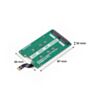
Seeed Studio PCIe 3.0 to Dual M.2 HAT for Raspberry Pi 5
Two M.2 slots for your Pi 5. Fit a pair of NVMe SSDs, or an SSD alongside a Hailo AI accelerator.
Available with a lead time
Expect dispatch between Nov 16 and Nov 16
Quantity Discounts:
- 25+ $66.08 (exc GST)
- 50+ $64.69 (exc GST)
Run fast NVMe storage and AI acceleration side by side on your Raspberry Pi 5, at PCIe 3.0 speed. This HAT adds two M.2 slots, so you can boot from one SSD while a second SSD or an AI accelerator uses the other.
The onboard ASMedia ASM2806 PCIe 3.0 switch shares the Pi 5's PCIe connection between both slots and lifts it beyond PCIe 2.0. In Seeed's tests, an SSD running alongside a Hailo-8 read at 416 MB/s with the Hailo-8 at 187 FPS on PCIe 3.0. On PCIe 2.0 the same setup gave 233 MB/s and 128 FPS.
The board mounts under the Pi, so the 40-pin GPIO stays free and an S-shaped FPC cable leaves the microSD slot clear. Pogo pins add a second power path for a stable high-speed link. Hailo-8 and 8L modules must be the M.2 B+M key version. SATA SSDs aren't supported, and not every NVMe SSD works yet because Raspberry Pi's NVMe controller support is still being updated.
Getting started:
- Use Raspberry Pi OS Bookworm or later and Pi 5 firmware from 6 December 2023 or newer. Update the bootloader if you plan to boot from SSD.
- Clean the pogo pins and GPIO pads with an alcohol swab before connecting.
- Add
dtparam=pciex1,dtparam=pciex1_gen=3anddtoverlay=pciex1-compat-pi5,no-mip,mmio-hito/boot/firmware/config.txt, then install Seeed'spcie-fix.dtbooverlay. - To boot from NVMe, copy the OS with SD Card Copier, then set the boot order to NVMe/USB in raspi-config.
Features
- Storage and AI on one Pi: run an NVMe SSD alongside a Hailo-8/8L or Google Coral AI accelerator, or fit two SSDs for more storage.
- Fits most NVMe drive lengths: supports the 2230, 2242, 2260 and 2280 M.2 sizes.
- Stack other HATs on top: mounting underneath keeps the 40-pin GPIO free.
- Stable under load: pogo pins supply up to 2 A on top of the 1 A from the PCIe connector.
- microSD stays accessible: the S-shaped FPC cable routes clear of the card slot.
- Boot straight from SSD: run Raspberry Pi OS from NVMe instead of microSD.
- Case ready to print: M.2 HATs don't fit the official Raspberry Pi 5 case. Seeed's product page links an adapted, open-source 3D-printable case (STP file).
Technical Specifications
| Property | Specification |
|---|---|
| M.2 slots | 2 |
| Max. PCIe speed | PCIe Gen 3.0 (Gen 2.0 also supported) |
| PCIe switch chip | ASMedia ASM2806 |
| Supported M.2 sizes | 2230 / 2242 / 2260 / 2280 |
| Supported devices | NVMe SSDs, Hailo-8/8L (M.2 B+M key only), Google Coral AI accelerators |
| Not supported | SATA SSDs |
| Max. power supply | 5 V / 3 A (pogo pins 2 A + PCIe connector 1 A) |
| Cable | FPC |
| Mounting | Underside of Raspberry Pi 5 |
| Dimensions | 87 × 55 × 10 mm |
Resources
What's Included
- 1x PCIe 3.0 to Dual M.2 HAT
- 2x 50 mm FPC cable
- 1x screw and stud pack
This product is listed in:
Raspberry Pi>Model B Hats & PlatesRaspberry Pi>Raspberry Pi 5>Raspberry Pi 5 Accessories
Exact shipping can be calculated on the view cart page (no login required).
Products that weigh more than 0.5 KG may cost more than what's shown (for example, test equipment, machines, >500mL liquids, etc).
We deliver Australia-wide with these options (depends on the final destination - you can get a quote on the view cart page):
- $3+ for Stamped Mail (typically 10+ business days, not tracked, only available on selected small items)
- $7+ for Standard Post (typically 6+ business days, tracked)
- $11+ for Express Post (typically 2+ business days, tracked)
- Pickup - Free! Only available to customers who live in the Newcastle region (must order online and only pickup after we email to notify you the order is ready). Orders placed after 2PM may not be ready until the following business day.
Non-metro addresses in WA, NT, SA & TAS can take 2+ days in addition to the above information.
Some batteries (such as LiPo) can't be shipped by Air. During checkout, Express Post and International Methods will not be an option if you have that type of battery in your shopping cart.
International Orders - the following rates are for New Zealand and will vary for other countries:
- $12+ for Pack and Track (3+ days, tracked)
- $16+ for Express International (2-5 days, tracked)
If you order lots of gear, the postage amount will increase based on the weight of your order.
Our physical address (here's a PDF which includes other key business details):
40 Aruma Place
Cardiff
NSW, 2285
Australia
Take a look at our customer service page if you have other questions such as "do we do purchase orders" (yes!) or "are prices GST inclusive" (yes they are!). We're here to help - get in touch with us to talk shop.
Have a product question? We're here to help!
 Raspberry Pi Touch Display 2 (10.1" Portrait)SKU: CE11100 Brand: Raspberry Pi
A bigger take on Raspberry Pi's Touch Display 2 - more screen, more windows, ...
- Raspberry Pi 5 Model B 16GBSKU: CE10111 Brand: Raspberry Pi
The 16GB Raspberry Pi 5 packs the most power and onboard memory in the Raspbe ...
- Hailo-8 M.2 AI Accelerator Module (26 TOPS)SKU: WS-27812 Brand: WaveshareHailo-8 M.2 AI Accelerator Module, based on the 26TOPS Hailo-8 AI processor, Sup ...
- Raspberry Pi Touch Display 2 (7" Portrait)SKU: CE09978 Brand: Raspberry Pi
Display your projects proudly with the Raspberry Pi Touch Display 2, featurin ...


- NeoPixel Stick - 8 x WS2812 5050 RGB LED with Integrated DriversSKU: ADA1426 Brand: AdafruitMake your own little LED strip arrangement with this stick of NeoPixel LEDs. Ada ...
- USB-C to 4-Pin Molex Socket Cable (0.5m)SKU: 104575 Brand: The Pi HutPower your Raspberry Pi 4 from an ATX power supply 5V line with our custom MOLEX ...
- Raspberry Pi 5 Model B 8GBSKU: CE09786 Brand: Raspberry Pi
The 8GB Raspberry Pi 5 is the latest powerhouse in the Raspberry Pi lineup. I ...
- Raspberry Pi 5 White Power Supply (Official) USB-C PD 5.1V 27WSKU: CE09787 Brand: Raspberry Pi
The official Power Supply needed to keep your Raspberry Pi 5 performing smoot ...


Videos
View AllGuides

Raspberry Pi AI HAT 1 vs AI HAT 2: Which Should You Buy?

YOLO Pose Estimation on the Raspberry Pi AI Hat+ | Writing Custom Python Code

YOLO Object Detection on the Raspberry Pi AI Hat+ | How to Write Custom Python Code

How to Add an SSD To Your Raspberry Pi 5 with the M.2 HAT
Projects
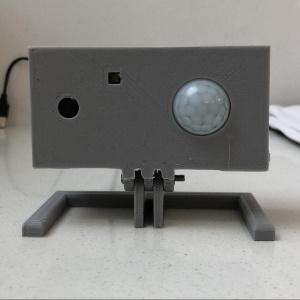
ESP32 IR-Triggered Camera with Home Assistant Integration

Raspberry Pi Rain Radar and Weather Display

Rain Gauge Data Logger
Educational Workshops
Raspberry Pi Workshop for Beginners

Makers love reviews as much as you do, please follow this link to review the products you have purchased.
Product Comments