
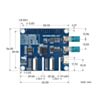
Waveshare 2-Channel GMSL Camera HAT for Pi 5 / Jetson Orin
Bring rugged, long-cable cameras from the automotive world into your robotics and vision projects.
Available with a lead time
Expect dispatch between Nov 18 and Nov 25
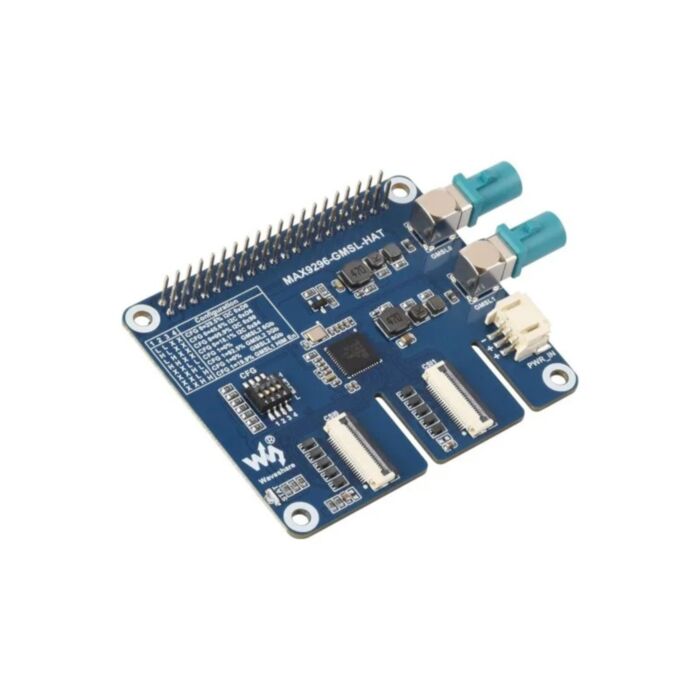
A GMSL deserializer in HAT form, built to bring long-cable cameras to your single-board computer.
GMSL is a high-speed serial link from the automotive and industrial world. It carries high-definition video and data over a single coaxial or twisted-pair cable, with long reach, low latency and strong resistance to interference. The onboard Maxim MAX9296A turns those links back into camera data for your host.
The board powers your cameras too, sending 12 V Power over Coax down each camera cable from its own supply. You don't need to wire a separate camera supply.
It works with Waveshare GMSL cameras, including the GMSL 1MP Camera (A), and suits robotics, autonomous driving and car surround-view projects. Cameras and the host computer are sold separately.
Hardware setup:
- Plug your GMSL cameras into the FAKRA Z inputs.
- Mount the HAT and connect it to your host's camera port.
- Supply 5 V through the PH2.0 3-pin cable.
- Set the CFG switch to suit your cameras.
Would a board that mounts apart from your host suit your build better? The Waveshare GMSL Camera Adapter uses the same deserializer in a standalone form.
Features
- Stacks on the 40-pin header: sits directly on your host, with a screw pack for mounting.
- Two 4-lane MIPI CSI outputs: twin 22-pin connectors. One FFC cable is included, so connecting both outputs needs a second 22-pin FFC cable.
- Hardware defaults, software override: the CFG switch, with its settings table printed on the board, sets the default serializer I2C address and link rate at power-up. Software can overwrite these settings after start-up.
- Proven camera pairings: designed for cameras built on MAX9295, MAX96717 and MAX96705 serializers. See the wiki for the tested camera list.
GMSL Camera HAT Specifications
| Property | Specification |
|---|---|
| Deserializer | Maxim (ADI) MAX9296A |
| Form factor | HAT (40-pin header) |
| Host support | Raspberry Pi 5, NVIDIA Jetson Orin Nano / Orin NX developer kits |
| GMSL input | 2 channels, simultaneous; GMSL2 (GMSL1 compatible) |
| Input connectors | 2 × MATE_AX FAKRA Z |
| Camera power | 12 V Power over Coax (PoC) |
| Output | 2 × 22-pin MIPI CSI (4-lane) |
| Serializer support | MAX9295, MAX96717, MAX96705, etc. |
| Supported cameras (Waveshare) | GMSL 1MP Camera (A), GMSL 2MP Camera (A), ISX031 GMSL Camera H60 / H100 / H120 / H190, ISX031C GMSL Camera H100 |
| Power input | 5 V |
| Dimensions | 65 × 56 mm |
Resources
What's Included
- 1x MAX9296 GMSL HAT
- 1x 22-pin FFC cable, approx. 100 mm
- 1x PH2.0 3-pin power cable
- 1x screw pack
Exact shipping can be calculated on the view cart page (no login required).
Products that weigh more than 0.5 KG may cost more than what's shown (for example, test equipment, machines, >500mL liquids, etc).
We deliver Australia-wide with these options (depends on the final destination - you can get a quote on the view cart page):
- $3+ for Stamped Mail (typically 10+ business days, not tracked, only available on selected small items)
- $7+ for Standard Post (typically 6+ business days, tracked)
- $11+ for Express Post (typically 2+ business days, tracked)
- Pickup - Free! Only available to customers who live in the Newcastle region (must order online and only pickup after we email to notify you the order is ready). Orders placed after 2PM may not be ready until the following business day.
Non-metro addresses in WA, NT, SA & TAS can take 2+ days in addition to the above information.
Some batteries (such as LiPo) can't be shipped by Air. During checkout, Express Post and International Methods will not be an option if you have that type of battery in your shopping cart.
International Orders - the following rates are for New Zealand and will vary for other countries:
- $12+ for Pack and Track (3+ days, tracked)
- $16+ for Express International (2-5 days, tracked)
If you order lots of gear, the postage amount will increase based on the weight of your order.
Our physical address (here's a PDF which includes other key business details):
40 Aruma Place
Cardiff
NSW, 2285
Australia
Take a look at our customer service page if you have other questions such as "do we do purchase orders" (yes!) or "are prices GST inclusive" (yes they are!). We're here to help - get in touch with us to talk shop.
Have a product question? We're here to help!
 FlySky i6 Nova AFHDS 2A Transmitter - Grey TransparentSKU: CE11240 Brand: FlySky
Command robots, cars, planes and helis with ten channels, then sharpen your s ...
- Waveshare RP2350A USB Mini Development BoardSKU: WS-30274 Brand: WaveshareWaveshare RP2350A USB Mini Development Board, Based On Raspberry Pi RP2350A Dual ...
- ESP32-S3 1.75inch AMOLED Round Touch Display Development BoardSKU: WS-31261 Brand: Waveshare
Build a watch face, smart dial or voice assistant that listens, talks back an ...
- 2-Channel GMSL Camera Adapter for Raspberry Pi 5 / Jetson OrinSKU: WS-33623 Brand: Waveshare
Put your GMSL deserializer wherever your build has room, not where your host' ...


Videos
View AllGuides

YOLO Pose Estimation on the Raspberry Pi AI Hat+ | Writing Custom Python Code

YOLO Object Detection on the Raspberry Pi AI Hat+ | How to Write Custom Python Code

Getting Started with YOLO Pose Estimation Recognition on the Raspberry Pi

Face Recognition With Raspberry Pi and OpenCV
Projects
ESP32 IR-Triggered Camera with Home Assistant Integration

Raspberry Pi Rain Radar and Weather Display

Rain Gauge Data Logger
Educational Workshops

Raspberry Pi Workshop for Beginners

Makers love reviews as much as you do, please follow this link to review the products you have purchased.
Product Comments