
Picade Max USB Audio
In stock, ships same business day if ordered before 2PM
Fastest delivery: Tomorrow*
Disclaimer:
For next-day delivery, the shipping address must
be in the AusPost next-day network, eParcel Express must be selected, and the order must be placed
before 2PM AEST Mon-Thurs excluding NSW Public Holidays. Orders may be delayed due to AusPost
pickup timings and order verifications. eParcel Express is typically a 1-day service within the
AusPost next-day network, though it is sometimes 2+ days.
Quantity Discounts:
- 10+ $29.85 (exc GST)
- 25+ $28.92 (exc GST)
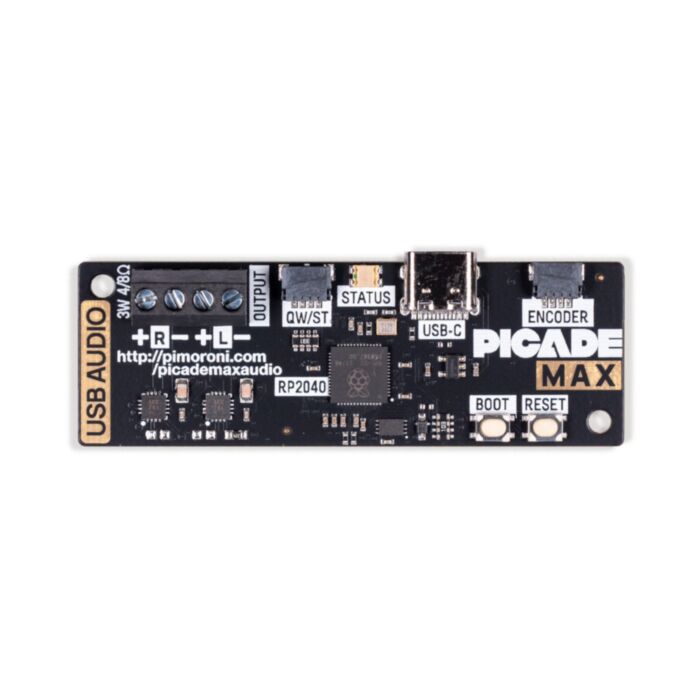
Connect a pair of small speakers up to a Raspberry Pi (or other computer) easily with this RP2040-powered USB-C sound card/3W stereo amplifier.
We made this RP2040 board to drive the speakers on Picade Max, but we thought it might also be useful for other builds where you want to connect some speakers up over USB-C - especially since 3.5mm audio jacks are now starting to become somewhat of a rarity!
There are two screw terminals to connect the wires from your speakers, you'll need a 2mm or 2.5mm flat blade screwdriver for this. Once it's plugged into your computer, you may need to set this board as your default audio output device (in Raspberry Pi OS you can right click on the speaker in the menu bar).
Need some speakers? Check out the recommendations in the extras! >
Features
- Powered by RP2040
- Dual ARM Cortex M0+ with 264kB of SRAM
- 2MB of QSPI flash supporting XiP
- 2 x screw terminals to attach speakers
- I2S audio DAC with 3W stereo amplifier
- Connector to add encoder for volume control
- USB-C connector
- Qw/ST (Qwiic/STEMMA QT) connector
- Status LED
- BOOT and RESET buttons
- Fully-assembled (no soldering required)
- C firmware
- Schematic
About RP2040
Raspberry Pi's RP2040 microcontroller is a dual core ARM Cortex M0+ running at up to 133Mhz. It bundles in 264kB of SRAM, 30 multifunction GPIO pins (including a four channel 12-bit ADC), a heap of standard peripherals (I2C, SPI, UART, PWM, clocks, etc), and USB support.
One very exciting feature of RP2040 is the programmable IOs which allow you to execute custom programs that can manipulate GPIO pins and transfer data between peripherals - they can offload tasks that require high data transfer rates or precise timing that traditionally would have required a lot of heavy lifting from the CPU.
Exact shipping can be calculated on the view cart page (no login required).
Products that weigh more than 0.5 KG may cost more than what's shown (for example, test equipment, machines, >500mL liquids, etc).
We deliver Australia-wide with these options (depends on the final destination - you can get a quote on the view cart page):
- $3+ for Stamped Mail (typically 10+ business days, not tracked, only available on selected small items)
- $7+ for Standard Post (typically 6+ business days, tracked)
- $11+ for Express Post (typically 2+ business days, tracked)
- Pickup - Free! Only available to customers who live in the Newcastle region (must order online and only pickup after we email to notify you the order is ready). Orders placed after 2PM may not be ready until the following business day.
Non-metro addresses in WA, NT, SA & TAS can take 2+ days in addition to the above information.
Some batteries (such as LiPo) can't be shipped by Air. During checkout, Express Post and International Methods will not be an option if you have that type of battery in your shopping cart.
International Orders - the following rates are for New Zealand and will vary for other countries:
- $12+ for Pack and Track (3+ days, tracked)
- $16+ for Express International (2-5 days, tracked)
If you order lots of gear, the postage amount will increase based on the weight of your order.
Our physical address (here's a PDF which includes other key business details):
40 Aruma Place
Cardiff
NSW, 2285
Australia
Take a look at our customer service page if you have other questions such as "do we do purchase orders" (yes!) or "are prices GST inclusive" (yes they are!). We're here to help - get in touch with us to talk shop.
Have a product question? We're here to help!
 Raspberry Pi Codec ZeroSKU: CE07560 Brand: Raspberry Pi
The Raspberry Pi Codec Zero is a Raspberry Pi Zero-sized audio I/O HAT. It de ...
- Raspberry Pi DAC+SKU: CE07561 Brand: Raspberry Pi
The Raspberry Pi DAC+ is an audio output HAT for all generations of Raspberry ...
- Raspberry Pi DAC ProSKU: CE07563 Brand: Raspberry Pi
The Raspberry Pi DAC Pro is Raspberry Pi's highest-fidelity audio output HAT. ...
- Speaker - 3" Diameter - 4 Ohm 3 WattSKU: ADA1314 Brand: AdafruitListen up! This 3" diameter speaker cone is the perfect addition to any audio pr ...


- Argon NEO 5 NVMe Case Bundle (With Case + Expansion Board)SKU: ARGN-0037 Brand: Argon40
Transform your Raspberry Pi 5 with the Argon NEO 5 NVMe Storage Case, featuri ...
- Picade Max Encoder (Volume Control)SKU: PIM770 Brand: PimoroniAdd a hardware volume control dial to Picade Max USB Audio....
- Speaker - 3" Diameter - 4 Ohm 3 WattSKU: ADA1314 Brand: AdafruitListen up! This 3" diameter speaker cone is the perfect addition to any audio pr ...
- Stereo Enclosed Speaker Set - 3W 4 OhmSKU: ADA1669 Brand: AdafruitListen up! This set of two 2.8" x 1.2" speakers are the perfect addition to any ...


Videos
View AllGuides

How to add mmWave Radar to a Pico | Detect and Track Humans

How to Control a Water Pump with a Raspberry Pi Pico
How to add GPS to a Raspberry Pi Pico | Get Real-Time Location in Your Project!
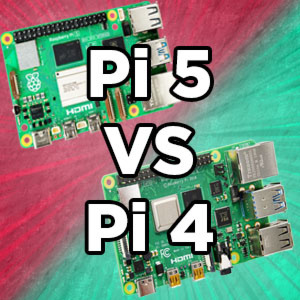
Raspberry Pi 5 Vs Raspberry Pi 4 Model B | Comparison & Benchmarking
Projects

Identify Birds through Sound with a Raspberry Pi | BirdNET-Pi Project
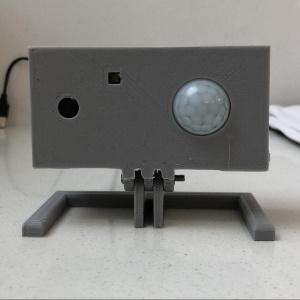
ESP32 IR-Triggered Camera with Home Assistant Integration

Raspberry Pi Rain Radar and Weather Display
Educational Workshops
Raspberry Pi Workshop for Beginners

Makers love reviews as much as you do, please follow this link to review the products you have purchased.
Product Comments