
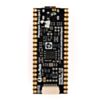
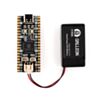
Pimoroni Pico LiPo 2
Available with a lead time
Expect dispatch between Nov 02 and Nov 09
Quantity Discounts:
- 10+ $27.15 (exc GST)
- 25+ $26.29 (exc GST)
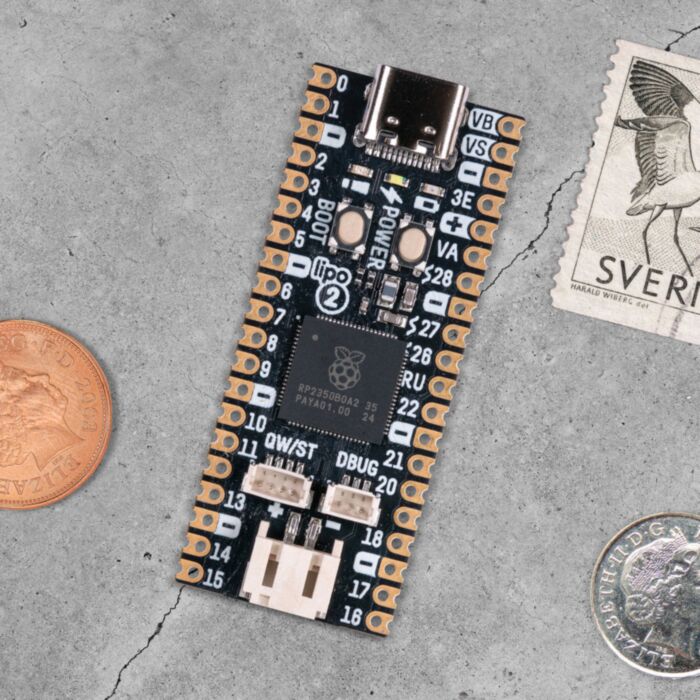
A top of the line Pirate-brand RP2350-powered microcontroller with 16MB of flash storage, 8MB of PSRAM, USB-C, Qw/ST and built in LiPo charging.
Psst - looking to use a RP2350 board in your project, but want more features than are present on a vanilla Raspberry Pi Pico 2? Pimoroni Pico boards are souped up microcontroller boards, with all the tasty extras baked in
Pimoroni Pico LiPo 2 is powered and programmable via USB-C and comes with an upgraded 8MB RAM, 16MB of flash storage and easy to read pin labels. It's got onboard LiPo/LiIon battery management - the inbuilt charging circuitry means charging your battery is as easy as plugging your board in via USB. There's two indicator LEDs connected to the battery circuit to keep you informed of on/off state and charging status and it's compatible with any of our LiPo, LiIon and high capacity LiPo batteries. There's also a handy power button and a BOOT button, which can also be used as a user switch.
It's super easy to connect up to things without soldering, with a Qw/ST connector (for adding I2C sensors and breakouts), a SP/CE connector (for hooking up SPI/serial breakouts or for adding a RM2 wireless breakout) and a debug connector (for if you prefer to program using a SWD debugger).
Looking for a similar board with WiFi and Bluetooth connectivity built in? Check out Pimoroni Pico LiPo 2 XL W!
Features
- Powered by RP2350B (Dual Arm Cortex M33 running at up to 150MHz with 520KB of SRAM)
- 16MB of QSPI flash supporting XiP
- 8MB of PSRAM
- MCP73831 charger with 215mA charging current (datasheet)
- XB6096I2S battery protector (datasheet)
- USB-C connector for power, programming, and data transfer
- Qw/ST (Qwiic/STEMMA QT) connector for attaching I2C breakouts
- SP/CE connector for attaching SPI/serial devices
- 3 pin debug connector (JST-SH)
- Switch for basic input (doubles up as DFU select on boot)
- Power button
- Power, charging and user LED indicators
- On-board 3V3 regulator (max regulator current output 600mA)
- Input voltage range 3V - 5.5V
- 2-pole JST PH battery connector, with polarity marked on the board
- Two rows of 20 pins, exposing 26 GPIO
- Compatible with Raspberry Pi Pico add-ons
Batteries, cables and headers are not included.
Pinout and Schematic

Getting Started
If you're new to working with RP2350 boards we'd recommend starting with our custom MicroPython build, which includes support for our breakouts and Pico add-ons.
Connecting Breakouts
Pico Lipo 2 XL W has both a Qw/ST (AKA Qwiic/STEMMA QT) connector and a SP/CE connector. You can easily connect up Qw/ST breakouts using a 4-pin JST-SH to 4-pin JST-SH cable and SP/CE breakouts using a 8-pin JST-SH to 8-pin JST-SH cable.
Exact shipping can be calculated on the view cart page (no login required).
Products that weigh more than 0.5 KG may cost more than what's shown (for example, test equipment, machines, >500mL liquids, etc).
We deliver Australia-wide with these options (depends on the final destination - you can get a quote on the view cart page):
- $3+ for Stamped Mail (typically 10+ business days, not tracked, only available on selected small items)
- $7+ for Standard Post (typically 6+ business days, tracked)
- $11+ for Express Post (typically 2+ business days, tracked)
- Pickup - Free! Only available to customers who live in the Newcastle region (must order online and only pickup after we email to notify you the order is ready). Orders placed after 2PM may not be ready until the following business day.
Non-metro addresses in WA, NT, SA & TAS can take 2+ days in addition to the above information.
Some batteries (such as LiPo) can't be shipped by Air. During checkout, Express Post and International Methods will not be an option if you have that type of battery in your shopping cart.
International Orders - the following rates are for New Zealand and will vary for other countries:
- $12+ for Pack and Track (3+ days, tracked)
- $16+ for Express International (2-5 days, tracked)
If you order lots of gear, the postage amount will increase based on the weight of your order.
Our physical address (here's a PDF which includes other key business details):
40 Aruma Place
Cardiff
NSW, 2285
Australia
Take a look at our customer service page if you have other questions such as "do we do purchase orders" (yes!) or "are prices GST inclusive" (yes they are!). We're here to help - get in touch with us to talk shop.
Have a product question? We're here to help!
 Raspberry Pi Pico 2 WSKU: CE09995 Brand: Raspberry Pi
The Raspberry Pi Pico 2 W is a flexible microcontroller featuring integrated ...
- Makerverse USB-C LiPo ChargerSKU: CE08374 Brand: Makerverse
A battery charger with selectable charge currents and USB-C!
- Olimex PICO2-XL - RP2350 Board with 48 GPIOSKU: TPH-106343 Brand: The Pi HutThe Olimex PICO2-XL is an RP2350-based development board exposing all 48 GPIO fr ...
- Polymer Lithium Ion Battery (LiPo) 3.7V 1100mAhSKU: CE04377 Brand: Core ElectronicsRely on the superior chemistry and energy density of Lithium Ion batteries for y ...


- OLED Display Module for Raspberry Pi Pico, 1.3inch, SPI/I2C (64×128)SKU: WS-19376 Brand: Waveshare1.3" OLED Display module an Embedded SH1107 Driver, Using SPI/I2C Bus.
- Polymer Lithium Ion Battery (LiPo) 3.7V 400mAhSKU: CE04375 Brand: Core ElectronicsPolymer Lithium Ion batteries offer superior energy density with this 400mAh bat ...
- Male Pin Header 2.54mm (1x20)SKU: CE08367 Brand: Core ElectronicsPerfect for prototyping, these straight male headers are a super common header t ...
- Pico/Pico W Female Header PackSKU: CE09119 Brand: Core Electronics
Grab a couple female headers for your Pico or Pico W!


Videos
View AllGuides

How to add mmWave Radar to a Pico | Detect and Track Humans

How to Control a Water Pump with a Raspberry Pi Pico
How to add GPS to a Raspberry Pi Pico | Get Real-Time Location in Your Project!
Raspberry Pi 5 Vs Raspberry Pi 4 Model B | Comparison & Benchmarking
Projects
ESP32 IR-Triggered Camera with Home Assistant Integration

Raspberry Pi Rain Radar and Weather Display

Rain Gauge Data Logger
Educational Workshops
Raspberry Pi Workshop for Beginners

Makers love reviews as much as you do, please follow this link to review the products you have purchased.
Product Comments