
52Pi M.2 NVMe SSD Plus 2.5G Ethernet Adapter for Raspberry Pi 5
Add fast NVMe storage and multi-gig networking to your Pi 5 with a single stacking board, ideal for compact NAS and home-server builds.
In stock, ships same business day if ordered before 2PM
Fastest delivery: Tomorrow*
Disclaimer:
For next-day delivery, the shipping address must
be in the AusPost next-day network, eParcel Express must be selected, and the order must be placed
before 2PM AEST Mon-Thurs excluding NSW Public Holidays. Orders may be delayed due to AusPost
pickup timings and order verifications. eParcel Express is typically a 1-day service within the
AusPost next-day network, though it is sometimes 2+ days.
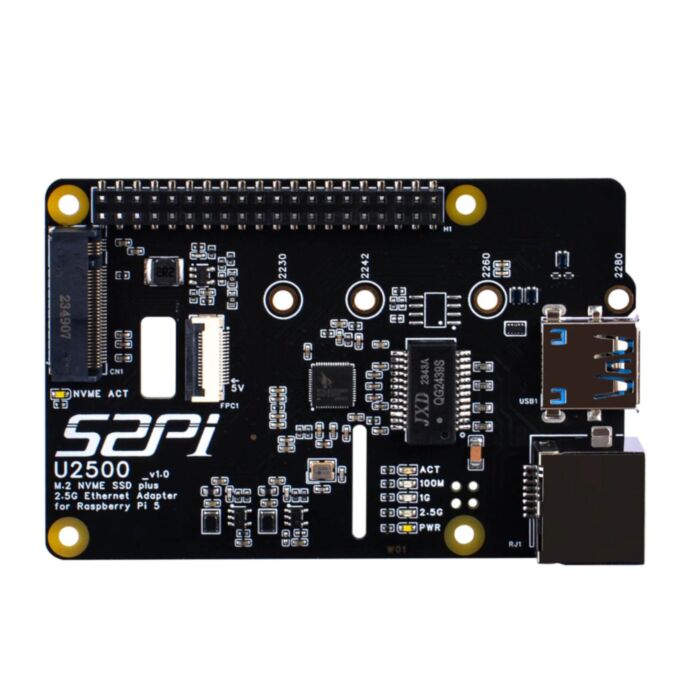
Fast SSD storage and 2.5 Gigabit Ethernet for the Raspberry Pi 5, on one compact board that sits on top of your Pi.
Network storage, media servers and self-hosted apps usually hit two limits on a Pi: microSD storage and the 1 Gbps onboard Ethernet. This HAT fixes both. Your M.2 NVMe SSD runs on the Pi 5's PCIe lane, and the Realtek RTL8156BG 2.5 Gbps network controller links over USB 3.0. Because each has its own path, storage and network traffic don't compete for the single PCIe lane.
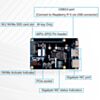
The board takes M-key NVMe drives from 2230 up to full-length 2280, with a dedicated mounting pillar, and no soldering is needed. Cut-outs in the PCB let camera or display ribbon cables pass through, and a 40-pin header passes the GPIO up for other add-ons.
Setup:
- Fit the standoffs and connect the PCIe ribbon cable to the Pi 5's PCIe connector.
- Plug the included USB bridge connector into the Pi 5's USB 3.0 port.
- Add
dtparam=pciex1to/boot/firmware/config.txtand reboot. The SSD and network port are then detected automatically.
Features
- Full-speed SSD access over the Pi 5's PCIe x1 interface. Runs at Gen 2 by default and supports Gen 3 for extra throughput (Gen 3 is not officially certified by Raspberry Pi).
- Network transfers up to 2.5 Gbps through the 2.5G RJ45 port, which also connects at 1 Gbps and 100 Mbps.
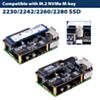
- Fits any common SSD length, with marked mounting points for M.2 2230, 2242, 2260 and 2280 drives.
- Delivers up to 3 A on the SSD's 3.3 V supply, which meets the M.2 power standard, so higher-performance drives run reliably.
- Short PCIe traces on a gold-plated PCB for reliable Gen 3 signalling.
- Activity and status at a glance, with an NVMe activity LED plus link, speed and power LEDs for the network port.
- Open, hollow board design that helps airflow through the stack.
- Cut-outs that let camera or display ribbon cables pass through the board.
- Ships with all mounting hardware and a screwdriver.
Specifications
| Property | Specification |
|---|---|
| Compatible board | Raspberry Pi 5 |
| SSD support | M.2 M-key NVMe, 2230 / 2242 / 2260 / 2280 |
| SSD interface | PCIe x1 via the Pi 5 FFC connector, Gen 2 (default) / Gen 3 |
| Ethernet controller | Realtek RTL8156BG |
| Ethernet port | RJ45, 2.5 Gbps / 1 Gbps / 100 Mbps |
| Ethernet host link | USB 3.0 (via included USB bridge connector) |
| PoE | Not supported |
| SSD power | 3.3 V rail, up to 3 A |
| Ethernet power | 5 V, 650 mA |
| Auxiliary power input | USB-C, connected directly to the Pi's 5 V rail (max 5 V / 5 A) |
| Indicators | NVMe activity; Ethernet link, speed and power |
| Dimensions | 85 × 56 × 15.15 mm |
Resources
- 52Pi EP-0228 Wiki – setup, PCIe enabling, SSD formatting and network testing
- 3D-printable enclosure design (DeskPi)
- Raspberry Pi 5 hardware documentation (PCIe and NVMe)
What's Included
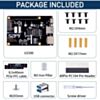
- 1x U2500 M.2 NVMe SSD + 2.5G Ethernet HAT
- 2x PCIe FFC cables (8.5 × 40 mm)
- 1x USB bridge connector
- 1x 40-pin GPIO header
- 4x M2.5 × 17 mm brass standoffs
- 8x M2.5 × 4 mm flat-head screws
- 1x M2 SSD mounting pillar
- 1x M2 × 3 mm screw
- 1x screwdriver
This product is listed in:
Raspberry Pi>Raspberry Pi 5>Raspberry Pi 5 AccessoriesBreakouts & Modules>Data Storage
Exact shipping can be calculated on the view cart page (no login required).
Products that weigh more than 0.5 KG may cost more than what's shown (for example, test equipment, machines, >500mL liquids, etc).
We deliver Australia-wide with these options (depends on the final destination - you can get a quote on the view cart page):
- $3+ for Stamped Mail (typically 10+ business days, not tracked, only available on selected small items)
- $7+ for Standard Post (typically 6+ business days, tracked)
- $11+ for Express Post (typically 2+ business days, tracked)
- Pickup - Free! Only available to customers who live in the Newcastle region (must order online and only pickup after we email to notify you the order is ready). Orders placed after 2PM may not be ready until the following business day.
Non-metro addresses in WA, NT, SA & TAS can take 2+ days in addition to the above information.
Some batteries (such as LiPo) can't be shipped by Air. During checkout, Express Post and International Methods will not be an option if you have that type of battery in your shopping cart.
International Orders - the following rates are for New Zealand and will vary for other countries:
- $12+ for Pack and Track (3+ days, tracked)
- $16+ for Express International (2-5 days, tracked)
If you order lots of gear, the postage amount will increase based on the weight of your order.
Our physical address (here's a PDF which includes other key business details):
40 Aruma Place
Cardiff
NSW, 2285
Australia
Take a look at our customer service page if you have other questions such as "do we do purchase orders" (yes!) or "are prices GST inclusive" (yes they are!). We're here to help - get in touch with us to talk shop.
Have a product question? We're here to help!
 Raspberry Pi 5 Model B 8GBSKU: CE09786 Brand: Raspberry Pi
The 8GB Raspberry Pi 5 is the latest powerhouse in the Raspberry Pi lineup. I ...
- Raspberry Pi 3 Model B+SKU: CE05436 Brand: Raspberry PiThe Raspberry Pi 3 Model B+ (note the plus on the end) was released by the Raspb ...
- Raspberry Pi 5 Model B 4GBSKU: CE09785 Brand: Raspberry Pi
The 4GB Raspberry Pi 5 is the latest powerhouse in the Raspberry Pi lineup. I ...
- Raspberry Pi 5 Active CoolerSKU: CE09791 Brand: Raspberry Pi
Unlock the untapped power of your Raspberry Pi 5 with our state-of-the-art Ac ...


Videos
View AllGuides

Raspberry Pi AI HAT 1 vs AI HAT 2: Which Should You Buy?

YOLO Pose Estimation on the Raspberry Pi AI Hat+ | Writing Custom Python Code

YOLO Object Detection on the Raspberry Pi AI Hat+ | How to Write Custom Python Code

How to Add an SSD To Your Raspberry Pi 5 with the M.2 HAT
Projects
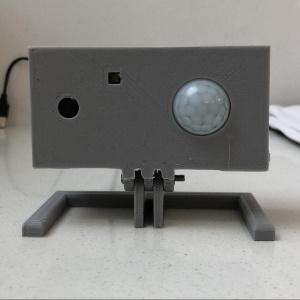
ESP32 IR-Triggered Camera with Home Assistant Integration

Raspberry Pi Rain Radar and Weather Display

Rain Gauge Data Logger
Educational Workshops
Raspberry Pi Workshop for Beginners

Makers love reviews as much as you do, please follow this link to review the products you have purchased.
Product Comments