
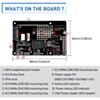
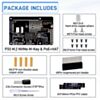
52Pi P33 M.2 NVMe & PoE+ HAT for Raspberry Pi 5
Run your Pi 5 from a single network cable and boot from a full-size NVMe SSD – power, data and fast storage in one tidy stack.
In stock, ships same business day if ordered before 2PM
Fastest delivery: Tomorrow*
Disclaimer:
For next-day delivery, the shipping address must
be in the AusPost next-day network, eParcel Express must be selected, and the order must be placed
before 2PM AEST Mon-Thurs excluding NSW Public Holidays. Orders may be delayed due to AusPost
pickup timings and order verifications. eParcel Express is typically a 1-day service within the
AusPost next-day network, though it is sometimes 2+ days.
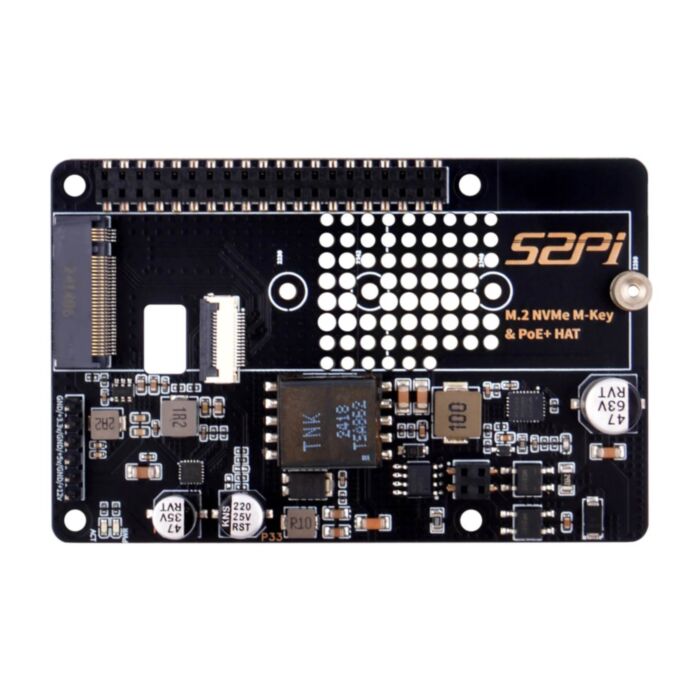
One Ethernet cable for power and data, plus an M.2 slot that takes full-length 2280 NVMe drives. Fit it to a Raspberry Pi 5 and you get a tidy, fast-booting network node with no USB-C power supply needed.
PoE and NVMe storage usually fight over the same space on top of the Pi 5. This board puts both on one PCB: a PoE+ (802.3at) power stage delivering 5.1 V at 4.5 A, and a PCIe-connected M.2 M-key socket with mounting points for 2230, 2242, 2260 and 2280 SSDs. That means most mainstream NVMe drives fit, not just the short 2230/2242 sizes.
It mounts on brass standoffs above the Pi, linked by a short PCIe flat cable and an extra-tall 40-pin header. The whole stack is about 36 mm tall, which suits rack, cluster and wall-mounted installs where a single cable run is the cleanest option.
Getting started:
- Fit the 4-pin PoE socket and 40-pin header, then mount the HAT on the standoffs and connect the PCIe cable (note the "to HAT" / "to RPi5" labels).
- Add
dtparam=pciex1to/boot/firmware/config.txtto enable the PCIe port. - Run
sudo rpi-eeprom-config --editand addPSU_MAX_CURRENT=5000so the Pi recognises the high-current supply, plusBOOT_ORDER=0xf416if you want to boot from NVMe. - Connect to an 802.3at PoE+ switch or injector and reboot.
Important: Do not connect a power supply to the Pi 5's USB-C port while the PoE+ HAT is powering it. Doing so may damage your hardware.
Features
- Power the Pi 5 and its SSD from one PoE+ network cable – up to 25.5 W input with a 5.1 V/4.5 A output, so no separate power point is needed at the install site
- Fits nearly any M.2 NVMe SSD, with dedicated mounting holes for 2230, 2242, 2260 and 2280 lengths
- Boot and run from NVMe for much faster boot times and file access than microSD, via the Pi 5's native PCIe connector
- PCIe Gen 2 by default, with optional Gen 3 for drives that test stable
- Power and PCIe activity LEDs show status at a glance
- Arrives ready to build, with standoffs, screws, PCIe cable, headers and a screwdriver included
Specifications
| Property | Specification |
|---|---|
| Compatible board | Raspberry Pi 5 |
| SSD interface | M.2 M-key socket, PCIe NVMe (M-key and B+M-key NVMe drives; M.2 SATA SSDs not supported) |
| Supported SSD lengths | 2230 / 2242 / 2260 / 2280 |
| PCIe speed | Gen 2 (5 GT/s) default; Gen 3 (10 GT/s) can be enabled but is not certified |
| PoE standard | IEEE 802.3at (PoE+), up to 25.5 W input |
| Output | 5.1 V, 4.5 A |
| Indicators | Power status LED, PCIe activity LED |
| Auxiliary power header | GND / 3.3 V / GND / +5 V / GND / +12 V |
| Board dimensions | 88 x 56 mm |
| Assembled stack height | Approx. 36 mm |
Resources
What's Included
- 1x 52Pi P33 M.2 NVMe M-Key & PoE+ HAT
- 1x PCIe FFC cable (40 mm)
- 1x 40-pin extra-tall pin header
- 1x 2x2 pin 2.54 mm PoE header socket
- 4x M2.5 x 19 mm brass standoffs
- 8x M2.5 x 4 mm flat-head screws
- 1x M2 SSD standoff
- 2x M2 x 3 mm flat-head screws
- 1x M2.5 screwdriver
Raspberry Pi 5 and SSD not included.
Exact shipping can be calculated on the view cart page (no login required).
Products that weigh more than 0.5 KG may cost more than what's shown (for example, test equipment, machines, >500mL liquids, etc).
We deliver Australia-wide with these options (depends on the final destination - you can get a quote on the view cart page):
- $3+ for Stamped Mail (typically 10+ business days, not tracked, only available on selected small items)
- $7+ for Standard Post (typically 6+ business days, tracked)
- $11+ for Express Post (typically 2+ business days, tracked)
- Pickup - Free! Only available to customers who live in the Newcastle region (must order online and only pickup after we email to notify you the order is ready). Orders placed after 2PM may not be ready until the following business day.
Non-metro addresses in WA, NT, SA & TAS can take 2+ days in addition to the above information.
Some batteries (such as LiPo) can't be shipped by Air. During checkout, Express Post and International Methods will not be an option if you have that type of battery in your shopping cart.
International Orders - the following rates are for New Zealand and will vary for other countries:
- $12+ for Pack and Track (3+ days, tracked)
- $16+ for Express International (2-5 days, tracked)
If you order lots of gear, the postage amount will increase based on the weight of your order.
Our physical address (here's a PDF which includes other key business details):
40 Aruma Place
Cardiff
NSW, 2285
Australia
Take a look at our customer service page if you have other questions such as "do we do purchase orders" (yes!) or "are prices GST inclusive" (yes they are!). We're here to help - get in touch with us to talk shop.
Have a product question? We're here to help!
 Raspberry Pi 5 Model B 8GBSKU: CE09786 Brand: Raspberry Pi
The 8GB Raspberry Pi 5 is the latest powerhouse in the Raspberry Pi lineup. I ...
- Raspberry Pi 5 M.2 HAT+SKU: CE09773 Brand: Raspberry Pi
Connect M.2-format PCIe and NVMe devices to your Raspberry Pi 5 with the M.2 ...
- Raspberry Pi 5 Active CoolerSKU: CE09791 Brand: Raspberry Pi
Unlock the untapped power of your Raspberry Pi 5 with our state-of-the-art Ac ...
- Power Over Ethernet HAT (G) For Raspberry Pi 5 (5V, 5A)SKU: WS-27670 Brand: WaveshareThe PoE HAT (G) is an IEEE 802.3af/at-compliant PoE (Power Over Ethernet) HAT fo ...


- Raspberry Pi 5 Model B 8GBSKU: CE09786 Brand: Raspberry Pi
The 8GB Raspberry Pi 5 is the latest powerhouse in the Raspberry Pi lineup. I ...
- Raspberry Pi 5 White Power Supply (Official) USB-C PD 5.1V 27WSKU: CE09787 Brand: Raspberry Pi
The official Power Supply needed to keep your Raspberry Pi 5 performing smoot ...
- Raspberry Pi 5 Active CoolerSKU: CE09791 Brand: Raspberry Pi
Unlock the untapped power of your Raspberry Pi 5 with our state-of-the-art Ac ...
- Tall Aluminium Cooling Case for Raspberry Pi 5SKU: TPH-ZP-0164 Brand: The Pi HutThis attractive aluminium alloy case from 52Pi has been designed specifically fo ...


Videos
View AllGuides

Raspberry Pi AI HAT 1 vs AI HAT 2: Which Should You Buy?

PiicoDev Magnetometer- Getting Started Guide

YOLO Pose Estimation on the Raspberry Pi AI Hat+ | Writing Custom Python Code

YOLO Object Detection on the Raspberry Pi AI Hat+ | How to Write Custom Python Code
Projects
Wireless QI Phone Charger Powered by Raspberry Pi
ESP32 IR-Triggered Camera with Home Assistant Integration

Rain Gauge Data Logger
Educational Workshops
Raspberry Pi Workshop for Beginners

Makers love reviews as much as you do, please follow this link to review the products you have purchased.
Product Comments