
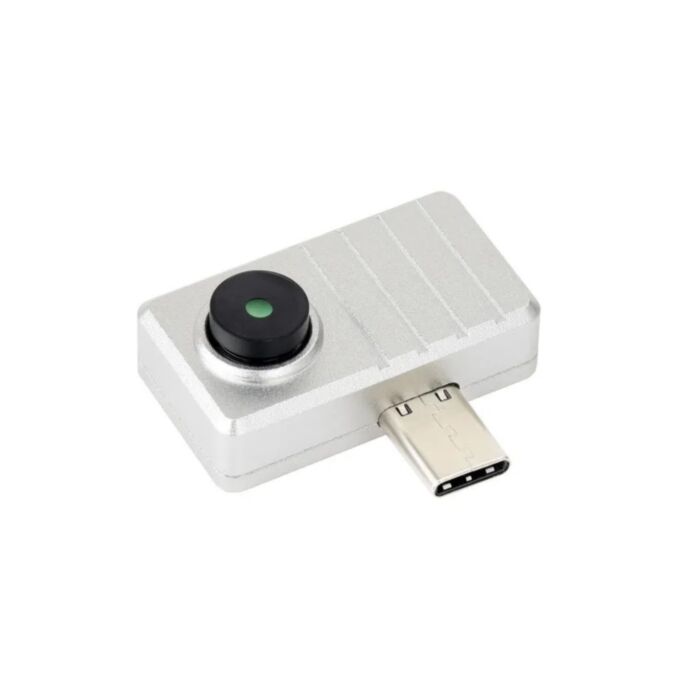
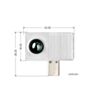
Thermal USB-C IR Imaging Camera (80×62 Pixels, 90° FOV)
See heat in real time – just plug into the USB-C port on your phone, PC or Raspberry Pi. A wide 90° view takes in a lot - PCB panels, rooms, you name it.
Available with a lead time
Expect dispatch between Nov 05 and Nov 12
Turn an Android phone, Windows PC or Raspberry Pi into a thermal imager – plug it into a USB-C port and watch the heat distribution of everything in view, streamed live at up to 25 FPS.
Tracking down an overheating regulator, an intermittent solder joint, a failing motor bearing or a draughty window frame normally means a dedicated handheld thermal camera. This wide-angle version packs a 122° (D) × 90° (H) × 67° (V) field of view, so you can capture a whole PCB, electrical panel or room from close range without stepping back.
Inside is an 80 × 62 pixel hybrid microbolometer/thermopile array with a shutterless design, so the thermal stream runs continuously without the periodic freeze of a mechanical shutter. It measures from -40 °C to 400 °C and draws just 20 mA at 5 V, all in a 22 g aluminium alloy case with a matte finish.
Getting started:
- Android: install the SenXor ProViewer app, plug the camera in and the thermal view opens automatically.
- Windows: run Waveshare's SenXorEvkViewer software, select the serial port and click Connect.
- Raspberry Pi: install the provided pysenxor Python demo and run the USB streaming example.
Features
- Captures large scenes at close range, thanks to the wide 90° horizontal field of view.
- Streams smooth, continuous thermal video at up to 25 FPS with no shutter interruptions.
- Picks out temperature differences as small as 125 mK (NETD), revealing subtle hot and cold spots.
- Measures surfaces from -40 °C to 400 °C, covering everything from freezer checks to hot soldering work.
- Plugs straight into USB-C devices with no external power, drawing only 20 mA at 5 V.
- Offers multiple colour palettes, snapshots and video recording in the Android app.
- Logs per-pixel temperature data to a text file in the Windows software for later analysis.
- Integrates into your own projects with Waveshare's Python demo for Raspberry Pi.
- Stands up to everyday handling in a compact, lightweight aluminium alloy case.
Specifications
| Property | Specification |
|---|---|
| Sensor | Hybrid microbolometer/thermopile array |
| Resolution | 80 × 62 pixels |
| Field of view | 122° (D) × 90° (H) × 67° (V) |
| Refresh rate | Up to 25 FPS |
| Spectral range | 8–14 µm |
| NETD | 125 mK RMS @ 1 Hz |
| Target temperature range | -40 °C to 400 °C |
| Accuracy | ±1.5 °C (targets 10–70 °C); ±2 °C or 5% outside this range |
| Interface | USB Type-C |
| Operating voltage | 5 V |
| Operating current | 20 mA @ 5 V |
| Operating temperature | -40 °C to 85 °C |
| Dimensions | 32.0 × 18.5 mm |
| Weight | 22 g |
Resources
Exact shipping can be calculated on the view cart page (no login required).
Products that weigh more than 0.5 KG may cost more than what's shown (for example, test equipment, machines, >500mL liquids, etc).
We deliver Australia-wide with these options (depends on the final destination - you can get a quote on the view cart page):
- $3+ for Stamped Mail (typically 10+ business days, not tracked, only available on selected small items)
- $7+ for Standard Post (typically 6+ business days, tracked)
- $11+ for Express Post (typically 2+ business days, tracked)
- Pickup - Free! Only available to customers who live in the Newcastle region (must order online and only pickup after we email to notify you the order is ready). Orders placed after 2PM may not be ready until the following business day.
Non-metro addresses in WA, NT, SA & TAS can take 2+ days in addition to the above information.
Some batteries (such as LiPo) can't be shipped by Air. During checkout, Express Post and International Methods will not be an option if you have that type of battery in your shopping cart.
International Orders - the following rates are for New Zealand and will vary for other countries:
- $12+ for Pack and Track (3+ days, tracked)
- $16+ for Express International (2-5 days, tracked)
If you order lots of gear, the postage amount will increase based on the weight of your order.
Our physical address (here's a PDF which includes other key business details):
40 Aruma Place
Cardiff
NSW, 2285
Australia
Take a look at our customer service page if you have other questions such as "do we do purchase orders" (yes!) or "are prices GST inclusive" (yes they are!). We're here to help - get in touch with us to talk shop.
Have a product question? We're here to help!
 ESP32-S3 7inch 1024x600 Capacitive Touch Display Dev Board (Type B)SKU: WS-31726 Brand: Waveshare
Build a touch-driven control panel or smart-home dashboard with a big, sharp ...
- ESP32-S3 LR1121 LoRa Development Board with 1.54inch OLED (HF, With Battery)SKU: WS-35899 Brand: Waveshare
Build your own LoRa walkie-talkie: push-to-talk, an OLED status screen and a ...
- ESP32-C5 3.5inch Touch LCD Development BoardSKU: WS-35416 Brand: Waveshare
A 3.5-inch capacitive touchscreen, dual-band Wi-Fi and onboard audio on a sin ...
- Seeed Studio XIAOML Kit - tinyML Kit for Vision, Sound and MotionSKU: SSE2025080501 Brand: Seeed Studio
Train and run machine learning models on vision, sound and motion data - a co ...


Videos
View AllGuides

Getting Started with the Grove Vision AI V2 | Power Efficient Object Detection

YOLO Pose Estimation on the Raspberry Pi AI Hat+ | Writing Custom Python Code

YOLO Object Detection on the Raspberry Pi AI Hat+ | How to Write Custom Python Code

Getting Started with YOLO Pose Estimation Recognition on the Raspberry Pi
Projects

Backyard Birdcam
ESP32 IR-Triggered Camera with Home Assistant Integration

Rain Gauge Data Logger
Educational Workshops
Raspberry Pi Workshop for Beginners

Makers love reviews as much as you do, please follow this link to review the products you have purchased.
Product Comments