
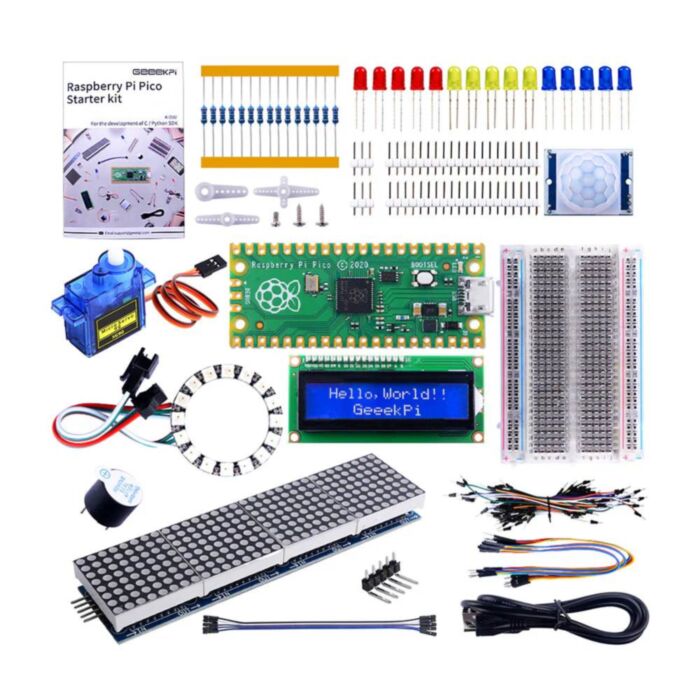
52Pi Raspberry Pi Pico Basic Starter Kit (Pico Included)
Learn to code real hardware with MicroPython: build eight hands-on projects with displays, lights, motion sensing and a servo.
In stock, ships same business day if ordered before 2PM
Delivered by Tue, 3rd of Nov
A beginner-friendly kit for getting started with microcontrollers. It brings together a Raspberry Pi Pico, a breadboard and a handful of displays, lights, sensors and actuators so you can start building real circuits straight away.
Starting out with microcontrollers often means buying parts one at a time and hoping they work together. This kit puts tested parts in one box with a printed instruction booklet and ready-to-run MicroPython demo code, so you can go from a blinking LED to a motion-triggered alert without hunting for the next component.
The projects build up step by step: drive LEDs, sweep a servo with PWM, show live readings on an I2C character LCD, scroll text across an 8x32 LED matrix, detect movement with a PIR sensor, animate a 16-LED addressable RGB ring and play tunes on a buzzer. All the code is open source on GitHub, and Fritzing wiring files are available for every circuit.
Getting started is simple:
- Solder the supplied 20-pin headers onto the Pico
- Flash MicroPython by dragging the UF2 file onto the Pico in BOOTSEL mode
- Open the demo code in Thonny, wire the circuit on the breadboard and click Run
Features
- Everything you need in one box: a Raspberry Pi Pico, half-size breadboard, jumper wires, resistors and a Micro-USB cable are included
- Learn by doing with eight guided MicroPython projects, from a blinking LED to motion detection and a CPU temperature display
- Uses only two GPIO pins for 16x2 text, thanks to the I2C backpack on the LCD1602 module
- Scroll text and graphics across an 8x32 LED dot matrix driven by a MAX7219, a common chip that's well supported in MicroPython
- Explore addressable lighting with a 16-LED WS2812 RGB ring, programmed from a single data pin using the Pico's PIO
- Add movement and sensing with a 9g 180° micro servo and a PIR motion sensor
- Room to grow: the Pico also supports C/C++, CircuitPython and the Arduino IDE once you're ready to move on
- Store and transport the kit easily in its reusable plastic case
Specifications
| Property | Specification |
|---|---|
| Microcontroller board | Raspberry Pi Pico (RP2040) |
| Processor | Dual-core Arm Cortex-M0+, up to 133 MHz |
| Memory | 264 KB SRAM, 2 MB onboard flash |
| USB connection | Micro-USB (cable included) |
| Headers | 2x 20-pin headers supplied loose (soldering required) |
| Character display | LCD1602 (16x2), I2C interface |
| LED matrix | 8x32 dot matrix, MAX7219 driver |
| Addressable LEDs | 16x WS2812 RGB LED ring |
| Sensor | PIR motion sensor |
| Actuator | 9g micro servo, 180° rotation |
| Audio | Active buzzer |
| Prototyping | Half-size solderless breadboard |
| Programming | MicroPython (demo code), C/C++ |
| Demo projects | 8 |
Resources
- 52Pi Wiki: Raspberry Pi Pico Starter Kit (K-0582)
- Demo code and libraries (GitHub)
- MicroPython firmware for Raspberry Pi Pico
- Raspberry Pi Pico documentation
- Video: CPU temperature on the LED matrix
What's Included
- 1x Raspberry Pi Pico
- 2x 20-pin headers
- 2x 3-pin headers
- 1x LCD1602 I2C display module
- 1x 8x32 LED dot matrix module (MAX7219)
- 1x 16-LED WS2812 RGB ring
- 1x PIR motion sensor
- 1x 9g micro servo pack
- 1x Active buzzer
- 15x LEDs (5x red, 5x yellow, 5x blue)
- 15x 220 Ω resistors
- 1x Jumper wire pack (M-M, M-F, F-F)
- 1x Half-size breadboard
- 1x Micro-USB cable
- 1x Instruction booklet
- 1x Plastic storage case
Exact shipping can be calculated on the view cart page (no login required).
Products that weigh more than 0.5 KG may cost more than what's shown (for example, test equipment, machines, >500mL liquids, etc).
We deliver Australia-wide with these options (depends on the final destination - you can get a quote on the view cart page):
- $3+ for Stamped Mail (typically 10+ business days, not tracked, only available on selected small items)
- $7+ for Standard Post (typically 6+ business days, tracked)
- $11+ for Express Post (typically 2+ business days, tracked)
- Pickup - Free! Only available to customers who live in the Newcastle region (must order online and only pickup after we email to notify you the order is ready). Orders placed after 2PM may not be ready until the following business day.
Non-metro addresses in WA, NT, SA & TAS can take 2+ days in addition to the above information.
Some batteries (such as LiPo) can't be shipped by Air. During checkout, Express Post and International Methods will not be an option if you have that type of battery in your shopping cart.
International Orders - the following rates are for New Zealand and will vary for other countries:
- $12+ for Pack and Track (3+ days, tracked)
- $16+ for Express International (2-5 days, tracked)
If you order lots of gear, the postage amount will increase based on the weight of your order.
Our physical address (here's a PDF which includes other key business details):
40 Aruma Place
Cardiff
NSW, 2285
Australia
Take a look at our customer service page if you have other questions such as "do we do purchase orders" (yes!) or "are prices GST inclusive" (yes they are!). We're here to help - get in touch with us to talk shop.
Have a product question? We're here to help!
 PiicoDev LiPo Expansion Board for Raspberry Pi PicoSKU: CE07693 Brand: PiicoDev
The PiicoDev® LiPo Expansion Board for Raspberry Pi Pico is a great way to s ...
- Makerverse Essentials KitSKU: CE08383 Brand: Makerverse
Essential components and hardware to begin working with Makerverse Kits
- 64x32 RGB LED Matrix Panel (4mm pitch)SKU: DFR0460 Brand: DFRobotThis is a 64x32 RGB LED Matrix Panel, it has 2048 full-color RGB LEDs in all. Ea ...
- Arduino UNO Q - 2GBSKU: ABX00162 Brand: Arduino
Combining a high-performance Linux CPU with real-time control - capable of ru ...


Videos
View AllGuides
How to add GPS to a Raspberry Pi Pico | Get Real-Time Location in Your Project!
Raspberry Pi 5 Vs Raspberry Pi 4 Model B | Comparison & Benchmarking
Raspberry Pi 5 | Review, Performance & Benchmarks
3D Printed Case For Raspberry Pi Pico and PiicoDev Boards
Projects
ESP32 IR-Triggered Camera with Home Assistant Integration

Raspberry Pi Rain Radar and Weather Display

Rain Gauge Data Logger
Educational Workshops
Raspberry Pi Workshop for Beginners

Makers love reviews as much as you do, please follow this link to review the products you have purchased.
Product Comments