
Monk Makes CO2 Sensor for micro:bit
Retired Product
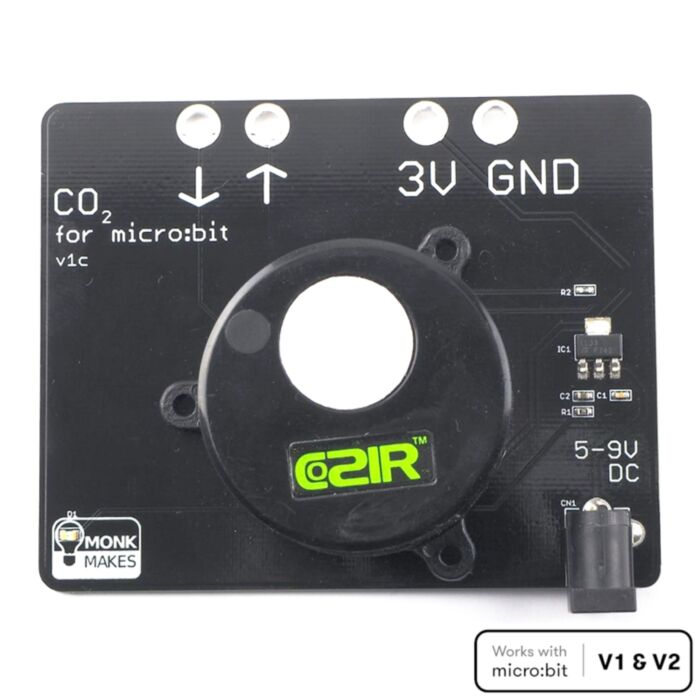
Search for an alternativeThis board, designed for use with the Lets Talk Science Living Space Project, provides a CO2, temperature and Relative Humidity measurements to a BBC micro:bit.
- Works with both the micro:bit V1 and micro:bit V21
Getting Started
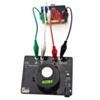
Wire-up the board to your micro:bit as shown above. Then flash the following program onto your micro:bit by clicking the image to open the blocks editor and then click on Download (bottom of the web page) and copy the hex file onto your micro:bit.

Once the program is uploaded, pressing Button A will display the CO2 level in parts per million of CO2. Pressing button B will display the temperature in degrees C and both buttons together will show the relative humidity.
If you are wondering about the big gray serial redirect block in the on start block, well this block starts serial transfer of data between the micro:bit and the CO2 sensor.
MicroPython
You can also use the board with MicroPython as the following code example shows.
Unless you are interested in the serial protocol used, you may want to copy the code below into your program and make use of the functions get_co2(), get_tempC() and get_rh().
from microbit import *
uart.init(tx=pin0, rx=pin1)
co2 = 0
tempC = 0
rh = 0
def check_incoming_messages():
global co2, tempC, rh
if uart.any():
response = str(uart.read(), 'UTF-8')
if len(response) < 8:
return
cmd_letter = response[1]
cmd_value_str = response[2:8]
value = int(cmd_value_str)
if cmd_letter == 'Z':
co2 = value
elif cmd_letter == 'T':
tempC = (value - 1000) / 10.0
elif cmd_letter == 'H':
rh = value / 10
def get_co2():
uart.write('Z\r\n')
sleep(100)
check_incoming_messages()
return co2
def get_tempC():
uart.write('T\r\n')
sleep(100)
check_incoming_messages()
return tempC
def get_rh():
uart.write('H\r\n')
sleep(100)
check_incoming_messages()
return rh
# Copy the code above into your program and then use the functions
# get_co2, get_tempC and get_rh in your own code
while True:
display.scroll(get_co2())
if button_a.was_pressed():
display.scroll('T=' + str(get_tempC()))
if button_b.was_pressed():
display.scroll('RH=' + str(get_rh()))
sleep(500)
CO2 Concentrations
So, what do these readings mean?
Fresh outdoor air should give a reading of around 400. In a smallish room with a few people in it, this will rapidly rise above 1000, as people breathe out CO2. If it gets above 2000 then your air is getting dangerously unhealthy.
Calibration
Your sensor is a sensitive scientific instrument and the readings it gives will gradually get less accurate. If you leave the sensor powered-up in a well ventilated room for 24 hours, then it will calibrate itself automatically.
You can also force calibration using the Calibrate CO2 block in the COZIR blocks category. This will set the sensor’s readings back to 400. So you should run this block only after the sensor has been in fresh air for 30 mins or so.
Altitude Compensation
If you live somewhere high up, then you need to tell the sensor about this by putting a Set Altitude block into your On Startup block and then changing its number to your altitude above sea-level in meters.
Battery Power
Once you have the code all working, you can disconnect the USB power and instead power the CO2 Sensor Board through the DC barrel jack using either a battery pack or a DC adapter. In both cases the power supply should be of between 5 and 9V.
When powered by batteries in this way, the CO2 sensor will provide power back to the micro:bit. But make sure you have the power leads connected right between the CO2 sensor board and the micro:bit or your micro:bit could be damaged.
1 There may be some rare cases where there are incompatibilities. BBC are working closely with accessory makers to ensure your accessories will continue to work in the same way.
Exact shipping can be calculated on the view cart page (no login required).
Products that weigh more than 0.5 KG may cost more than what's shown (for example, test equipment, machines, >500mL liquids, etc).
We deliver Australia-wide with these options (depends on the final destination - you can get a quote on the view cart page):
- $3+ for Stamped Mail (typically 10+ business days, not tracked, only available on selected small items)
- $7+ for Standard Post (typically 6+ business days, tracked)
- $11+ for Express Post (typically 2+ business days, tracked)
- Pickup - Free! Only available to customers who live in the Newcastle region (must order online and only pickup after we email to notify you the order is ready). Orders placed after 2PM may not be ready until the following business day.
Non-metro addresses in WA, NT, SA & TAS can take 2+ days in addition to the above information.
Some batteries (such as LiPo) can't be shipped by Air. During checkout, Express Post and International Methods will not be an option if you have that type of battery in your shopping cart.
International Orders - the following rates are for New Zealand and will vary for other countries:
- $12+ for Pack and Track (3+ days, tracked)
- $16+ for Express International (2-5 days, tracked)
If you order lots of gear, the postage amount will increase based on the weight of your order.
Our physical address (here's a PDF which includes other key business details):
40 Aruma Place
Cardiff
NSW, 2285
Australia
Take a look at our customer service page if you have other questions such as "do we do purchase orders" (yes!) or "are prices GST inclusive" (yes they are!). We're here to help - get in touch with us to talk shop.
Have a product question? We're here to help!
Guides

The Maker Revolution
Projects
The Rats Nest VCC Desktop Power Supply

Remote-Controlled Mars Rover

FlipperMate: Hands-Free Pinball

Makers love reviews as much as you do, please follow this link to review the products you have purchased.
Product Comments