


DRV8880 Stepper Motor Driver Carrier
Retired Product
Replaced by: POLOLU-3766This product is no longer available. This page is only for reference.
 |
DRV8880 stepper motor driver carrier with dimensions. |
|---|
This product is a carrier board or breakout board for TI’s DRV8880 stepper motor driver; Pololu therefore recommend careful reading of the DRV8880 datasheet before using this product. This stepper motor driver lets you control one bipolar stepper motor at up to 1.6 A output current per coil (see the Power Dissipation Considerations section below for more information). Here are some of the driver’s key features:
- Simple step and direction control interface
- Six different step resolutions: full-step, half-step, non-circular half-step, 1/4-step, 1/8-step, and 1/16-step
- Adjustable current control lets you set the maximum current output with a potentiometer, which lets you use voltages above your stepper motor’s rated voltage to achieve higher step rates
- Digital inputs for dynamically scaling the current limit to 25%, 50%, 75%, or 100% of the limit set by the potentiometer, which lets you reduce power consumption in situations where full speed or torque is not required
- Ten different decay mode options:
- AutoTune (enabled by default): automatically selects the decay mode each PWM cycle for optimal current regulation performance and to compensate for motor variation and aging effects
- Fixed decay modes: nine different combinations of mixed, fast, and slow decay on increasing and decreasing steps
- 6.5 V to 45 V supply voltage range
- Built-in regulator (no external logic voltage supply needed)
- Can interface directly with 3.3 V and 5 V systems
- Over-temperature thermal shutdown, over-current shutdown, short circuit protection, and under-voltage lockout
- 4-layer, 2 oz copper PCB for improved heat dissipation
- Exposed solderable ground pad below the driver IC on the bottom of the PCB
- Module size, pinout, and interface match those of Pololu's A4988 stepper motor driver carriers in most respects (see the bottom of this page for more information)
This product ships with all surface-mount components—including the DRV8880 driver IC—installed as shown in the product picture.
For alternative, pin-compatible stepper motor drivers, consider Pololu's DRV8825 carrier, DRV8834 carrier, or MP6500 carrier. The DRV8825 and MP6500 can deliver more current, and the DRV8834 operates down to 2.5 V, making it suitable for low-voltage applications.
Some unipolar stepper motors (e.g. those with six or eight leads) can be controlled by this driver as bipolar stepper motors. For more information, please see the frequently asked questions. Unipolar motors with five leads cannot be used with this driver.
Included hardware
The DRV8880 stepper motor driver carrier ships with one 1×18-pin breakaway 0.1" male header strip (for a version of this carrier with header pins already installed, see item #2875). The headers can be soldered in for use with solderless breadboards or 0.1" female connectors. You can also solder your motor leads and other connections directly to the board.
|
|


Using the driver
 |
Minimal wiring diagram for connecting a microcontroller to a DRV8880 stepper motor driver carrier (1/8-step mode). |
|---|
Power connections
The driver requires a motor supply voltage of 6.5 V to 45 V to be connected across VMOT and GND. This supply should have appropriate decoupling capacitors close to the board, and it should be capable of delivering the expected stepper motor current.
A 3.3 V output from the DRV8880’s internal regulator is made available on the V3P3 pin. This output can supply up to 10mA to external loads. When the driver is in sleep mode the 3.3 V output is disabled, so it cannot be used to pull up the sleep pin.
Warning: This carrier board uses low-ESR ceramic capacitors, which makes it susceptible to destructive LC voltage spikes, especially when using power leads longer than a few inches. Under the right conditions, these spikes can exceed the 50 V maximum voltage rating for the DRV8880 and permanently damage the board, even when the motor supply voltage is as low as 12 V. One way to protect the driver from such spikes is to put a large (at least 47 µF) electrolytic capacitor across motor power (VMOT) and ground somewhere close to the board.
Motor connections
Four, six, and eight-wire stepper motors can be driven by the DRV8880 if they are properly connected; a FAQ answer explains the proper wirings in detail.
Warning: Connecting or disconnecting a stepper motor while the driver is powered can destroy the driver. (More generally, rewiring anything while it is powered is asking for trouble.)
Step (and microstep) size
Stepper motors typically have a step size specification (e.g. 1.8° or 200 steps per revolution), which applies to full steps. A microstepping driver such as the DRV8880 allows higher resolutions by allowing intermediate step locations, which are achieved by energizing the coils with intermediate current levels. For instance, driving a motor in quarter-step mode will give the 200-step-per-revolution motor 800 microsteps per revolution by using four different current levels.
The resolution (step size) selector inputs (M0 and M1) enable selection from the six step resolutions according to the table below. M0 is floating by default, while M1 has an on-board 10 kO pull-down resistor, so leaving these two microstep selection pins disconnected results in 1/8-step mode. For the microstep modes to function correctly, the current limit must be set low enough (see below) so that current limiting gets engaged. Otherwise, the intermediate current levels will not be correctly maintained, and the motor will skip microsteps.
| M0 | M1 | Microstep Resolution |
|---|---|---|
| Low | Low | Full step |
| High | Low | Non-circular half step |
| Low | High | Half step |
| High | High | 1/4 step |
| Floating | Low | 1/8 step |
| Floating | High | 1/16 step |
Control inputs
Each pulse to the STEP input corresponds to one microstep of the stepper motor in the direction selected by the DIR pin. These inputs are both pulled low by default through internal 100 kO pull-down resistors. If you just want rotation in a single direction, you can leave DIR disconnected.
The chip has two different inputs for controlling its power states: SLEEP and ENABLE. For details about these power states, see the datasheet. Please note that the driver pulls the SLEEP pin low through an internal 100 kO pull-down resistor, and the carrier board pulls the ENABLE pin high through an on-board 10 kO pull-up resistor. The default SLEEP state prevents the driver from operating; this pin must be high to enable the driver (it can be connected directly to a logic “high” voltage between 1.8 and 5.3 V, or it can be dynamically controlled by connecting it to a digital output of an MCU). The default state of the ENABLE pin is to enable the driver, so this pin can be left disconnected.
 |
Schematic of nSLEEP and nFAULT pins on DRV8880 carrier. |
|---|
The DRV8880 also features a FAULT output that drives low whenever the H-bridge FETs are disabled as the result of over-current protection or thermal shutdown, or while the undervoltage lockout is disabling the chip. The carrier board connects this pin to the SLEEP pin through a 10k resistor that acts as a FAULT pull-up whenever SLEEP is externally held high, so no external pull-up is necessary on the FAULT pin. Note that the carrier includes a 1.5k protection resistor in series with the FAULT pin that makes it is safe to connect this pin directly to a logic voltage supply, as might happen if you use this board in a system designed for the pin-compatible A4988 carrier. In such a system, the 10k resistor between SLEEP and FAULT would then act as a pull-up for SLEEP, making the DRV8880 carrier more of a direct replacement for the A4988 in such systems (the A4988 has an internal pull-up on its SLEEP pin).
To keep faults from pulling down the SLEEP pin, any external pull-up resistor you add to the SLEEP pin input should not exceed 4.7k.
The current limit on the DRV8880 can be dynamically reduced using the current scaler pins (TRQ0 and TRQ1) as shown in the table below. These pins are controlled with digital high and low signals and can be used to scale the output current of the driver to 25%, 50%, 75%, or 100% of the current limit set by the VREF voltage. By default, the current scaler on the DRV8880 carrier is set to 100%. (Systems meant for the A4988 that connect the A4988’s SLEEP pin to RST will have a default scaler of 75%.)
| TRQ0 | TRQ1 | Current scaler |
|---|---|---|
| High | High | 25% |
| Low | High | 50% |
| High | Low | 75% |
| Low | Low | 100% |
The DRV8880 also allows the driver’s fixed off time to be configured using the TOFF pin. This is a tri-state pin that is floating by default, which results in a 10 µs default fixed off time. Bringing this pin low will change the fixed off time to 20 µs, and bringing it high will change the fixed off time to 30 µs. More details about the driver’s fixed off time can be found in the Current Regulation section of the DRV8880 datasheet.
Optional pin jumpers
By default, the DRV8880 carrier is configured to enable autotune. In this configuration, the decay mode is automatically selected each PWM cycle (slow, fast, or mixed decay), based on factors like the motor winding resistance and inductance and the motor’s dynamic speed and load. If a different decay mode is desired, the trace from the autotune pin (ATE) to V3P3 on the bottom of the board can be cut and the ATE pin on the corresponding surface-mount jumper (the one closer to the edge of the board) can be used to control the autotune state. Beside the jumper for ATE, there are also surface mount jumpers for the decay mode selection pins (D0 and D1). These pins are connected to ground by default, but if a decay mode that requires one or both pins to be floating or high is desired, the existing ground connections can be cut and a solder bridge can be used to connect the decay pins to the V3P3 pads above them. For more information on the different decay modes of the DRV8880, see its datasheet.
 |
Current limiting
To achieve high step rates, the motor supply is typically higher than would be permissible without active current limiting. For instance, a typical stepper motor might have a maximum current rating of 1 A with a 5 O coil resistance, which would indicate a maximum motor supply of 5 V. Using such a motor with 9 V would allow higher step rates, but the current must actively be limited to under 1 A to prevent damage to the motor.
The DRV8880 supports such active current limiting, and the trimmer potentiometer on the board can be used to set the current limit. You will typically want to set the driver’s current limit to be at or below the current rating of your stepper motor. One way to set the current limit is to put the driver into full-step mode and to measure the current running through a single motor coil without clocking the STEP input. The measured current will be 0.7 times the current limit (since both coils are always on and limited to approximately 70% of the current limit setting in full-step mode).
Another way to set the current limit is to measure the voltage on the “ref” pin and to calculate the resulting current limit (the current sense resistors are 0.200 O). The ref pin voltage is accessible on a via that is circled on the bottom silkscreen of the circuit board. The current limit in Amps relates to the reference voltage in Volts as follows:
or, rearranged to solve for VREF:
Where TRQ is the current scaling percent set by the TRQ0 and TRQ1 pins. So, for example, if you have a stepper motor rated for 1 A, you can set the current limit to 1 A by setting the reference voltage to about 1.32 V and leaving the current scaling pins (which are internally pulled down) disconnected.
Note: The coil current can be very different from the power supply current, so you should not use the current measured at the power supply to set the current limit. The appropriate place to put your current meter is in series with one of your stepper motor coils.
Power dissipation considerations
The DRV8880 driver IC has a maximum current rating of 2 A per coil, but the current sense resistors further limit the maximum current to 1.6 A, and the actual current you can deliver depends on how well you can keep the IC cool. The carrier’s printed circuit board is designed to draw heat out of the IC, but to supply more than approximately 1 A per coil, a heat sink or other cooling method is required.
This product can get hot enough to burn you long before the chip overheats. Take care when handling this product and other components connected to it.
Please note that measuring the current draw at the power supply will generally not provide an accurate measure of the coil current. Since the input voltage to the driver can be significantly higher than the coil voltage, the measured current on the power supply can be quite a bit lower than the coil current (the driver and coil basically act like a switching step-down power supply). Also, if the supply voltage is very high compared to what the motor needs to achieve the set current, the duty cycle will be very low, which also leads to significant differences between average and RMS currents. Additionally, please note that the coil current is a function of the set current limit, but it does not necessarily equal the current limit setting. The actual current through each coil changes with each microstep. See the DRV8880 datasheet for more information.
Schematic diagram
 |
Schematic diagram of the DRV8880 Stepper Motor Driver Carrier. |
|---|
This schematic is also available as a downloadable pdf (121k pdf).
Key differences between the DRV8880 and A4988
The DRV8880 carrier was designed to be as similar to Pololu's A4988 stepper motor driver carriers as possible, and it can be used as a drop-in replacement for the A4988 carrier in many applications because it shares the same size, pinout, and general control interface. There are a few differences between the two modules that should be noted, however:
 |
DRV8880 stepper motor driver carrier. |
|---|
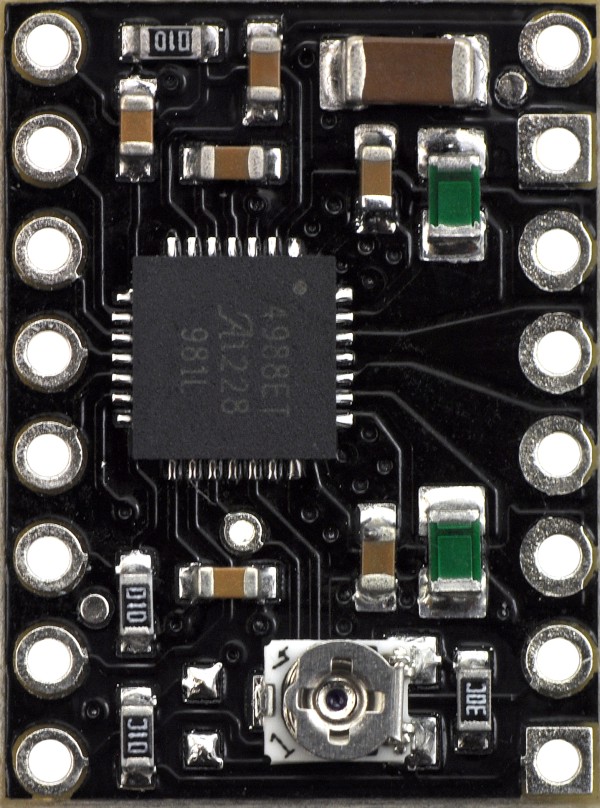 |
A4988 stepper motor driver carrier, Black Edition (shown with original green 50 mO current sense resistors). |
|---|
- The pin used to supply logic voltage to the A4988 is used as the DRV8880’s FAULT output, since the DRV8880 does not require a logic supply (and the A4988 does not have a fault output). Note that it is safe to connect the FAULT pin directly to a logic supply (there is a 1.5k resistor between the IC output and the pin to protect it), so the DRV8880 module can be used in systems designed for the A4988 that route logic power to this pin.
- The SLEEP pin on the DRV8880 is not pulled up by default like it is on the A4988, but the carrier board does connect it to the FAULT pin through a 10k resistor. Therefore, systems intended for the A4988 that route logic power to the FAULT pin will effectively have a 10k pull-up on the SLEEP pin.
- The current limit potentiometer is in a different location.
- The relationship between the current limit setting and the reference pin voltage is different.
- The DRV8880 offers a non-circular half-step mode that the A4988 does not.
- The DRV8880 only has two pins for setting its microstep mode; the A4988 has three. The step selection table differs between the DRV8880 and A4988 for all microstepping resolutions other than full-step mode. On the DRV8880, the M0 pin must be left in a floating (high-impedance) state to select some of the microstepping modes. The default microstepping mode on the DRV8880 carrier is 1/8-step while the default microstepping mode on the A4988 carrier is full-step.
- The DRV8880 has no RESET input.
- The ENABLE pin on the DRV8880 enables the driver when high and is pulled up on the carrier. On the A4988 the ENABLE pin enables the driver when low and is pulled down by the carrier.
- The DRV8880 has an autotune feature that the A4988 does not. This feature automatically selects the best decay mode for a system. In addition, in case autotune is not desired, the control pins for setting the decay mode on the DRV8880 carrier are more accessible than on the A4988.
- The pins on the DRV8880 carrier corresponding to the A4988 carrier’s MS3 and RESET pins are connected to the DRV8880’s current scaler pins, so systems that connect those pins high by default will set actually use a current limit lower than 100% of the limit set with the VREF voltage.
- The DRV8880 carrier has a TOFF pin that is used to adjust the driver’s fixed off time that is not on the A4988.
- The timing requirements for minimum pulse durations on the STEP pin are different for the two drivers. The DRV8880 only requires the high and low STEP pulses to be at least 0.47 µs, where they must be at least 1 µs when using the A4988.
- The DRV8880 has a lower minimum supply voltage than the A4988 (6.5 V vs 8.2 V) and a higher maximum supply voltage (45 V vs 35 V), which means the DRV8880 can be used in a wider range of systems, is safer for using higher voltages, and is less susceptible to damage from LC voltage spikes.
- The DRV8880 uses a different naming convention for the stepper motor outputs, but they are functionally the same as the corresponding pins on the A4988 carrier, so the same connections to both drivers result in the same stepper motor behavior. On both boards, the first part of the label identifies the coil (so you have coils “A” and “B” on the DRV8880 and coils “1” and “2” on the A4988).
- For those with color-sensitive applications, note that the DRV8880 carrier is blue.
In summary, the DRV8880 carrier is similar enough to Pololu's A4988 carriers that the minimum connection diagram for the A4988 is a valid alternate way to connect the DRV8880 to a microcontroller as well:
 |
Alternative minimal wiring diagram for connecting a microcontroller to a DRV8880 stepper motor driver carrier (1/8-step mode). |
|---|
People often buy this product together with:
 | AMIS-30543 Stepper Motor Driver Carrier |
 | DRV8825 Stepper Motor Driver Carrier, High Current |
 | DRV8834 Low-Voltage Stepper Motor Driver Carrier |
Dimensions
| Size: | 0.6" × 0.8" |
|---|---|
| Weight: | 1.3 g1 |
General specifications
| Minimum operating voltage: | 6.5 V |
|---|---|
| Maximum operating voltage: | 45 V |
| Continuous current per phase: | 1 A2 |
| Maximum current per phase: | 1.6 A3 |
| Minimum logic voltage: | 1.8 V4 |
| Maximum logic voltage: | 5.3 V4 |
| Microstep resolutions: | full, non-circular 1/2, 1/2, 1/4, 1/8, and 1/16 |
| Reverse voltage protection?: | N |
| Header pins soldered?: | N |
Identifying markings
| PCB dev codes: | md32a |
|---|---|
| Other PCB markings: | 0J9581 |
Notes:
- 1
- Without included optional headers.
- 2
- Without a heat sink or forced air flow.
- 3
- With sufficient additional cooling.
- 4
- This driver works with 1.8 V to 5.3 V logic. It does not take an external logic power supply.
File downloads
-
DRV8880 Stepper Motor Driver Carrier schematic diagram (121k pdf)
Printable schematic diagram of the DRV8880 Stepper Motor Driver Carrier.
-
Dimension diagram of the DRV8880 Stepper Motor Driver Carrier (436k pdf)
-
3D model of the DRV8880 Stepper Motor Driver Carrier (4MB step)
-
Drill guide for the DRV8880 Stepper Motor Driver Carrier (42k dxf)
This DXF drawing shows the locations of all of the board’s holes.
Recommended links
-
Video: setting the current limit on Pololu stepper motor driver carriers
-
Arduino library for A4988, DRV8825, DRV8834, DRV8880
This Arduino library, written by forum member laurb9, allows users to control a stepper motor with Pololu's A4988, DRV8825, or DRV8834 carriers. The library has functions that enable users to set rotational rate, change microstepping mode, and specify how many steps to take or specify how many degrees to rotate.
Exact shipping can be calculated on the view cart page (no login required).
Products that weigh more than 0.5 KG may cost more than what's shown (for example, test equipment, machines, >500mL liquids, etc).
We deliver Australia-wide with these options (depends on the final destination - you can get a quote on the view cart page):
- $3+ for Stamped Mail (typically 10+ business days, not tracked, only available on selected small items)
- $7+ for Standard Post (typically 6+ business days, tracked)
- $11+ for Express Post (typically 2+ business days, tracked)
- Pickup - Free! Only available to customers who live in the Newcastle region (must order online and only pickup after we email to notify you the order is ready). Orders placed after 2PM may not be ready until the following business day.
Non-metro addresses in WA, NT, SA & TAS can take 2+ days in addition to the above information.
Some batteries (such as LiPo) can't be shipped by Air. During checkout, Express Post and International Methods will not be an option if you have that type of battery in your shopping cart.
International Orders - the following rates are for New Zealand and will vary for other countries:
- $12+ for Pack and Track (3+ days, tracked)
- $16+ for Express International (2-5 days, tracked)
If you order lots of gear, the postage amount will increase based on the weight of your order.
Our physical address (here's a PDF which includes other key business details):
40 Aruma Place
Cardiff
NSW, 2285
Australia
Take a look at our customer service page if you have other questions such as "do we do purchase orders" (yes!) or "are prices GST inclusive" (yes they are!). We're here to help - get in touch with us to talk shop.
Have a product question? We're here to help!
Guides

The Maker Revolution
Projects
The Rats Nest VCC Desktop Power Supply

Remote-Controlled Mars Rover

FlipperMate: Hands-Free Pinball

Makers love reviews as much as you do, please follow this link to review the products you have purchased.
Product Comments