
Enviro Weather (Pico W Aboard) - Weather Station Kit
Retired Product
Replaced by: CE08703This product is no longer available. This page is only for reference.
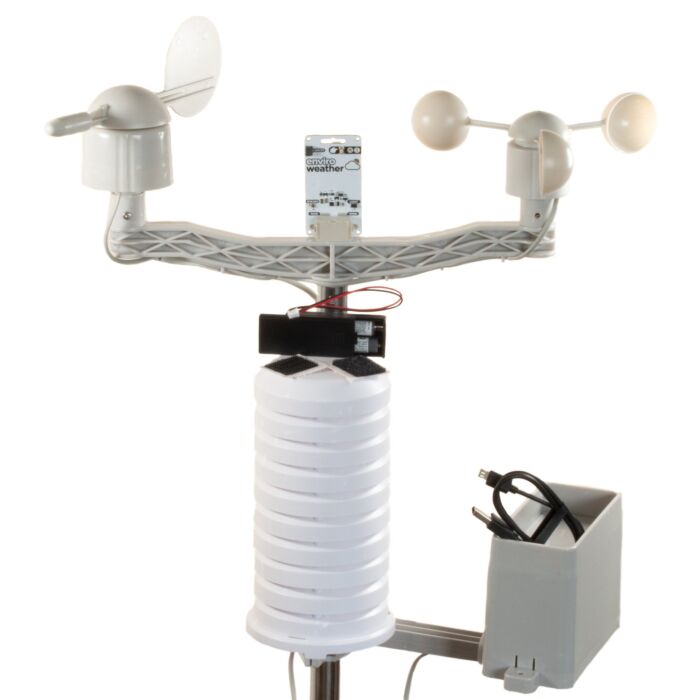
A wireless climate and environmental monitoring system designed to make hooking up weather sensors a breeze (or a squall, or a gale). Includes wind and rain sensors and weatherproof enclosure!
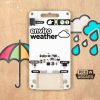
Enviro Weather is a super slimline all in one board for keeping a (weather) eye on the great outdoors. The onboard sensors can measure temperature, humidity, pressure and light. The sturdy RJ11 connectors (remember those?) will let you easily attach wind and rain sensors. Pimoroni has designed this one to be installed outside in a suitable weatherproof enclosure (like a Stevenson screen) and connected to wirelessly - logging the data locally or piping it into databases, home automation dashboards or online citizen science projects.
This kit contains everything you need to build your own Enviro Weather powered weather station. The sensors come in a massive box, so we can only ship this kit by courier, sorry. We also sell Enviro Weather boards on their own!
Enviro x Pico W AboardOur new Enviro (Pico W Aboard) range is designed with environmental monitoring / logging in mind. We wanted to make a range of Pico/RP2040-powered, all-in-one sensor boards that are compact, easy to install in places and straightforward to program. The wireless capability of Raspberry Pi Pico W lets Enviro integrate with other systems - so you could post your data into databases, home automation systems, or online citizen science efforts - the Internet's your lobster!
Because the least fun thing about adding lots of sensors to your environment is figuring out how supply power to everything without tons of trailing wires, they are all designed to work well off battery power. Each Enviro board has an onboard RTC (Real Time Clock), so that they can periodically wake up from deep sleep, take a reading (and, optionally, connect to wifi) and then go back to sleep - giving you months of untethered battery life.
Pimoroni has also put together some handy accessory kits to go with our Enviro boards, that include an appropriately sized AA or AAA battery pack, a USB cable and other essentials for each board, so you can get going super quick.
Enviro Features- Raspberry Pi Pico W Aboard
- Dual Arm Cortex M0+ running at up to 133Mhz with 264kB of SRAM
- 2MB of QSPI flash supporting XiP
- Powered and programmable by USB micro-B
- 2.4GHz wireless
- Deep sleep/wake function using RTC
- 1 x POKE (user) button
- Reset button (because Pimoroni are not monsters)
- Battery connector (JST-PH connector, 5.5V max voltage)
- User/activity LED (dimmable via PWM, can only be lit when board is awake)
- Warn LED (attached to RTC)
- Qw/ST connector for attaching breakouts
- Fully assembled
- No soldering required.
- Enviro firmware
- BME280 temperature, pressure, humidity sensor (datasheet)
- LTR-559 light and proximity sensor (datasheet)
- RJ11 connectors for connecting wind and rain sensors
- Enviro Weather
- Wind and rain sensors
- Weatherproof cover/Stevenson screen (will require slight modding*)
- 2 x AAA battery pack
- 2 x AAA batteries
- USB micro-B cable
- Velcro for attaching the battery pack
Enviro ships with some super slick provisioning software that makes it really easy to set it up and connect to things, even if it's your first foray into environmental logging/IoT. Power it up and connect to the network called 'Enviro Weather Setup' with your phone, tablet or other wi-fi enabled device - your Pico W will walk you through the rest!
Connecting BreakoutsThe Qw/ST connectors on Enviro boards make it super easy to connect up I2C Qwiic or STEMMA QT breakouts. If your breakout has a QW/ST connector on board, you can plug it straight in with a JST-SH to JST-SH cable.
Breakout Garden breakouts that don't have a Qw/ST connector can be connected using a JST-SH to JST-SH cable plus a Qw/ST to Breakout Garden adaptor. Want to use multiple breakouts at the same time? Try this adaptor!
- List of breakouts currently compatible with our C++/MicroPython build.
- Measurements: 69 x 36 x 14 mm (L x W x H, approx)
- Enviro boards can enter a deep sleep mode where the Pico W, on board sensors and sensors connected via Qw/ST are completely powered down. The only thing left running on the board is the RTC which can wake up the board again at a set date and time or on a timer. You can also wake up the board via the POKE button, or by connecting the USB cable (the board will never sleep if connected to USB power). Power consumption when asleep is 20uA.
- The RTC can also be used to keep track of the time and date (which means we don't need to waste power by making a wireless call to find out the time/date each time we log a sensor reading!)
- The Warn LED is connected to the RTC, so it can be lit even during deep sleep to notify you of problems. It is limited to three states - on, off, or 1hz blink (it's not possible to control the brightness).
- Most Enviro boards can be powered by a 2 x AAA battery pack, which fits neatly behind the board. Any battery pack that can supply between 2V and 5.5V will work though - 2 or 3 alkaline AA or AAA cells, 4 rechargeable NiMH cells or a single cell LiPo. If you're using a LiPo, bear in mind there's no battery charging included on Enviro boards, so you'll need a separate LiPo battery charger (like a LiPo Amigo) to be able to charge it.
- * Please note that you'll need to mod the base of the Stevenson tube somehow to be able to fit the RJ11 jacks from the sensors through. We snipped a hole out of one of the grills using side cutters!
Our new Pico W Aboard products come with a built in Raspberry Pi Pico W. This means you get all the advantages of a RP2040 microcontroller - a speedy fast dual-core ARM processor, a dynamic, growing ecosystem and a choice of different programming methods to experiment with. Most excitingly though, Pico W has wireless connectivity, so your Pico/RP2040 devices can communicate with each other, and the internet! ??
Wireless is very new to Pico/RP2040 - be aware that things will move fast and change! Software support (wireless examples, tutorials, CircuitPython support etc) will take a little while to catch up. If you're an absolute beginner to Pico/RP2040, you might have a better experience with wireless if you wait until everything is a little more settled.
Exact shipping can be calculated on the view cart page (no login required).
Products that weigh more than 0.5 KG may cost more than what's shown (for example, test equipment, machines, >500mL liquids, etc).
We deliver Australia-wide with these options (depends on the final destination - you can get a quote on the view cart page):
- $3+ for Stamped Mail (typically 10+ business days, not tracked, only available on selected small items)
- $7+ for Standard Post (typically 6+ business days, tracked)
- $11+ for Express Post (typically 2+ business days, tracked)
- Pickup - Free! Only available to customers who live in the Newcastle region (must order online and only pickup after we email to notify you the order is ready). Orders placed after 2PM may not be ready until the following business day.
Non-metro addresses in WA, NT, SA & TAS can take 2+ days in addition to the above information.
Some batteries (such as LiPo) can't be shipped by Air. During checkout, Express Post and International Methods will not be an option if you have that type of battery in your shopping cart.
International Orders - the following rates are for New Zealand and will vary for other countries:
- $12+ for Pack and Track (3+ days, tracked)
- $16+ for Express International (2-5 days, tracked)
If you order lots of gear, the postage amount will increase based on the weight of your order.
Our physical address (here's a PDF which includes other key business details):
40 Aruma Place
Cardiff
NSW, 2285
Australia
Take a look at our customer service page if you have other questions such as "do we do purchase orders" (yes!) or "are prices GST inclusive" (yes they are!). We're here to help - get in touch with us to talk shop.
Have a product question? We're here to help!
Guides

The Maker Revolution
Projects

FlipperMate: Hands-Free Pinball

Raspberry Pi Cyberdeck (SDR Edition)
Pico-Dog Motion Activated Audio Alarm

Makers love reviews as much as you do, please follow this link to review the products you have purchased.
Product Comments