
 Monitoring what’s happening inside your microcontroller is an invaluable tool for prototyping and debugging. One of the best ways to do this is to send/receive data over a serial port. Most microcontrollers have a serial port that can output UART data over the TX/RX lines, and if you’re used to using Arduino, you’ll take the built in Serial Monitor for granted. But what if you’re using a Particle device such as the Photon or Electron, or a Raspberry Pi without a display, or any other board with a Serial port? Well, fortunately, there are plenty of serial terminal programs available to use, but one of the most popular is Tera Term. It’s simple, open source, and free! It’s what we recommend if you’re a Windows user.
To connect your device to a computer you'll need a Serial-USB converter. Fortunately, most boards have a USB port on them for programming and communication which allows you to monitor the Serial port directly over USB, but if you don't have a USB port on your board, you can follow the instructions on our 'USB-Serial Converters' tutorial on how to connect it up.
Click here to download Tera Term, and once you’ve got it open, we can begin.
Choose Serial Port
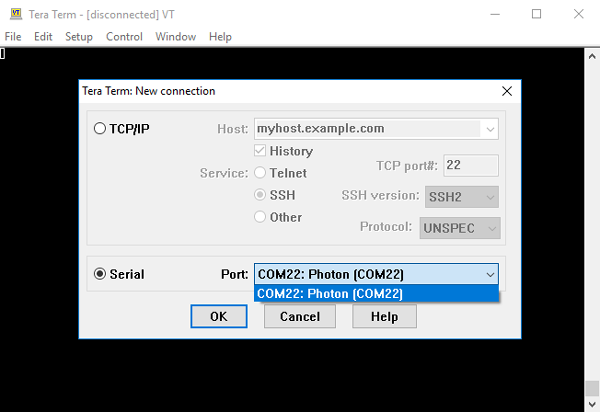
The first thing you’ll want to do is create a new connection to a device. The new connection screen may pop up when you first open it, otherwise select ‘New Connection’ (Alt + N) from the ‘File’ menu.
Choose the ‘Serial’ option and then select the appropriate board from the drop-down menu. Note that a serial port connection can only occur between 2 devices so if a device already has its serial port in use, it will not appear as a device until you disconnect it from the connection.
Configuring Settings
Now that you’re device is connected, we’re good to go. For most maker platform board such as Arduino or Particle, the default settings for Tera Term will already suit the connection settings native to Arduino/Particle. However, if you use a baud rate other than the default 9600, or want to change other settings, go to Setup > Terminal to view the terminal port settings for that connection and adjust as needed.
Tips and Tricks
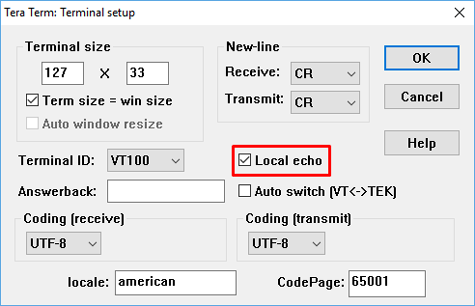
As you can see, Tera Term is extremely easy to use for serial monitoring, however by default, unless your program prints the entered values back to the terminal, you won’t be able to see the characters entered. To change this, go back to the Terminal setup menu and select ‘Echo Local’.
Another handy trick is the ‘Clear Screen’ and ‘Clear Buffer’ options. They can be found in the ‘File’ menu and allow you to either clear the screen of previous communications or clear the serial buffer.
And that’s all there is to it folks, Tera Term is an incredibly simple program to use and provides a serial terminal connection which offers more flexibility than the default Arduino Serial Monitor, and supports any device with a Serial port.

