
In this guide, we’ll be taking a look at Walter, a pretty impressive ESP32‑based board that gives your projects full internet access anywhere there’s mobile coverage - no Wi‑Fi required. With a built‑in 4G LTE‑M / NB‑IoT modem and GPS, it’s designed for those who want to build connected projects that can work out in the field or on the move.
We’ll go through getting it set up with MicroPython, connecting to the network, grabbing GPS data, and sending information up to the cloud. By the end, you’ll have everything you need to start building your own cellular‑connected IoT devices with Walter.
Let's get into it!
What is Walter?
Walter is a compact, high‑quality ESP32‑S3 development board built for modern cellular IoT projects. At its heart is an ESP32‑S3 microcontroller with 2 MB of PSRAM and 16 MB of flash memory, which should be plenty enough for most projects. This chip also provides Bluetooth 5 LE and Wi‑Fi up to 150 Mbit/s - that alone makes it a capable little board, but Walter goes a lot further than your standard ESP32.
On the opposite side of the board sits a Sequans Monarch 2 modem, which gives Walter full 4G LTE‑M and NB‑IoT connectivity. These are low‑power, low‑bandwidth cellular technologies designed exactly for IoT devices and are the kinds of technologies for a board that might be out in the field running on battery power for weeks or months. On Walter's site, we saw "4G/5G" being advertised a lot, but this modem is only 4G? While Walter's connectivities are defined in 4G standards, LTE‑M and NB‑IoT are also supported across most 5G infrastructure, meaning Walter can get online pretty much anywhere you have mobile coverage, regardless if it's 5G or 4G. It is also quite a while away, but when 4G networks are switched off, it also means there is a good chance these will still work, which is a nice-to-have.
The Sequans chip also includes a GNSS receiver that supports GPS and Galileo satellite navigation systems. When we think of GNSS, we often think of GPS - the global array of satellites around the earth that help us find our location. But GPS is actually the American network of satellites,` and there are actually other networks you can use as well, such as GLONASS (Russian), BeiDou (Chinese) and Galileo (European). All of these satellite systems can locate anywhere on earth, not just the region they are from, and with this chip being able to use GPS and Galileo systems, it just means that you have plenty of redundancy, and can use more satellites for better locating (also, Galileo is also a bit more accurate).

Walter’s hardware is also rounded out by strong practical details: it’s designed and manufactured in the EU, fully open‑source, and comes with certifications for most major regions. That makes it a solid choice if you’re building something that might one day move beyond a maker project into a commercial or low‑volume production environment.
On top of that, Walter has great libraries and documentation ready to go. We will look at it as we go, but it has libraries available in C++ and MicroPython, which expose nearly every single thing that the Sequans modem is capable of. There is also nice documentation for the board itself and the libraries, which is a nice change of pace.
What You Will Need
To follow along, you will need:
- A Walter Board.
- LTE and GPS Antennas. You will need antennas to use these functions. Avoid powering Walter on without its antennas connected. Running the LTE modem or GPS receiver without a proper load can permanently damage the board.
- A Nano SIM Card. You will need a SIM card with an active data plan in your region. Walter is not region locked, so you could whack in a global SIM card. For testing purposes, the SIM card from your phone will likely work, but if you are deploying it into the field, a proper IOT SIM plan will work out to be far cheaper.
- USB‑C Cable.
- Optional: Walter Feels Board. This is a carrier board for Walter that breaks out a lot of industry standards like CAN bus, and comes with a few sensors. Probably overkill for most maker projects, but worth considering if you are chasing a more industrial or commercial use for Walter.
Setting up Walter
Start by connecting the two antennas. The LTE antenna connects to the port labelled 5G, and the GNNS to the one with the satellite symbol. These connectors are small and can be delicate, so take care to ensure you firmly press them down nice and square - don't twist or push them on sideways.
WARNING: Do not attempt to use LTE or GNNS without a proper antenna attached. Doing so can damage your Modem and potentially destroy it. The first time you power on your Walter, it will try and use these functions,so ensure you have them connected.
Insert a nano SIM card into the slot on the edge of the board. For testing, you can use a regular phone SIM.
If you’re planning to leave Walter out in the field, it’s worth looking into dedicated IoT SIM plans. Many carriers now offer machine‑to‑machine or multi‑device data options where you can add a few megabytes per month SIMs for a few dollars. Data use for most IoT apps is tiny, so you can often share one main plan between multiple devices. Global IoT SIM providers also work well if you need something that connects internationally.

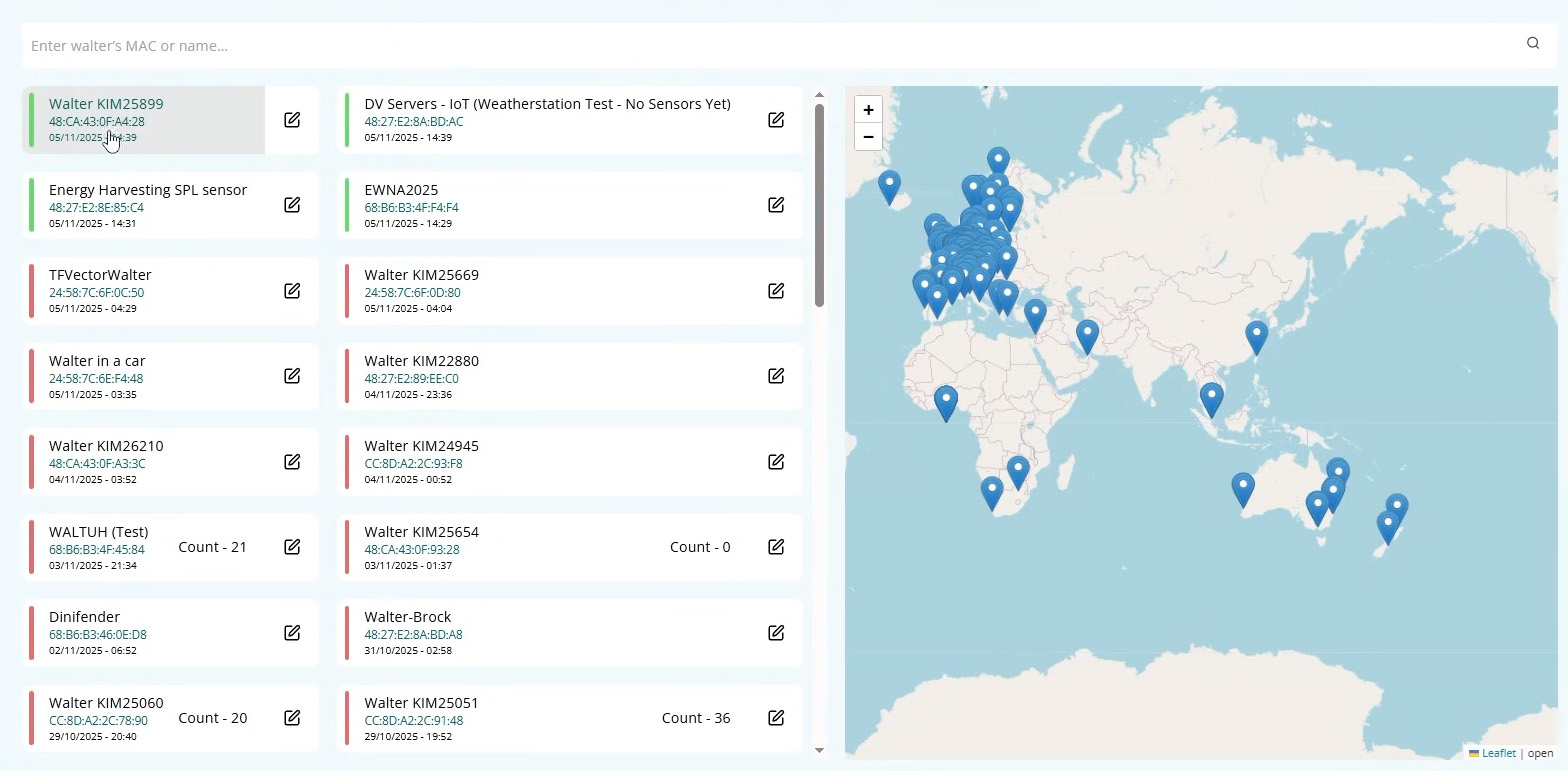
If you power on your Walter, you will actually fire up a pre-loaded demo. Head to the Walter demo page, and your device should show up and report basic information from your board! You can tell which board is yours by the MAC address, which should be on the bag Walter came with. This is a nice little way to test that you have everything set up right.
Please note that this is a public site and anyone can see your Walter's location (your location!). Once you turn off your Walter, the location should not be visible anymore. If you do not wish to use this demo, do not insert a SIM card until after you have flashed your own firmware onto the board.
Also, don't worry about there being a big-Walter surveillance state monitoring your every move. The demo code is written to send data to this site, and when you flash something else onto it, \they will no longer receive information.
We are going to be using MicroPython in our demos, so we will be looking at how to set it up with Thonny, our IDE of choice. If you prefer to use C++, you can have a quick look around through their documentation to get going with that as well.
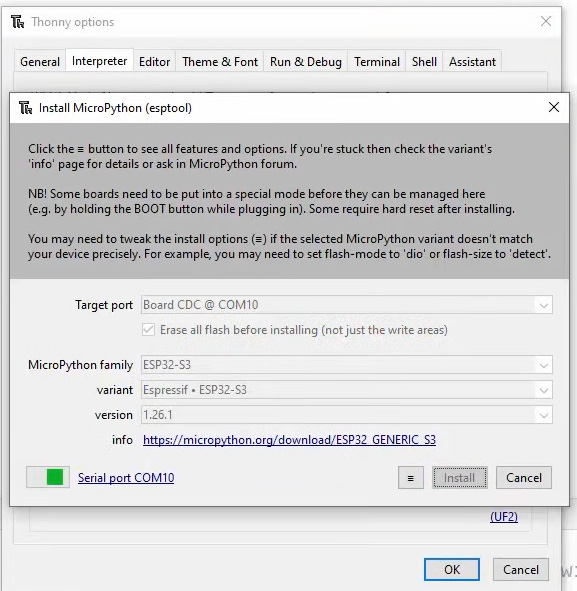
Walter runs standard MicroPython for ESP32‑S3, so the setup process is the same as any other generic ESP32 board. Open up Thonny, select Run > Configure Interpreter and hit Install or Update MicroPython. Connect your Walter to your PC, and select its COM Port. Then select ESP32-S3 as the MicroPython family and Espressif ESP32-S3 as the variant. Hit install it and that should be it!
Now we need to install the libraries that will allow us to use the Sequans Modem. You can download them from the Walter MicroPython Github page, or you can directly download them here. Unzip this, and inside you should find a folder called "walter_modem" which contains a few Python library files. This "walter_model" folder is what you will copy onto Walter.
In Thonny, select View and ensure that files is ticked so you can see the file explorer on the left side. In the bottom window (the files on your Walter), right-click and create a new directory and call it "lib", double-click to enter the folder. Then, in the top window (your PC's files), navigate to the "walter_modem" folder, right click, and select upload to /lib.
You Walter is now all set up and ready to go; you just need to write code for it now!
Connecting to LTE and Getting Online
Let’s get Walter on the internet! In this section, we’ll be connecting to cellular using the onboard Sequans Monarch 2 modem, pulling the time from the mobile network, and then doing a small test query over HTTP to confirm everything’s working.
First, create two new files on your Walter:
- main.py - The core code that controls the modem and runs our demo.
- config.py - Holds all your APN and SIM settings.
Paste the following into config.py and save it to the Walter. The following code is verbatim the code that we ran on our Walter. Sections can remain blank unless your region or carrier requires you to manually specify them. Most SIM cards will work fine with automatic APN detection, but if your provider uses a custom APN name, username, or password, you can add them here. You can also change the site to be queried as well, we are just using time and date in our example:
from walter_modem.mixins.default_pdp import WalterModemPDPAuthProtocol

# Cellular connection settings
CELL_APN = ""           # leave blank for automatic APN detection
APN_USERNAME = ""       # leave blank unless operator requires one
APN_PASSWORD = ""
AUTHENTICATION_PROTOCOL = WalterModemPDPAuthProtocol.NONE
SIM_PIN = None           # set if your SIM needs a PIN

# HTTP demo target
HTTP_ADDRESS = "worldtimeapi.org"     # free, public JSON time API
HTTP_PORT = 80                        # 443 if you later add TLS
HTTP_URI = "/api/timezone/Etc/UTC"
Paste the following code into main.py and save it to the Walter as well. As it is saved as main.py, this code will automatically run any time Walter powers on:
import micropython
micropython.opt_level(1)

import asyncio, sys
from walter_modem import Modem
from walter_modem.mixins.default_sim_network import *
from walter_modem.mixins.default_pdp import *
from walter_modem.mixins.http import *
from walter_modem.coreEnums import *
from walter_modem.coreStructs import *
from walter_modem.mixins.http import HTTPMixin

import config

# Instantiate modem with the HTTP mixin for querying sites
modem = Modem(HTTPMixin, load_default_power_saving_mixin=False)
modem_rsp = WalterModemRsp()

# --- Helper: wait for registration -----------------------------------------
async def wait_for_network_reg_state(timeout: int, *states: WalterModemNetworkRegState) -> bool:
    for _ in range(timeout):
        if modem.get_network_reg_state() in states:
            return True
        await asyncio.sleep(1)
    return False


# --- LTE connect logic ------------------------------------------------------
async def lte_connect(_retry: bool = False) -> bool:
    """Bring up LTE link, automatically toggling RAT if needed."""
    # Already connected?
    if modem.get_network_reg_state() in (
        WalterModemNetworkRegState.REGISTERED_HOME,
        WalterModemNetworkRegState.REGISTERED_ROAMING,
    ):
        return True

    # Full operation mode
    if not await modem.set_op_state(WalterModemOpState.FULL):
        print("Failed to set operational state to FULL")
        return False

    if not await modem.set_network_selection_mode(WalterModemNetworkSelMode.AUTOMATIC):
        print("Failed to set selection mode")
        return False

    print("Waiting for network...")
    if not await wait_for_network_reg_state(
        180,
        WalterModemNetworkRegState.REGISTERED_HOME,
        WalterModemNetworkRegState.REGISTERED_ROAMING,
    ):
        # Retry with opposite RAT once
        if await modem.get_rat(rsp=modem_rsp):
            next_rat = (
                WalterModemRat.NBIOT
                if modem_rsp.rat == WalterModemRat.LTEM
                else WalterModemRat.LTEM
            )
            print(f"Switching RAT and retrying ({WalterModemRat.get_value_name(next_rat)})")
            await modem.set_rat(next_rat)
            await modem.reset()
            return await lte_connect(_retry=True)
        return False
    return True


# --- Setup ------------------------------------------------------------------
async def setup():
    print("Walter Demo 1: Hello Internet\n----------------------------")
    await modem.begin()

    # Basic modem check
    if not await modem.check_comm():
        print("Modem communication failed")
        return False

    # Unlock SIM if a PIN is defined (unlikely but worth checking)
    if config.SIM_PIN and not await modem.unlock_sim(pin=config.SIM_PIN):
        print("Could not unlock SIM")
        return False

    # Create PDP context (APN)
    if not await modem.create_PDP_context(apn=config.CELL_APN):
        print("Failed to create PDP")
        return False

    if config.APN_USERNAME:
        await modem.set_PDP_auth_params(
            protocol=config.AUTHENTICATION_PROTOCOL,
            user_id=config.APN_USERNAME,
            password=config.APN_PASSWORD,
        )

    # Attach and connect to LTE
    print("Connecting to LTE...")
    if not await lte_connect():
        print("LTE connection failed")
        return False

    print("Connected to network\n")
    return True


# --- Demo logic -------------------------------------------------------------
async def demo_http_and_time():
    """Fetch modem time, then query external API."""
    # Get network time
    print("Fetching modem clock...")
    if await modem.get_clock(rsp=modem_rsp):
        print(f"Network time: {modem_rsp.clock}")
    else:
        print("Could not read time")

    # Configure an HTTP profile (no TLS)
    print(f"Setting up HTTP profile for {config.HTTP_ADDRESS}")
    if not await modem.http_config_profile(
        profile_id=1,
        server_address=config.HTTP_ADDRESS,
        port=config.HTTP_PORT,
    ):
        print("Failed to config HTTP profile")
        return

    # Perform GET request
    print(f"Requesting {config.HTTP_URI} ...")
    if await modem.http_query(profile_id=1, uri=config.HTTP_URI):
        print("HTTP GET sent, waiting for response...")
        while True:
            if await modem.http_did_ring(profile_id=1, rsp=modem_rsp):
                if modem_rsp.http_response:
                    hr = modem_rsp.http_response
                    print(f"\nHTTP status: {hr.http_status}")
                    print(f"Content type: {hr.content_type}")
                    print("Snippet of response:")
                    # first 200 bytes preview (avoid full JSON blob flood)
                    print(hr.data[:200])
                break
            await asyncio.sleep(1)
    else:
        print("HTTP query failed")


# --- Entrypoint -------------------------------------------------------------
async def main():
    try:
        if not await setup():
            raise RuntimeError("Setup failed")
        await demo_http_and_time()
        print("\nDemo complete.")
    except Exception as err:
        print("ERROR:")
        sys.print_exception(err)

asyncio.run(main())
Run this code, and you should see something like the following in the shell:
MPY: soft reboot
Walter Demo 1: Hello Internet
----------------------------
Connecting to LTE...
Waiting for network...
Connected to network
Fetching modem clock...
Network time: 1763082923
Setting up HTTP profile for worldtimeapi.org
Requesting /api/timezone/Etc/UTC ...
HTTP GET sent, waiting for response...
HTTP status: 200
Content type: "application/json; charset=utf-8"
Snippet of response:
bytearray(b'{"utc_offset":"+00:00","timezone":"Etc/UTC","day_of_week":5,"day_of_year":318,"datetime":"2025-11-14T01:15:25.092797+00:00","utc_datetime":"2025-11-
Demo complete.
Congratulations! Your Walter has just connected to the internet, pulled the time from your mobile network (in epoch time, which is the number of seconds since January 1st 1970), and queried a website, which returned the time and date. There is no point in running demo scripts if you don't understand how they work, so let's break it down to see what's going on.
We start by importing micropython and setting an optimisation level. This just tells the interpreter to skip some debug checks so the code runs a little faster—helpful for asynchronous tasks.
asyncio is MicroPython’s asynchronous framework (which lets you run multiple pieces of code at the same time), and sys is used for clean error output later.
import micropython
micropython.opt_level(1)
import asyncio, sys
Then we import the Walter model library and several mixins.
A mixin adds a bundle of commands for a particular set of features — for example:
- efault_sim_network contains functions for registering the modem to a network.
- default_pdp adds commands for managing PDP contexts (your data connection).
- http adds functions to make HTTP requests once connected.
By importing these, our code can access high‑level helper functions instead of manually sending AT commands to the modem. We also import our config file we created so we can access information from it.
import asyncio, sys
from walter_modem import Modem
from walter_modem.mixins.default_sim_network import *
from walter_modem.mixins.default_pdp import *
from walter_modem.mixins.http import *
from walter_modem.coreEnums import *
from walter_modem.coreStructs import *
from walter_modem.mixins.http import HTTPMixin
import config
Here we initialise the modem object and add the HTTPMixin, which gives it the ability to make web requests later. The WalterModemRsp() object is a container used for storing structured replies from the modem, like the current network status or HTTP response data.
modem = Modem(HTTPMixin, load_default_power_saving_mixin=False)
modem_rsp = WalterModemRsp()
Cellular devices have to register with a nearby tower before they get data access. This helper function checks the modem’s network registration state every second for up to timeout seconds, returning True once the modem reports it’s registered (either on its home network or a roaming partner).
async def wait_for_network_reg_state(timeout: int, *states: WalterModemNetworkRegState) -> bool:
    for _ in range(timeout):
        if modem.get_network_reg_state() in states:
            return True
        await asyncio.sleep(1)
    return False
Next we have a larger helper function that manages the LTE connection logic. A few things happen here. First it chceks if we are already connected, and skips all setup if the modem is already registered:
async def lte_connect(_retry: bool = False) -> bool:
    if modem.get_network_reg_state() in (
        WalterModemNetworkRegState.REGISTERED_HOME,
        WalterModemNetworkRegState.REGISTERED_ROAMING,
    ):
        return True
Then it will try to bring the modem up to full power / operational state. This is largely checking its not in a sleep mode or something.
    if not await modem.set_op_state(WalterModemOpState.FULL):
        print("Failed to set operational state to FULL")
        return False
Then we tell the modem to automatically select the best network. Most likely the strongest one.
    if not await modem.set_network_selection_mode(WalterModemNetworkSelMode.AUTOMATIC):
        print("Failed to set selection mode")
        return False
Then we give up to 3 minutes for the modem to attatch to the tower, we are just waiting for network registration so we can start communicating with the network.
    print("Waiting for network...")
    if not await wait_for_network_reg_state(
        180,
        WalterModemNetworkRegState.REGISTERED_HOME,
        WalterModemNetworkRegState.REGISTERED_ROAMING,
    ):
If that fails, we will retry on another RAT (Radio Access Technology). If LTE fails, we are telling the code to try NB-IOT or vice versa. This might be a bit redundant in our case, but its just good robust code.
        # Retry with opposite RAT once
        if await modem.get_rat(rsp=modem_rsp):
            next_rat = (
                WalterModemRat.NBIOT
                if modem_rsp.rat == WalterModemRat.LTEM
                else WalterModemRat.LTEM
            )
            print(f"Switching RAT and retrying ({WalterModemRat.get_value_name(next_rat)})")
            await modem.set_rat(next_rat)
            await modem.reset()
            return await lte_connect(_retry=True)
        return False
    return True
And with that function, we now have a way to establish the cellular connection!
Next, we have another function that fully activates the modem and checks our SIM. It starts with modem.begin() , which activates the modem and opens the serial interface between the ESP32 and the Sequans chip so that they can start working together.
async def setup():
    await modem.begin()
Then, we run modem.check_comm(), which checks if the ESP32 can talk to the modem, one more final check before we start using it.
    if not await modem.check_comm():
        print("Modem communication failed")
        return False
Then we go ahead and use the library to check if the SIM needs to be unlocked. For 95% of SIM cards, this is not a neccesary step, but we might as well.
    if config.SIM_PIN and not await modem.unlock_sim(pin=config.SIM_PIN):
        print("Could not unlock SIM")
        return False
Then we create our PDP context - this is the step that actually enables internet data to start flowing. A PDP context (Packet Data Protocol) defines the “session” between your device and the carrier’s network. It’s configured with your APN (Access Point Name), which tells the carrier what network service to provide. If your SIM plan requires credentials, the script sets them from the config file we created.
    if config.APN_USERNAME:
        await modem.set_PDP_auth_params(
            protocol=config.AUTHENTICATION_PROTOCOL,
            user_id=config.APN_USERNAME,
            password=config.APN_PASSWORD,
        )
Then we finish our set up script by attatching to LTE. This calls the earlier lte_connect() helper and waits until the modem reports a valid data connection. When this step succeeds, the modem has an IP address and Walter is officially online and ready to start using the net.
    print("Connecting to LTE...")
    if not await lte_connect():
        print("LTE connection failed")
        return False

    print("Connected to network\n")
    return True
Next we create one more function that fetches the time and makes the web request we are chasing. It starts off by getting the network epoch time with modem.get_clock(rsp=modem_rsp). This queries the mobile carrier’s network clock (NITZ service) so you get an accurate timestamp even without GPS.
async def demo_http_and_time():
    print("Fetching modem clock...")
    if await modem.get_clock(rsp=modem_rsp):
        print(f"Network time: {modem_rsp.clock}")
    else:
        print("Could not read time")
Then we set up a saved HTTP session on the modem (using profile 1), and specify the address and port which we set in the config file.
    print(f"Setting up HTTP profile for {config.HTTP_ADDRESS}")
    if not await modem.http_config_profile(
        profile_id=1,
        server_address=config.HTTP_ADDRESS,
        port=config.HTTP_PORT,
    ):
        print("Failed to config HTTP profile")
        return
Then we launch our very important line of actually issueing a GET request to our site. This is us actually attempting to connect to the site itself.
    print(f"Requesting {config.HTTP_URI} ...")
    if await modem.http_query(profile_id=1, uri=config.HTTP_URI):
Then we just wait for a response. The library signals incoming HTTP data with a small “ring” event. When it arrives, the code reads the structured reply from modem_rsp.http_response and prints key fields: status code, content type, and a snippet of the payload (capped at 200 bytes so you don’t flood Thonny).
    print(f"Requesting {config.HTTP_URI} ...")
    if await modem.http_query(profile_id=1, uri=config.HTTP_URI):
        print("HTTP GET sent, waiting for response...")
        while True:
            if await modem.http_did_ring(profile_id=1, rsp=modem_rsp):
                if modem_rsp.http_response:
                    hr = modem_rsp.http_response
                    print(f"\nHTTP status: {hr.http_status}")
                    print(f"Content type: {hr.content_type}")
                    print("Snippet of response:")
                    # first 200 bytes preview (avoid full JSON blob flood)
                    print(hr.data[:200])
                break
            await asyncio.sleep(1)
    else:
        print("HTTP query failed")
Now we finally get to our main() function that ties everything togetther. It runs setup() to get online, then executes the HTTP demo. If anything crashes, the exception handler prints a traceback instead of silently freezing. Finally, asyncio.run(main()) starts the asynchronous event loop that lets all those await calls work.
There is quite a lot happening here for the simple task of querying a website, but having this much control over each step is going to allow you have greater control and error handling in your projects. Ontop of that, this code acts as a nice template and most projects with Walter will follow the same core flow - maybe sometimes with some minor tweaks here and there.
In summary though, through the complete process we:
- Power up and communicate with the modem.
- Unlock the SIM (if needed).
- Create a PDP context (define your cellular data session).
- Connect to LTE‑M or NB‑IoT and get an IP address.
- Read the network’s clock.
- Make a test HTTP request.
And as you can see, most of the heavy lifting is done by the Walter library mixins: create_PDP_context() sets up your data session, lte_connect() attaches to the tower, get_clock() reads the carrier’s time, and the HTTPMixin handles web requests without you needing to send raw AT commands to the modem.
MQTT GPS Tracker Demo
In this demo, we’re turning Walter into a GPS tracker that reports its location to an MQTT broker (Adafruit IO in our case). MQTT is a lightweight protocol designed for IOT that is easy to set up and use. It does have a tad bit of latency (a couple of seconds or so), but it is just the easiest possible way to send short messages from a device connected to the internet. Adafruit IO also has a built-in GPS map that we will be using to view our data on. The end result of this will provide us with a way to track Walter's location through our own private set-up.
You will again need a config file with the following pasted in:
from walter_modem.mixins.default_pdp import WalterModemPDPAuthProtocol

CELL_APN = ""
APN_USERNAME = ""
APN_PASSWORD = ""
AUTHENTICATION_PROTOCOL = WalterModemPDPAuthProtocol.NONE
SIM_PIN = None

# --- MQTT credentials for Adafruit IO ---
MQTT_SERVER_ADDRESS = "io.adafruit.com"  # or change to what ever MQTT broker you are using
MQTT_PORT = 1883                 # or 8883 if you enable TLS
MQTT_USERNAME = ""               # enter your MQTT username
MQTT_PASSWORD = ""               # enter your MQTT password
MQTT_TOPIC = f"{MQTT_USERNAME}/feeds/walter-gps" #assuming you created a feed called walter-gps

MAX_GNSS_CONFIDENCE = 80  # if the accuracy is greater than this, it won't send the location

PUBLISH_INTERVAL = 5            # seconds between publishes (sorta). It takes about 8-10 seconds to connect and send the message, this adds to that time.
Then also go ahead and save the following as main.py:
# walter_mqtt_gps_csv.py
import micropython
micropython.opt_level(1)

import asyncio, sys
import network
from walter_modem import Modem
from walter_modem.mixins.default_sim_network import *
from walter_modem.mixins.default_pdp import *
from walter_modem.mixins.mqtt import *
from walter_modem.mixins.gnss import *
from walter_modem.coreEnums import *
from walter_modem.coreStructs import *
import config

# ---------------------------------------------------------------------------
# Adafruit IO topic in CSV format.
AIO_CSV_TOPIC = f"{config.MQTT_USERNAME}/feeds/walter-gps/csv"

modem = Modem(MQTTMixin, GNSSMixin, load_default_power_saving_mixin=False)
modem_rsp = WalterModemRsp()

# ---------------------------------------------------------------------------
async def wait_for_network_reg_state(timeout: int, *states: WalterModemNetworkRegState):
    for _ in range(timeout):
        if modem.get_network_reg_state() in states:
            return True
        await asyncio.sleep(1)
    return False

# ---------------------------------------------------------------------------
async def lte_connect(_retry=False):
    """Connect to LTE, retry once toggling RAT if needed."""
    if modem.get_network_reg_state() in (
        WalterModemNetworkRegState.REGISTERED_HOME,
        WalterModemNetworkRegState.REGISTERED_ROAMING,
    ):
        return True

    if not await modem.set_op_state(WalterModemOpState.FULL):
        print("Failed to set op state FULL")
        return False

    if not await modem.set_network_selection_mode(WalterModemNetworkSelMode.AUTOMATIC):
        print("Failed to set network selection mode")
        return False

    print("Waiting for network registration ...")
    if not await wait_for_network_reg_state(
        180,
        WalterModemNetworkRegState.REGISTERED_HOME,
        WalterModemNetworkRegState.REGISTERED_ROAMING,
    ):
        if await modem.get_rat(rsp=modem_rsp):
            next_rat = (
                WalterModemRat.NBIOT
                if modem_rsp.rat == WalterModemRat.LTEM
                else WalterModemRat.LTEM
            )
            if not _retry:
                print(f"Retrying with RAT {WalterModemRat.get_value_name(next_rat)}")
                await modem.set_rat(next_rat)
                await modem.reset()
                return await lte_connect(True)
        return False
    return True

# ---------------------------------------------------------------------------
async def lte_disconnect():
    """Turn off RF to allow GNSS to get a fix."""
    ok = await modem.set_op_state(WalterModemOpState.MINIMUM)
    await asyncio.sleep(3)
    return ok

# ---------------------------------------------------------------------------
async def gnss_assistance_update():
    """Check and update almanac/ephemeris if required."""
    if not await modem.get_clock(rsp=modem_rsp):
        if not await lte_connect():
            return False
        await modem.get_clock(rsp=modem_rsp)

    if not await modem.gnss_assistance_get_status(rsp=modem_rsp):
        print("Failed to retrieve GNSS assistance status")
        return False

    alm = modem_rsp.gnss_assistance.almanac
    eph = modem_rsp.gnss_assistance.realtime_ephemeris
    if (not alm.available) or (alm.time_to_update <= 0):
        await lte_connect()
        await modem.gnss_assistance_update(WalterModemGNSSAssistanceType.ALMANAC)
    if (not eph.available) or (eph.time_to_update <= 0):
        await lte_connect()
        await modem.gnss_assistance_update(WalterModemGNSSAssistanceType.REALTIME_EPHEMERIS)
    return True

# ---------------------------------------------------------------------------
async def get_gnss_fix(max_tries=5):
    """Get a single valid GNSS fix."""
    print("Requesting GNSS fix:")
    gnss_fix = None
    for i in range(max_tries):
        print(f"  Try {i+1}/{max_tries}")
        await lte_disconnect()
        ok = await modem.gnss_perform_action(
            action=WalterModemGNSSAction.GET_SINGLE_FIX, rsp=modem_rsp
        )
        if not ok:
            print("    Failed to request fix")
            await asyncio.sleep(3)
            continue
        gnss_fix = await modem.gnss_wait_for_fix()
        if gnss_fix and gnss_fix.estimated_confidence <= config.MAX_GNSS_CONFIDENCE:
            print(f"    ✅ Fix ({gnss_fix.latitude:.6f}, {gnss_fix.longitude:.6f})")
            return gnss_fix
        await asyncio.sleep(5)
    return gnss_fix

# ---------------------------------------------------------------------------
async def setup():
    print("\n=== Walter MQTT + GNSS CSV Publisher ===")

    await modem.begin()
    if not await modem.check_comm():
        print("Modem communication failed")
        return False

    if config.SIM_PIN and not await modem.unlock_sim(pin=config.SIM_PIN):
        print("SIM unlock failed")
        return False

    if not await modem.create_PDP_context(apn=config.CELL_APN):
        print("Failed PDP context")
        return False

    if config.APN_USERNAME:
        await modem.set_PDP_auth_params(
            protocol=config.AUTHENTICATION_PROTOCOL,
            user_id=config.APN_USERNAME,
            password=config.APN_PASSWORD,
        )

    if not await lte_connect():
        print("LTE attach failed")
        return False

    if not await modem.gnss_config():
        print("Couldn't configure GNSS")
        return False

    await gnss_assistance_update()
    return True

# ---------------------------------------------------------------------------
async def publish_csv_location(lat: float, lon: float, alt: float = 0.0):
    """Publish a CSV-formatted location for Adafruit IO Map block."""
    payload = f"0,{lat:.6f},{lon:.6f},{alt:.1f}"
    print("Publishing CSV:", payload)

    if not await modem.mqtt_config(
        user_name=config.MQTT_USERNAME,
        password=config.MQTT_PASSWORD,
    ):
        print("MQTT config failed")
        return

    if not await modem.mqtt_connect(
        server_name=config.MQTT_SERVER_ADDRESS,
        port=config.MQTT_PORT,
    ):
        print("MQTT connect failed")
        return

    ok = await modem.mqtt_publish(
        topic=AIO_CSV_TOPIC,
        data=payload,
        qos=1,
        rsp=modem_rsp,
    )
    print("Publish result:", "OK" if ok else "FAIL")
    await modem.mqtt_disconnect(rsp=modem_rsp)

# ---------------------------------------------------------------------------
async def main():
    try:
        if not await setup():
            raise RuntimeError("Setup failed")

        while True:
            fix = await get_gnss_fix()
            if fix:
                await lte_connect()
                altitude = getattr(fix, "altitude", 0.0) or 0.0
                await publish_csv_location(fix.latitude, fix.longitude, altitude)
            else:
                print("No valid fix.")
            print(f"Sleeping {config.PUBLISH_INTERVAL}s …\n")
            await asyncio.sleep(config.PUBLISH_INTERVAL)

    except Exception as err:
        print("ERROR:")
        sys.print_exception(err)
        await asyncio.sleep(10)

# ---------------------------------------------------------------------------
asyncio.run(main())
Much of this code is the same as last time, and before we move on to setting up Adafruit IO, we will just quickly go through it and see what else we are doing here.
In our import section, we import mixins for GNNS and MQTT. There are a lot of good MQTT libraries out there, but it is nice that Walter comes with well-built ones of its own.
import micropython
micropython.opt_level(1)

import asyncio, sys
import network
from walter_modem import Modem
from walter_modem.mixins.default_sim_network import *
from walter_modem.mixins.default_pdp import *
from walter_modem.mixins.mqtt import *
from walter_modem.mixins.gnss import *
from walter_modem.coreEnums import *
from walter_modem.coreStructs import *
import config
Then we initialise our modem object, but this time we include the MQTT and GNNS mixins.
modem = Modem(MQTTMixin, GNSSMixin, load_default_power_saving_mixin=False)
modem_rsp = WalterModemRsp()
Then we have our helper functions wait_for_network_reg_state() and lte_connect(), which are the same as the previous script and help bring Walter online.
async def wait_for_network_reg_state(timeout: int, *states: WalterModemNetworkRegState):
    for _ in range(timeout):
        if modem.get_network_reg_state() in states:
            return True
        await asyncio.sleep(1)
    return False

# ---------------------------------------------------------------------------
async def lte_connect(_retry=False):
    """Connect to LTE, retry once toggling RAT if needed."""
    if modem.get_network_reg_state() in (
        WalterModemNetworkRegState.REGISTERED_HOME,
        WalterModemNetworkRegState.REGISTERED_ROAMING,
    ):
        return True

    if not await modem.set_op_state(WalterModemOpState.FULL):
        print("Failed to set op state FULL")
        return False

    if not await modem.set_network_selection_mode(WalterModemNetworkSelMode.AUTOMATIC):
        print("Failed to set network selection mode")
        return False

    print("Waiting for network registration ...")
    if not await wait_for_network_reg_state(
        180,
        WalterModemNetworkRegState.REGISTERED_HOME,
        WalterModemNetworkRegState.REGISTERED_ROAMING,
    ):
        if await modem.get_rat(rsp=modem_rsp):
            next_rat = (
                WalterModemRat.NBIOT
                if modem_rsp.rat == WalterModemRat.LTEM
                else WalterModemRat.LTEM
            )
            if not _retry:
                print(f"Retrying with RAT {WalterModemRat.get_value_name(next_rat)}")
                await modem.set_rat(next_rat)
                await modem.reset()
                return await lte_connect(True)
        return False
    return True
We do however have a new helper function, lte_disconnect(). This is going to temporarily power down the LTE radio as our GPS needs it to be off when we are getting a reading.
async def lte_disconnect():
    ok = await modem.set_op_state(WalterModemOpState.MINIMUM)
    await asyncio.sleep(3)
    return ok
We also have a new function that keeps the GPS module’s almanac and ephemeris data current. Those two data sets are what GPS chips use to know where satellites are and get quicker locks. It first ensures the system clock is correct (using get_clock()), since GNSS timing depends on it. Next, it calls modem.gnss_assistance_get_status() to see whether the almanac or ephemeris data are out of date. If they are, it reconnects to LTE and runs modem.gnss_assistance_update() for each data type. This entire step is about reducing GPS lock time — otherwise, the first fix after a cold start could take minutes.
async def gnss_assistance_update():
    """Check and update almanac/ephemeris if required."""
    if not await modem.get_clock(rsp=modem_rsp):
        if not await lte_connect():
            return False
        await modem.get_clock(rsp=modem_rsp)

    if not await modem.gnss_assistance_get_status(rsp=modem_rsp):
        print("Failed to retrieve GNSS assistance status")
        return False

    alm = modem_rsp.gnss_assistance.almanac
    eph = modem_rsp.gnss_assistance.realtime_ephemeris
    if (not alm.available) or (alm.time_to_update <= 0):
        await lte_connect()
        await modem.gnss_assistance_update(WalterModemGNSSAssistanceType.ALMANAC)
    if (not eph.available) or (eph.time_to_update <= 0):
        await lte_connect()
        await modem.gnss_assistance_update(WalterModemGNSSAssistanceType.REALTIME_EPHEMERIS)
    return True
Then we move on to our function, which gets a lock with GPS and actually gives the location. It starts by temporarily shutting down LTE communications by calling lte_disconnect(). If the helper function returns (as we programmed it to), it will tell the modem to get a fix. If that doesn't work, it will print out an error and keep going. All of this is nested inside a loop that allows us to attempt a GPS fix a given number of times (5 in our default case).
async def get_gnss_fix(max_tries=5):
    print("Requesting GNSS fix:")
    gnss_fix = None
    for i in range(max_tries):
        print(f"  Try {i+1}/{max_tries}")
        await lte_disconnect()
        ok = await modem.gnss_perform_action(
            action=WalterModemGNSSAction.GET_SINGLE_FIX, rsp=modem_rsp
        )
        if not ok:
            print("    Failed to request fix")
            await asyncio.sleep(3)
            continue
If the LTE successfully shuts down, then we will wait for it to get a fix. If it gets one, we will then compare it to our maximum confidence value we created in the config file - if it's bigger, we will ignore it! If we didn't get a lock, this 5-second sleep gives the GPS a bit of time before we try again.
        gnss_fix = await modem.gnss_wait_for_fix()
        if gnss_fix and gnss_fix.estimated_confidence <= config.MAX_GNSS_CONFIDENCE:
            print(f"    ✅ Fix ({gnss_fix.latitude:.6f}, {gnss_fix.longitude:.6f})")
            return gnss_fix
        await asyncio.sleep(5)
    return gnss_fix
Then we get to our setup() function again. The first part of this is the same as last demo.
async def setup():
    print("\n=== Walter MQTT + GNSS CSV Publisher ===")

    await modem.begin()
    if not await modem.check_comm():
        print("Modem communication failed")
        return False

    if config.SIM_PIN and not await modem.unlock_sim(pin=config.SIM_PIN):
        print("SIM unlock failed")
        return False

    if not await modem.create_PDP_context(apn=config.CELL_APN):
        print("Failed PDP context")
        return False

    if config.APN_USERNAME:
        await modem.set_PDP_auth_params(
            protocol=config.AUTHENTICATION_PROTOCOL,
            user_id=config.APN_USERNAME,
            password=config.APN_PASSWORD,
        )

    if not await lte_connect():
        print("LTE attach failed")
        return False
However, we have 2 new sections. One configures our GNSS which initialises the hardware itself, and the other runs the assistant update function we described above. This is sort of "priming" the GNNS before we start using it. Without knowledge of satellite info, it can take a few minutes to cold-start it.
    if not await modem.gnss_config():
        print("Couldn't configure GNSS")
        return False

    await gnss_assistance_update()
    return True
We have one more new major function, and this one formats and sends our GPS readings to Adafruit IO. It starts by preparing the payload (the message we will send), and puts it in the right format that Adafruit IO is expecting for it's map block.
async def publish_csv_location(lat: float, lon: float, alt: float = 0.0):
    payload = f"0,{lat:.6f},{lon:.6f},{alt:.1f}"
Then we configure out MQTT credentials with the library, and connect to the MQTT broker.
    if not await modem.mqtt_config(
        user_name=config.MQTT_USERNAME,
        password=config.MQTT_PASSWORD,
    ):
        print("MQTT config failed")
        return

    if not await modem.mqtt_connect(
        server_name=config.MQTT_SERVER_ADDRESS,
        port=config.MQTT_PORT,
    ):
If all of this is successful, we then simply publish the data, to the broker, with the library.
    ok = await modem.mqtt_publish(
        topic=AIO_CSV_TOPIC,
        data=payload,
        qos=1,
        rsp=modem_rsp,
    )
    print("Publish result:", "OK" if ok else "FAIL")
Then, after all that, we disconnect from our broker. To get another GNSS location, we will need to turn off the LTE, and this is an important step to ensure that we don't get any weird connection issues (this one was a bit of a headache in developing this guide).
await modem.mqtt_disconnect(rsp=modem_rsp)
With that, we now have a function we can call that will take in GPS data and send that to our MQTT broker. How nifty!
Finally, we come to our main() loop, which orchestrates it all. We start by running setup() to get everything going.
async def main():
    try:
        if not await setup():
            raise RuntimeError("Setup failed")
And then the rest of this loop looks like a miniature telemetry pipeline. It gets uses functions to get a GNNS fix, turns back on the LTE after it was shut off by get_gnns_fix(), then it sends that data to Adafruit IO with publish_csv_location(). With these three steps being repeated, we can track Walter wherever it goes as long as it is in cellular range!
        while True:
            fix = await get_gnss_fix()
            if fix:
                await lte_connect()
                altitude = getattr(fix, "altitude", 0.0) or 0.0
                await publish_csv_location(fix.latitude, fix.longitude, altitude)
            else:
                print("No valid fix.")
            print(f"Sleeping {config.PUBLISH_INTERVAL}s …\n")
            await asyncio.sleep(config.PUBLISH_INTERVAL)
And with that, we have our MQTT-based GPS tracker! A brief summary of the steps here:
- Initialises the modem and checks communication between the ESP32‑S3 and the Sequans chip.
- Unlocks the SIM (if required) and creates a PDP context so the modem can carry data traffic.
- Attaches to LTE‑M or NB‑IoT — just like before — but now also configures and powers up the GNSS receiver.
- Updates the almanac and ephemeris assistance data to speed up GPS lock.
- Temporarily disables the LTE radio and requests a clean single GPS fix with gnss_perform_action().
- Reconnects to the LTE network and opens an MQTT session using the built‑in MQTT mixin.
- Publishes the coordinates to your Adafruit IO feed in the CSV format required for the Map dashboard.
- Disconnects cleanly from the MQTT broker, waits a few seconds, and repeats the cycle from step 5.
Now let's set up the Adafruit IO side of things! If you don’t already have an Adafruit IO account, you can create one at io.adafruit.com. The free tier is suitable for most projects at home as it lets you send up to 30 data points per minute, across 10 feeds, and keeps the data for 30 days. Ensure you update config.py with your Adafruit IO details as well!
Once logged in, you will need to create a new feed called walter-gps as this is what our code is looking for. If you create another feed, update the code. At this point, if you send data from your Walter to Adafruit IO, you should see information appearing in this feed.
Now go ahead and create a new dashboard (or alter an existing one). Hit the "New Block" button and select the map. Select the walter-gps feed as the source feed. Then set the name and map type if you wish. The only really important setting here is to set how many hours of GPS history you wish to display.
Head to your dashboard, fire up your Walter, and your GPS tracker should be complete!

Running Walter in Low-Power Mode
As powerful as Walter is, running a 4 G‑capable ESP32 constantly online isn’t great for batteries, so let's take a look at how we can introduce a deep-sleep cycle to save some power! We will be taking the last section's demo code and implementing some of this deep sleep code so that Walter can sleep for any given amount of time.
To use this code, update your config.py file. This is the same as last time, but with the addition of a variable for how long Walter should sleep for:
from walter_modem.mixins.default_pdp import WalterModemPDPAuthProtocol

CELL_APN = ""
APN_USERNAME = ""
APN_PASSWORD = ""
AUTHENTICATION_PROTOCOL = WalterModemPDPAuthProtocol.NONE
SIM_PIN = None

# --- MQTT credentials for Adafruit IO ---
MQTT_SERVER_ADDRESS = "io.adafruit.com"
MQTT_PORT = 1883                 # or 8883 if you enable TLS
MQTT_USERNAME = ""
MQTT_PASSWORD = ""
MQTT_TOPIC = f"{MQTT_USERNAME}/feeds/walter-gps"

MAX_GNSS_CONFIDENCE = 80  # or similar

SLEEP_TIME = 20   # seconds the ESP32-S3 stays in deep sleep
And then update the main.py code with the following:
import micropython
micropython.opt_level(1)
import asyncio, sys
from walter_modem import Modem
from walter_modem.mixins.default_sim_network import *
from walter_modem.mixins.default_pdp import *
from walter_modem.mixins.mqtt import *
from walter_modem.mixins.gnss import *
from walter_modem.coreEnums import *
from walter_modem.coreStructs import *
import config

# ---------------------------------------------------------------------------
AIO_CSV_TOPIC = f"{config.MQTT_USERNAME}/feeds/walter-gps/csv"
modem = Modem(MQTTMixin, GNSSMixin, load_default_power_saving_mixin=False)
modem_rsp = WalterModemRsp()

# ---------------------------------------------------------------------------
async def wait_for_network_reg_state(timeout: int, *states: WalterModemNetworkRegState):
    for _ in range(timeout):
        if modem.get_network_reg_state() in states:
            return True
        await asyncio.sleep(1)
    return False

# ---------------------------------------------------------------------------
async def lte_connect(_retry=False):
    if modem.get_network_reg_state() in (
        WalterModemNetworkRegState.REGISTERED_HOME,
        WalterModemNetworkRegState.REGISTERED_ROAMING,
    ):
        return True

    if not await modem.set_op_state(WalterModemOpState.FULL):
        print("Failed to set op state FULL");  return False

    if not await modem.set_network_selection_mode(WalterModemNetworkSelMode.AUTOMATIC):
        print("Failed network selection mode");  return False

    print("Waiting for network registration …")
    if not await wait_for_network_reg_state(
        180,
        WalterModemNetworkRegState.REGISTERED_HOME,
        WalterModemNetworkRegState.REGISTERED_ROAMING,
    ):
        if await modem.get_rat(rsp=modem_rsp):
            next_rat = (WalterModemRat.NBIOT
                        if modem_rsp.rat == WalterModemRat.LTEM
                        else WalterModemRat.LTEM)
            if not _retry:
                print(f"Retrying with RAT {WalterModemRat.get_value_name(next_rat)}")
                await modem.set_rat(next_rat)
                await modem.reset()
                return await lte_connect(True)
        return False
    return True

# ---------------------------------------------------------------------------
async def lte_disconnect():
    """Turn off RF to allow GNSS and battery savings."""
    ok = await modem.set_op_state(WalterModemOpState.MINIMUM)
    await asyncio.sleep(3)
    return ok

# ---------------------------------------------------------------------------
async def gnss_assistance_update():
    if not await modem.get_clock(rsp=modem_rsp):
        if not await lte_connect():
            return False
        await modem.get_clock(rsp=modem_rsp)

    if not await modem.gnss_assistance_get_status(rsp=modem_rsp):
        print("Failed to retrieve GNSS assistance status")
        return False

    alm = modem_rsp.gnss_assistance.almanac
    eph = modem_rsp.gnss_assistance.realtime_ephemeris
    if (not alm.available) or (alm.time_to_update <= 0):
        await lte_connect()
        await modem.gnss_assistance_update(WalterModemGNSSAssistanceType.ALMANAC)
    if (not eph.available) or (eph.time_to_update <= 0):
        await lte_connect()
        await modem.gnss_assistance_update(WalterModemGNSSAssistanceType.REALTIME_EPHEMERIS)
    return True

# ---------------------------------------------------------------------------
async def get_gnss_fix(max_tries=5):
    print("Requesting GNSS fix …")
    gnss_fix = None
    for i in range(max_tries):
        print(f"  Try {i+1}/{max_tries}")
        await lte_disconnect()
        ok = await modem.gnss_perform_action(
            action=WalterModemGNSSAction.GET_SINGLE_FIX, rsp=modem_rsp
        )
        if not ok:
            print("    Failed to request fix")
            await asyncio.sleep(3)
            continue
        gnss_fix = await modem.gnss_wait_for_fix()
        if gnss_fix and gnss_fix.estimated_confidence <= config.MAX_GNSS_CONFIDENCE:
            print(f"    ✅ Fix ({gnss_fix.latitude:.6f}, {gnss_fix.longitude:.6f})")
            return gnss_fix
        await asyncio.sleep(5)
    return gnss_fix

# ---------------------------------------------------------------------------
async def setup():
    print("\n=== Walter MQTT + GNSS CSV Publisher (Sleep edition) ===")
    await modem.begin()

    if not await modem.check_comm():
        print("Modem communication failed");  return False

    if config.SIM_PIN and not await modem.unlock_sim(pin=config.SIM_PIN):
        print("SIM unlock failed");  return False

    if not await modem.create_PDP_context(apn=config.CELL_APN):
        print("Failed PDP context");  return False

    if config.APN_USERNAME:
        await modem.set_PDP_auth_params(
            protocol=config.AUTHENTICATION_PROTOCOL,
            user_id=config.APN_USERNAME,
            password=config.APN_PASSWORD,
        )

    if not await lte_connect():
        print("LTE attach failed");  return False

    if not await modem.gnss_config():
        print("Couldn't configure GNSS");  return False

    await gnss_assistance_update()
    return True

# ---------------------------------------------------------------------------
async def publish_csv_location(lat: float, lon: float, alt: float = 0.0):
    payload = f"0,{lat:.6f},{lon:.6f},{alt:.1f}"
    print("Publishing CSV:", payload)

    if not await modem.mqtt_config(
        user_name=config.MQTT_USERNAME,
        password=config.MQTT_PASSWORD,
    ):
        print("MQTT config failed");  return

    if not await modem.mqtt_connect(
        server_name=config.MQTT_SERVER_ADDRESS,
        port=config.MQTT_PORT,
    ):
        print("MQTT connect failed");  return

    ok = await modem.mqtt_publish(
        topic=AIO_CSV_TOPIC,
        data=payload,
        qos=1,
        rsp=modem_rsp,
    )
    print("Publish result:", "OK" if ok else "FAIL")
    await modem.mqtt_disconnect(rsp=modem_rsp)

# ---------------------------------------------------------------------------
async def main():
    try:
        if not await setup():
            raise RuntimeError("Setup failed")

        # Single publish cycle ------------------------------------------------
        fix = await get_gnss_fix()
        if fix:
            await lte_connect()
            altitude = getattr(fix, "altitude", 0.0) or 0.0
            await publish_csv_location(fix.latitude, fix.longitude, altitude)
        else:
            print("No valid GNSS fix this round.")

        # --------------------------------------------------------------------
        print(f"\nEntering deep sleep for {config.SLEEP_TIME}s …")
        await modem.set_op_state(WalterModemOpState.MINIMUM)
        await modem.sleep(
            sleep_time_ms=int(config.SLEEP_TIME * 1000),
            light_sleep=False
        )
        # Never returns from deep sleep; resumes from reboot
        # --------------------------------------------------------------------

    except Exception as err:
        print("ERROR:")
        sys.print_exception(err)
        await asyncio.sleep(10)

# ---------------------------------------------------------------------------
asyncio.run(main())
Nearly all of the functions in this code is exactly the same as the previous demo. The real change happens in the main() loop. Right after we collect our GPS data and send it, we have two new lines:
await modem.set_op_state(WalterModemOpState.MINIMUM)
await modem.sleep(
    sleep_time_ms=int(config.SLEEP_TIME * 1000),
    light_sleep=False
)
The first line puts the modem into it's lowest operational state, then the next line puts it, as well as the esp32, into a deep sleep state for a given time. And thats all there is to it!
To confirm that we were correctly sleeping, we fired up our Otii Arc, a super-accurate power-measurement rig. The image on the right shows one cycle powered with 5 Volts through the USB:
- It starts with Walter trying to get a GPS lock, which consumes about 60mA.
- Then it turns on LTE and beams that data to our MQTT broker which consumes about 100mA.
- Once it has been sent, it enters deep sleep, which drops the current draw down to below 100 uA, and then restarts this process.

Where To From Here?
We’ve now taken Walter from a bare ESP32 board to a fully connected cellular IoT device. It can grab its own GPS position, upload data over 4G, and even run off a battery for days or weeks thanks to deep sleep. That’s a pretty incredible set of capabilities to pack into one little board, and a testament to the state of hardware available at a maker-level.
The examples we’ve gone through here only scratch the surface of what Walter and its libraries are capable of. The official Walter documentation is well worth a deep dive. If you’re keen to keep experimenting, check out the CoAP (Constrained Application Protocol) features exposed in the library. CoAP is similar in spirit to MQTT but operates over UDP instead of TCP, using a leaner message structure that’s designed for resource‑constrained or low‑power devices. In practice, it’s faster and uses less data, making it a natural upgrade path when you’re building serious, large‑scale or long‑life IoT deployments.
That wraps things up for this guide. If you build something cool with Walter (a tracker, a remote sensor, or anything else that roams over 4G) we’d love to see it! Or if you need a hand with anything we covered in this guide, feel free to post on the forum topic linked below.
Until next time, happy making!

